Summary
- Give every alert an owner and a shared set of tags before any AI model touches your alert stream.
- Measure alert quality first, so you have a baseline that shows if AIOps is helping.
- Run correlation in suggest mode, feed it change data and collect one-click feedback on every suggestion.
- Automate fixes only after approved runs build a clean record, behind blast-radius limits and a kill switch.
Most AIOps projects I’m called into have the same story. A team bought a platform, pointed every alert at it and switched on automatic grouping. Within a month, engineers had stopped trusting the groups and gone back to reading raw alerts. The AI was fine. The alerts it was fed weren’t. In my AI operations consulting work, the order you do things in matters more than the platform you pick.
Below are the 9 AIOps best practices I use to take a team from alert noise to automated fixes, arranged as a maturity path in three stages. The table gives you each practice in one line. Each stage then ends with a clear test for when you’re ready to move on.
AIOps Best Practices at a Glance
Read the rows top to bottom. Each one depends on the rows above it, so skipping ahead tends to cost you time later.
| Practice | Do this | Avoid this |
|---|---|---|
| 1. Ownership cleanup | An owner for every alert | Alerts nobody claims |
| 2. Tags and topology | One tag set, one service map | Each tool naming its own way |
| 3. Alert quality baseline | Label every closed alert | Guessing how noisy it is |
| 4. Suggest mode first | AI proposes, people decide | Auto-merging from day one |
| 5. Change data | Deploys and flags in the feed | Alerts with no change context |
| 6. Feedback on suggestions | One-click yes or no | Silent, ignored suggestions |
| 7. Approved runbooks | One-click fixes with sign-off | Scripts that run unseen |
| 8. Automation guardrails | Blast radius and rate limits | No cap on targets |
| 9. MTTA, MTTR and toil | Medians by service, monthly | Counting alerts only |
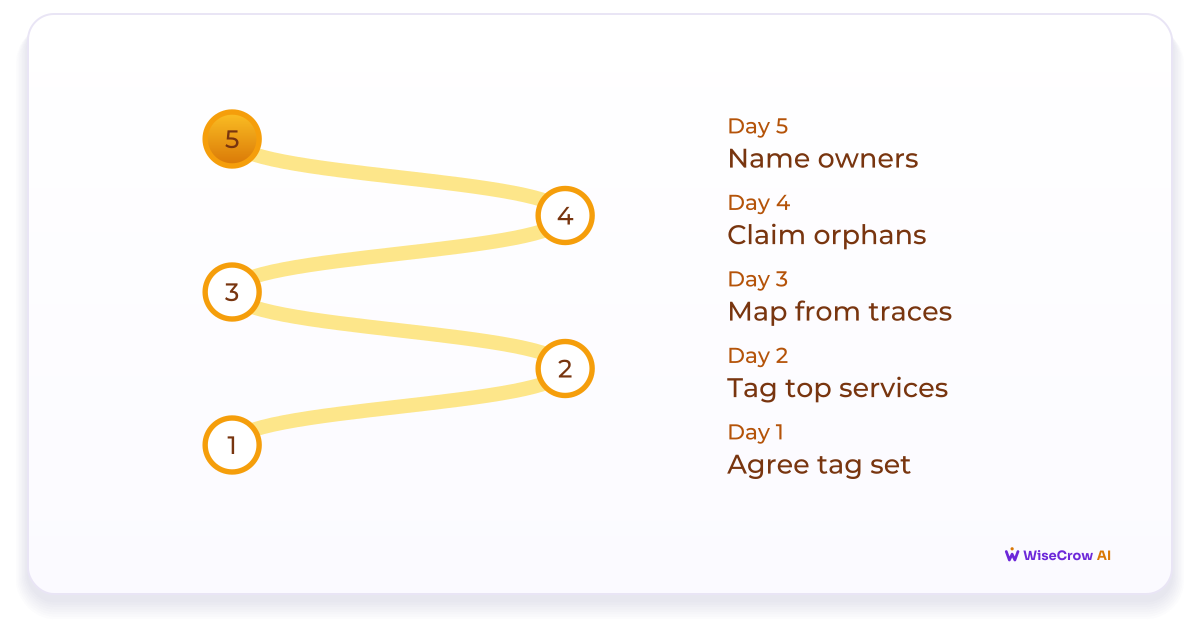
Stage 1, Quiet the Noise: Practices 1 to 3
No model can fix alerts that have no owner, no consistent name and no known purpose. Stage 1 has no AI in it at all. It’s also where most of the early gains come from.
Clean Up Monitoring and Ownership First
Export every alert rule from every monitoring tool into one sheet. For each rule, note the tool, the service, the owning team, when it last fired and when someone last acted on it. Then sit down with each team lead for an hour. In my client work, somewhere between a quarter and a half of rules fail at least one of those checks on the first pass. Some have no owner. Others fire weekly and never lead to an action.
Google’s SRE book sets a simple bar: every page should be actionable. Delete the rules that guard nothing, move the merely useful ones to tickets or dashboards and give every remaining page a named team. A regional insurer I worked with started with 1,140 rules across four tools and finished the cleanup with fewer than 500 that could page anyone. Most of the named teams in my AIOps examples from real IT teams did a version of this step before any AI went live.
Use One Tag Set and Keep a Service Map
Correlation groups alerts by what they have in common. If one tool calls a service “checkout-api”, a second says “CHECKOUT_PROD” and a third only knows the host name, the model sees three unrelated things. Agree on a short set of required tags: service, environment and owning team, plus region or tier if you need them. OpenTelemetry’s resource semantic conventions give you a ready vocabulary, starting with service.name, which saves you a long naming debate. Then reject any new alert rule without the tags in code review.
Topology is the other half. You need to know which services call which, at least for the ones behind your most important customer journeys. Maps built from tracing data stay current better than a CMDB someone updates by hand. When the map lives in one team’s tool and the alerts in another, you’ve hit one of the data silos that stall AIOps. At a logistics client, the tagging exercise alone turned up three production services that no team would claim.
Measure Alert Quality Before You Change Anything
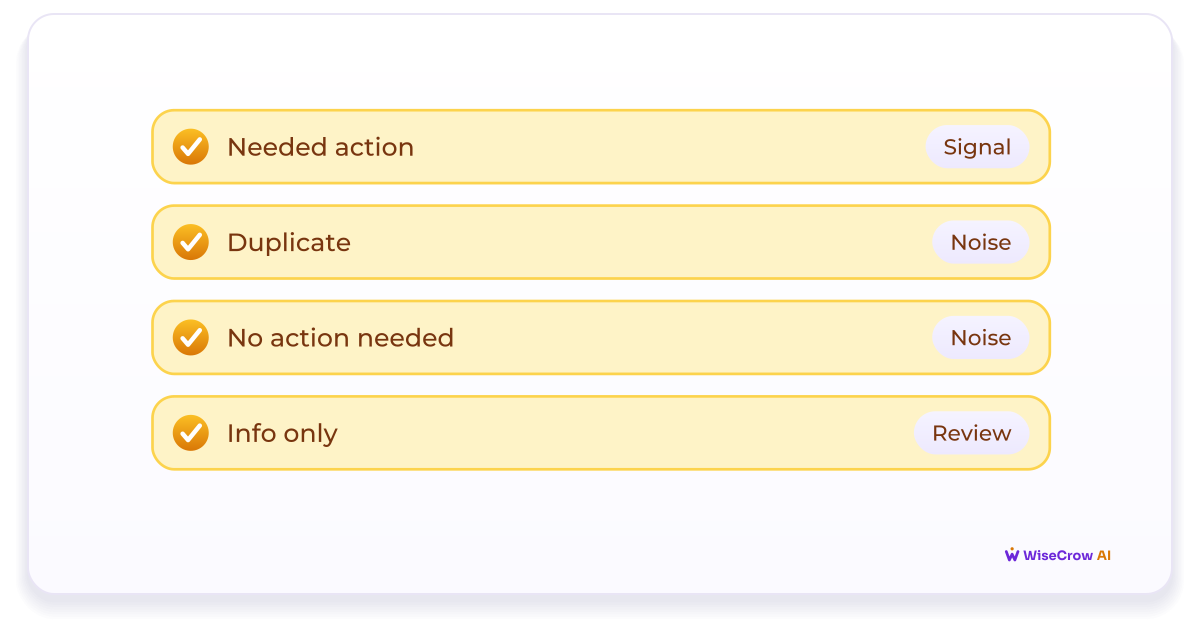
You can’t prove AIOps helped without a before number. I track four: pages per on-call shift, the share of alerts closed with no action, the share that were duplicates or flapping and the share of incidents customers reported first. For a sense of scale, Google’s SRE book caps on-call load at 2 incidents per 12-hour shift, since each one takes about six hours once you count follow-up work. Few teams I meet are anywhere near that.
The easiest way to get the data is a required label when someone closes an alert: acted on it, no action needed or duplicate. Two weeks of labels is enough for a first picture. At one SaaS client, the labels showed that 61% of night pages came from just nine rules. Fixing those nine did more for the on-call team than the first month of any AI feature they tested later.
Stage 2, Let AI Suggest: Practices 4 to 6
With clean, tagged alerts, AI has something to work with. Correlation and probable-cause hints sit near the top of most lists of AIOps use cases ranked by ROI, and they’re also where engineers decide if they trust the system. Keep people in charge for this whole stage.
Start Correlation in Suggest Mode
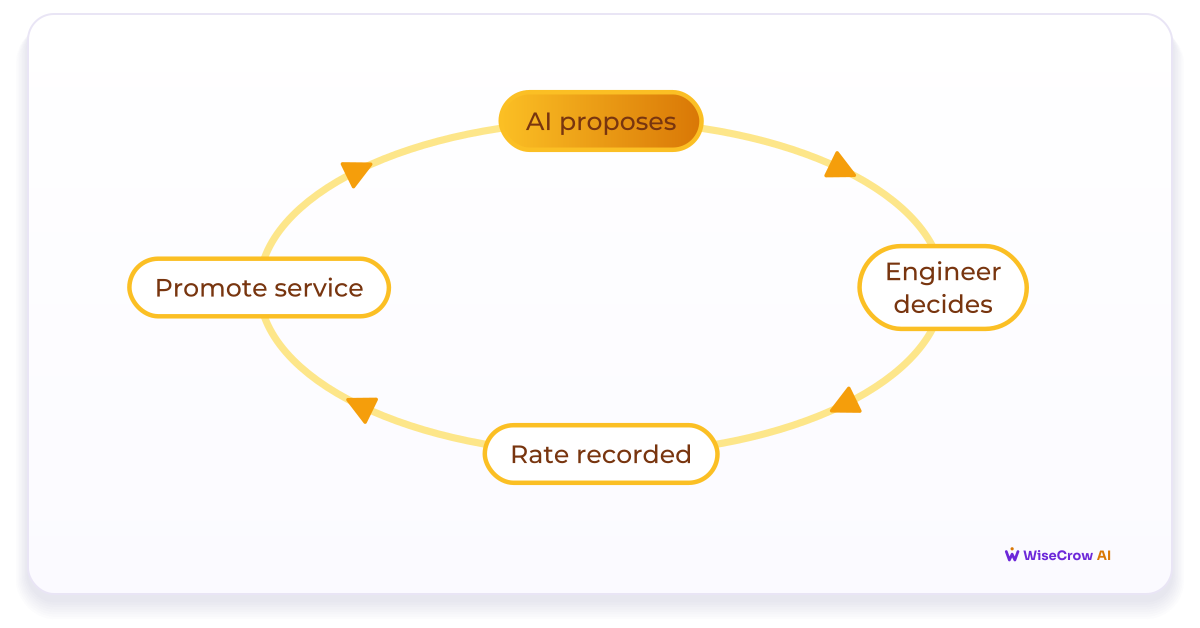
Turn correlation on so it proposes groups and leaves the alert stream as it is. Engineers keep getting their usual pages, with a note such as “these 14 alerts look related” next to them. Run it for four to six weeks of real incidents. Measure two things: the share of suggested groups people keep as they are, and the merges people make by hand that the model missed.
Promote one service or team at a time, once its acceptance rate holds above about 90% for several weeks. A retail client’s pilot kept grouping payment gateway timeouts with unrelated CDN alerts during traffic peaks, because the time window was too wide. In suggest mode, that cost a few confused looks. With automatic grouping, a real payment incident would have been folded into a CDN ticket during the busiest week of the year.
Feed Change Data Into Every Incident
Plenty of incidents start with a change. Send deploys, config edits, feature flag flips and infrastructure changes into the same place as your alerts, carrying the same tags from practice 2. The incident view can then show “checkout-api deployed 11 minutes before the first alert”, which is often the fastest clue you’ll get. Once changes and incidents share an ID, you can also track DORA’s change fail rate, the share of deployments that need immediate intervention such as a rollback or a hotfix.
Feature flags are the gap I find most often. At a fintech client, the worst incident of the year began with a flag flipped in a vendor’s web console that no system recorded. Engineers spent the first hour ruling out deploys that had nothing to do with it. A webhook from the flag tool to the event feed closed that gap in an afternoon. Add the change ID to every postmortem too, so the link survives after the incident closes.
Collect Feedback on Every AI Suggestion
Every grouping, routing guess and probable cause should get a quick yes or no from the person handling the incident. Put the buttons where people already work, in the incident channel or the incident tool. Without that loop, the model keeps making the same mistakes and engineers quietly stop reading its output. You won’t see it happen until someone asks why nobody used the feature you paid for.
Keep it cheap: one click to accept or reject, plus an optional “real cause” field when the incident closes. Then review the rejects once a month and change something visible, such as a rule, a tag or a time window. Tools differ a lot here. Some learn from corrections and others only let you edit rules, so test the feedback flow in a trial when you compare AIOps tools for incident response.
Stage 3, Automate With Care: Practices 7 to 9
Automated fixes are where AIOps saves the most time, and where it can do the most damage. Treat automation as something each fix earns through a track record.
Approve Runbooks Before You Automate Fixes
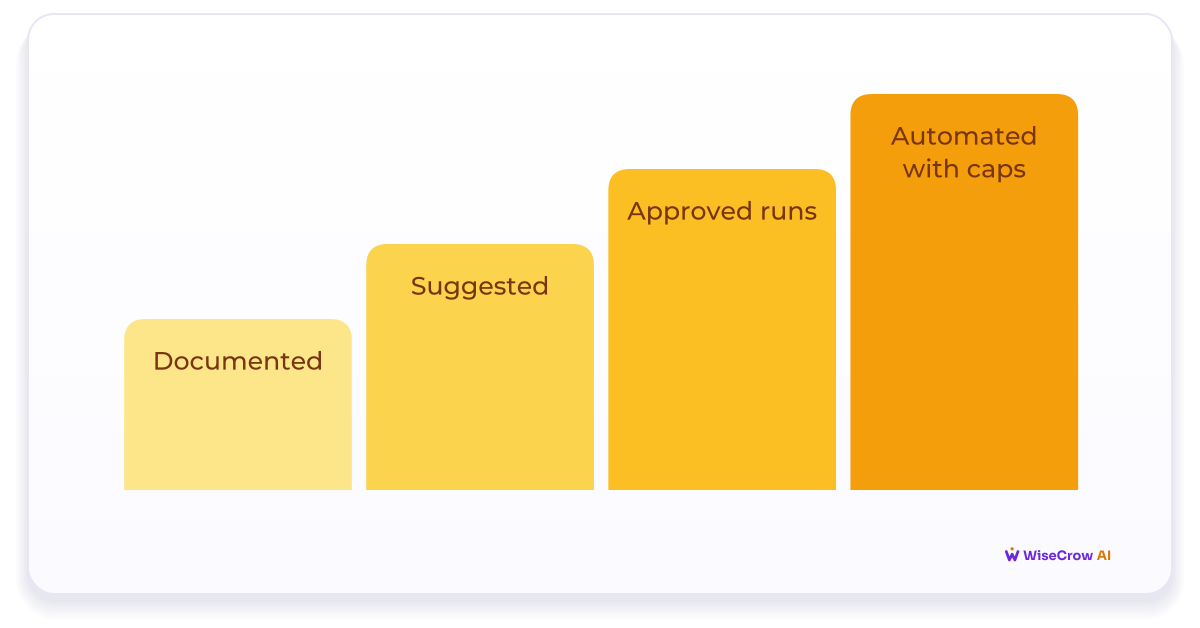
The SRE book calls pages with rote, algorithmic responses a red flag. Those pages are your automation backlog. Write each fix as a runbook with five parts: the trigger, the checks before it runs, the action, the check that it worked and the way to roll it back. Offer it as a one-click action in the incident, with a named person approving each run, and log every approval, override and rollback.
Set the graduation rule in advance, such as 25 approved runs in a row with no override and no rollback. Only then does the fix run on its own, with a notice to the on-call engineer. A healthcare client had a “clear temp files” runbook approved 40 times without a hitch. On one host type, the target path also held files the backup agent needed. An engineer read the path before clicking approve and stopped it. Under full automation, that run would have broken backups on every host of that type.
Put Guardrails Around Every Automated Action
Google’s SRE book tells the story of a decommissioning job that read an empty list of machines as “all machines” and wiped the disks on all machines in its CDN. The fixes it lists include more sanity checks, rate limiting among them, and a workflow that was safe to rerun. Your fixes are smaller, but the failure mode is the same: automation does the wrong thing very fast.
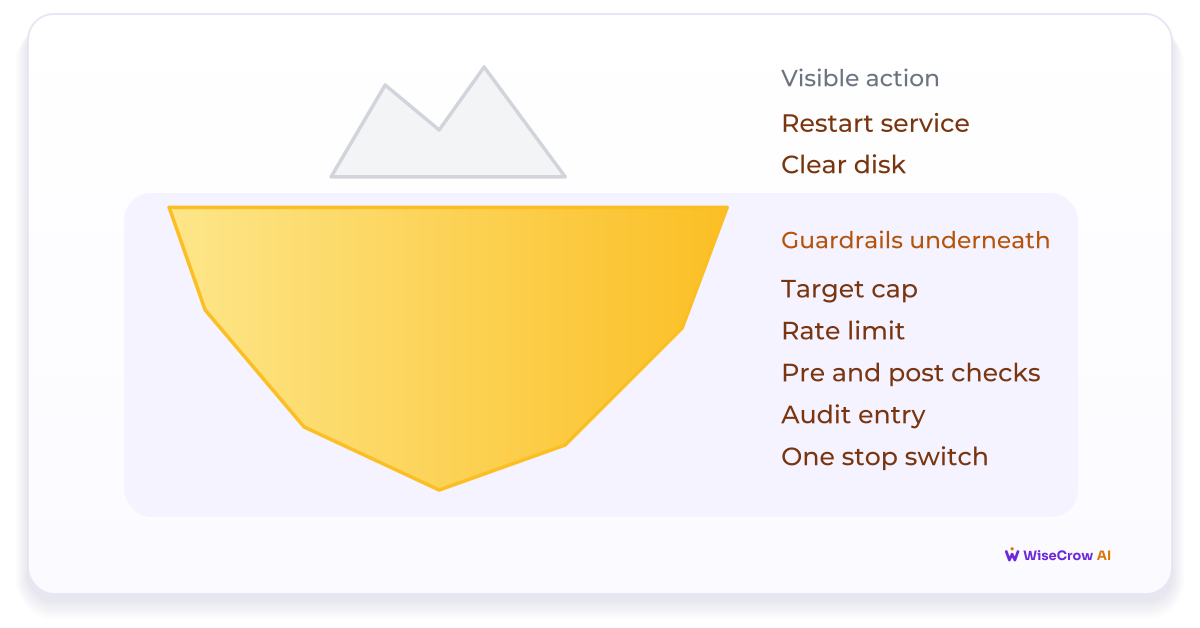
Every automated action gets a cap on how many targets it may touch, with a refusal if the target list is empty or larger than a set share of the fleet. Add a rate limit per action, checks before and after the run, least-privilege credentials and an audit entry for each run. Pause automatic fixes during a declared major incident unless the incident lead says go. Give the on-call engineer one switch that stops every automated action at once, and test it every quarter.
Track MTTA, MTTR and Toil Every Month
Pin down your clocks first. MTTA runs from the first alert to a person acknowledging it. MTTR, in the way I use it, runs from the first alert until service is restored. Report medians and the 90th percentile by service and severity, since one long outage can drag an average for months. DORA’s failed deployment recovery time covers the slice caused by deploys, and it fits next to your change data from practice 5.
Toil is the number most teams forget. The SRE book defines it as manual, repetitive, automatable work that grows with the service, and Google aims to keep it below 50% of each SRE’s time. Its own surveys put the average near 33%. A short monthly survey is enough to track it. One client halved its pages, yet toil barely moved, because engineers spent the saved hours tuning correlation rules by hand. Without the toil number, the project would have been reported as a clean win.
When to Move to the Next Stage
Each stage has a test for moving on and a warning sign that says go back. Check both before you widen the rollout. A team can sit in stage 2 for some services and stage 3 for others, and that’s normal.
| Stage | Move on when | Stop and fix if |
|---|---|---|
| 1. Quiet the noise | Every alert has an owner | Most pages need no action |
| 2. Let AI suggest | Groups kept 9 times in 10 | Engineers skip suggestions |
| 3. Automate with care | Clean approval streaks | Overrides or rollbacks rise |
The warning signs matter more than the targets. When engineers start skipping suggestions or overriding runbooks, they’re telling you something about the data or the rules long before the dashboards do. Ask them what they saw, fix it and repeat the stage for that service.
Estimate the Toil You Could Take Off Your Team
Pick one repeated task from your runbook backlog, such as restarting a stuck worker, clearing a full disk or closing pages that need no action. Enter how long it takes and how often it happens across the rotation each week. Keep the automated share modest at first, since stage 3 rolls out one fix at a time.
How Much Time Could You Save?
Move the sliders to match one repetitive task in your business.
How to Choose Your Starting Stage
Most teams think they’re further along than they are. Answer these four questions honestly and your starting point is usually clear:
- Can you name the owner of every alert that paged someone last week? If not, start at practice 1.
- Do all your monitoring tools use the same service names? If not, practice 2 comes before any AI feature.
- Do you know your share of no-action pages and your median MTTA? If not, spend two weeks on practice 3.
- Do engineers accept most AI groupings today? If yes for a service, that service can start on practices 7 and 8.
For the tooling, data and rollout plan behind each stage, my step-by-step AIOps implementation guide lays out the sequence with timelines. One trade-off I push back on: teams want automated fixes early because that’s where the savings are. I’d rather see three solid months in stage 2 first. A single runaway runbook can erase a year of trust in AIOps across your whole engineering group.
Questions About AIOps Best Practices
What Are the Most Important AIOps Best Practices?
If I could keep only three, I’d keep an owner for every alert, consistent service tags across tools and suggest mode for any new AI feature. Ownership gets the right person paged. Tags give correlation something real to group on. Suggest mode lets your team check the AI before it changes what reaches them. The other six practices build on those three.
How Long Does It Take to Go from Alert Noise to Automation?
In my client work, the first stage usually takes one to three months, depending on how many monitoring tools and teams you have. Suggest mode for correlation needs another four to six weeks of real incidents. The first automated fixes tend to arrive somewhere between six and twelve months in, and only for a handful of well-tested actions.
What Is Suggest Mode in AIOps?
Suggest mode means the AI proposes an action and a person decides. A correlation engine shows which alerts it thinks belong together, but the original alerts still page as before. A root-cause feature lists likely causes without closing anything. You measure how often people accept the suggestions, and you switch to automatic handling only where the acceptance rate stays high.
When Is Auto-Remediation Safe to Switch On?
When a runbook has a long run of approved, clean executions with no overrides or rollbacks, and when guardrails are in place: a limit on how many targets it can touch, a rate limit, checks before and after it runs, a kill switch and an audit log. Start with fixes that are easy to reverse, such as restarting a stateless service, and keep a person informed of every run.
Which Metrics Show If AIOps Is Working?
Track median time to acknowledge and median time to restore by service and severity, pages per on-call shift, the share of alerts closed with no action and the share of incidents customers report first. Add toil, measured as time spent on manual, repetitive work. Alert counts alone can fall while response times stay flat, so watch the clocks too.
Do We Need a CMDB for AIOps?
You need a reliable map of which services depend on which, but it doesn’t have to live in a CMDB. Service maps built from tracing data are often more current than a hand-kept CMDB. Start with the services behind your most important customer journeys, keep the map updated automatically where you can and check it after each major incident.
How Do You Get Engineers to Trust AI Suggestions?
Show the evidence behind each suggestion, such as shared tags, timing and a recent change, so people can check it in seconds. Make feedback one click and visibly act on it each month. Start in suggest mode, report the acceptance rate openly and let each team decide when its services move to automatic grouping.
Sources
- Google SRE Book: Monitoring Distributed Systems
- Google SRE Book: Being On-Call
- Google SRE Book: Eliminating Toil
- Google SRE Book: The Evolution of Automation at Google
- DORA: Software Delivery Performance Metrics
- OpenTelemetry: Resource Semantic Conventions
General information only: this is not legal, financial or tax advice. Examples and numbers reflect typical projects; check the specifics with your advisers before deciding.
Did you find this helpful?
Thank you for your feedback.
Marlena leads the WiseCrow editorial team and works with our consultants to turn real client projects into practical guides on AI strategy, automation and governance. Before joining WiseCrow, she spent 12 years in B2B operations and SaaS content. She has since edited more than 400 articles on AI and automation and reviewed workflows from over 60 client projects. She is based in Austin, Texas.