Summary
- Most ecommerce automation is plain rules. Use AI where the input is messy text, images or patterns a rule can’t describe.
- Order status, returns and post-purchase email are the safest first workflows, because volume is high and errors are easy to undo.
- Stacked automations break in quiet ways. Give every workflow an owner, a log and a way to switch it off.
- Measure one number per workflow for a few weeks before launch, or you won’t be able to prove the gain.
Online stores run on triggers. An order comes in, stock drops, a customer writes, a review lands, a cart sits idle. Each trigger starts a small chain of work, and in most stores I see, people still carry a lot of those chains by hand. In my ecommerce AI consulting projects, the first job is to list every chain and ask one plain question about each: does it need judgment, or does it just need doing?
The answer sorts your store into two piles. Work that just needs doing goes to rules. Work that needs judgment is where AI helps. Below I’ll walk through the full store, from the moment an order lands to the report you read on Monday, and show you which pile each job belongs in.
What AI Ecommerce Automation Actually Covers
Every store automation has three parts. A trigger starts it. Logic decides what to do. An action does it. A new order is a trigger, “ship from the East Coast warehouse if the address is east of Ohio” is logic, and tagging the order for that warehouse is the action.
Classic automation puts fixed rules in the middle. AI automation swaps part of that logic for a model that reads, scores or writes. The model might read a support email and work out that “where’s my stuff” and “tracking hasn’t moved in 5 days” are the same question. It might score an order’s fraud risk from dozens of signals. Or it might write a product description from a spec sheet.
Most good setups mix both. A rule fetches the order data, AI drafts the reply, and another rule sends low-risk drafts out and holds the rest for a person. When I audit a store, I find that roughly two thirds of the automation ideas on the wish list need no AI at all. The other third is where the hours hide.
Rules vs AI: When Each One Fits
Shopify Flow is a good yardstick, since many stores already have it. It’s free to install on Basic, Grow, Advanced and Plus plans and works with triggers, conditions and actions. Zapier and Make work the same way across apps. If you can write the logic as “when X, if Y, do Z,” a rule tool will do it cheaply and predictably.
AI earns its place when you can’t write the rule down. Customer messages come in a thousand phrasings. Fraud hides in combinations of signals. Product copy has to be written, and a filter can’t write. Here’s how the common jobs split.
| Job | Plain rule | Where AI helps |
|---|---|---|
| Tag VIP orders | Enough | Rarely needed |
| Low-stock alert | Enough | Adds demand timing |
| Fraud review | Catches obvious cases | Scores the gray zone |
| Order status reply | Template works | Handles messy wording |
| Return approval | Policy checks | Spots abuse patterns |
| Product copy | Can’t write | Drafts at scale |
| Review replies | Thank-you only | Reads tone and issue |
| Email segments | Static filters | Predicts next purchase |
Two signs tell you a rule has hit its limit. The first is a condition list that keeps growing, with exceptions on top of exceptions. The second is a queue where staff still read every item because the rule can’t sort them well. Both mean the logic needs judgment.
The Store Automation Map
Here’s the whole store in one view. Each row is a workflow, the event that starts it, the step where AI usually adds value and the kinds of tools stores use for it. Read the tool column as examples. Your stack may differ, and plenty of these jobs run inside your store platform.
| Workflow | Trigger | AI step | Typical tools |
|---|---|---|---|
| Order routing | Order created | Picks warehouse | Shopify Flow, OMS |
| Fraud review | Payment captured | Risk score | Signifyd, Shopify |
| Reorder alerts | Stock drops | Demand forecast | Inventory planner |
| Product content | SKU added | Drafts copy, tags | LLM, PIM |
| Feed updates | Price or stock change | Fixes titles, errors | Feed manager |
| Order status | Customer asks | Reads, replies | Gorgias, Zendesk |
| Returns | Return requested | Offers exchange | Loop, AfterShip |
| Reviews and UGC | Review posted | Tags themes | Okendo, Yotpo |
| Email and SMS | Browse, cart, buy | Segments, timing | Klaviyo, Attentive |
| Ads and promos | Spend or margin shift | Flags, pauses | Ad platforms |
| Reporting | Daily schedule | Writes summary | BI, Triple Whale |
The sections below group these rows by where they sit in your store: fulfillment, catalog, after-sale service, marketing and reporting. If you’d rather compare vendors side by side, my ranking of the best AI ecommerce tools covers search, recommendations and support platforms in detail.
Orders, Fraud and Stock
Fulfillment is where automation pays off first for most stores, because every order passes through it and delays cost you directly.
Order Routing
Routing decides which warehouse, store or 3PL ships each order. With one warehouse, there’s nothing to route. With two or more, rules cover most of it: nearest location with full stock, split only above a set order value, hold preorders until the release date. Shopify Flow and most order management systems handle these well.
AI enters when the cheapest option isn’t obvious. A model can weigh carrier rates, transit times, stock depth and the chance of a split shipment, then pick the location that costs least while still hitting the promised date. For a store shipping a few hundred orders a week, I usually stop at rules. Past a few thousand, the savings from smarter routing tend to cover the tool.
Fraud Review
Every platform flags obvious fraud: mismatched billing and shipping countries, many failed card attempts, a proxy IP. The hard part is the gray zone in the middle, where a manual reviewer spends five minutes per order and still guesses.
Fraud tools score each order with models trained on huge numbers of transactions, and some offer chargeback guarantees on approved orders. Set it up so low scores ship, high scores cancel and only the middle band reaches a person. Review that middle band weekly at first. A too-strict model quietly cancels good customers, and you won’t hear about it because they just shop somewhere else.
Inventory and Reorder Alerts
A low-stock alert is a simple rule: when a SKU drops under 20 units, send a message. It’s useful, and it’s also blunt. Twenty units of a winter coat in October means something different from twenty units in February.
Inventory planning tools forecast demand per SKU from sales history, seasons, promotions and supplier lead times, then tell you when to reorder and how much. The alert changes from “you’re low” to “order 340 units by Thursday to avoid a stockout on the 22nd.” Your buyer still places the order. In my client work, the biggest gain comes from catching slow movers early, since cash stuck in dead stock hurts a small brand more than the odd stockout does.
Product Content and Feeds
The catalog is where generative AI does its most visible work. A new SKU needs a title, a description, bullet points, alt text, tags, a meta description and often translations. Multiply that by a few hundred new items a season and you have a full-time job.
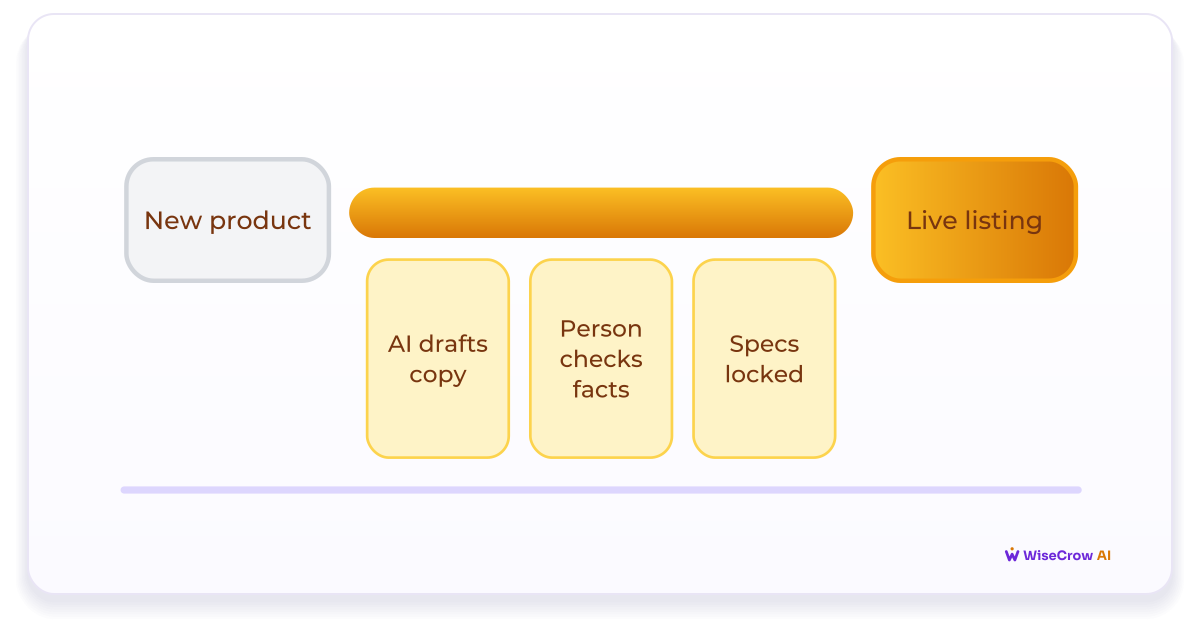
A content workflow I often set up looks like this. A new product lands in the store or PIM with specs and photos. A model drafts the copy in your brand voice, suggests tags and collections and writes alt text from the images. The draft waits in a review queue until a person checks facts such as sizes, materials and care instructions, then publishes.
Feeds are the second half. Google Shopping, Meta and marketplaces each want their own format and reject items for missing fields or policy issues. Rules keep prices and stock in sync whenever they change. AI helps by rewriting titles to fit each channel, filling missing attributes from the description and reading disapproval messages so the fix lands on the right person’s desk.
Support, Returns and Reviews
After the order ships, the work shifts to talking with customers. Volume is high, questions repeat and the answers mostly live in data you already have.
Order Status and Support
“Where is my order” is the classic ticket. A rule-based macro can answer it if the customer gives an order number and asks clearly. Many don’t. They reply to a shipping email, mention the wrong product or ask two things at once.
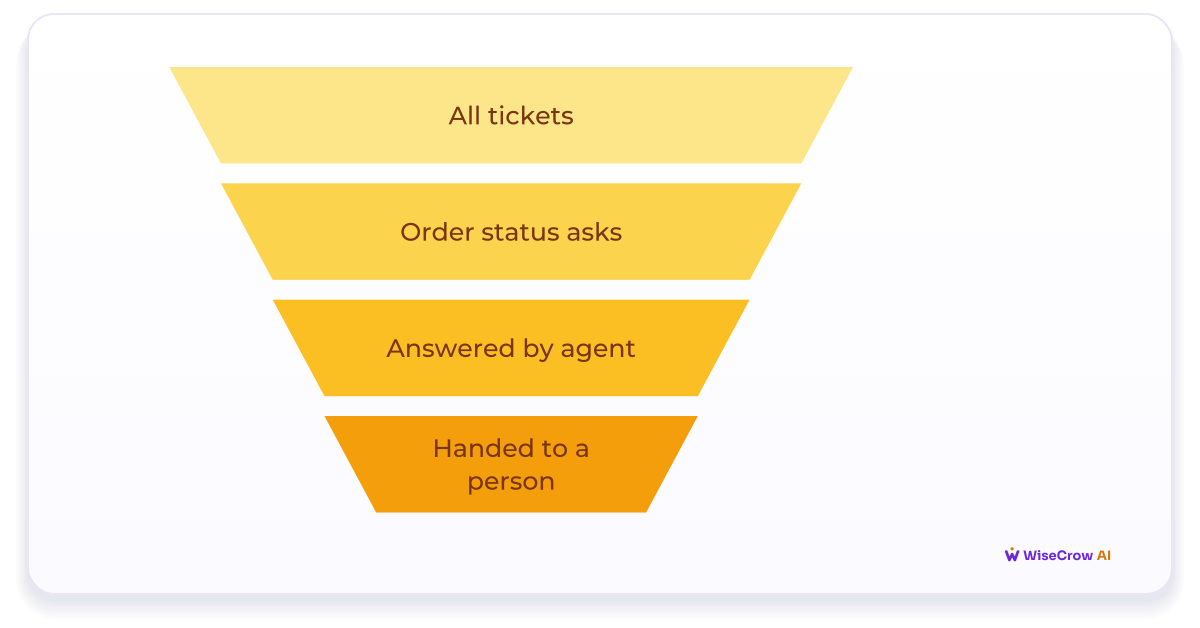
An AI agent connected to your help desk, store and carrier tracking can read the message, find the order by email address and reply with real tracking status. It can change a shipping address before fulfillment, cancel an unshipped order or start a return. Keep tight limits. In most setups I build, the agent acts alone only on order status, address changes and policy questions. Damaged items, refund disputes and angry customers go to a person with the full thread attached.
Returns Processing
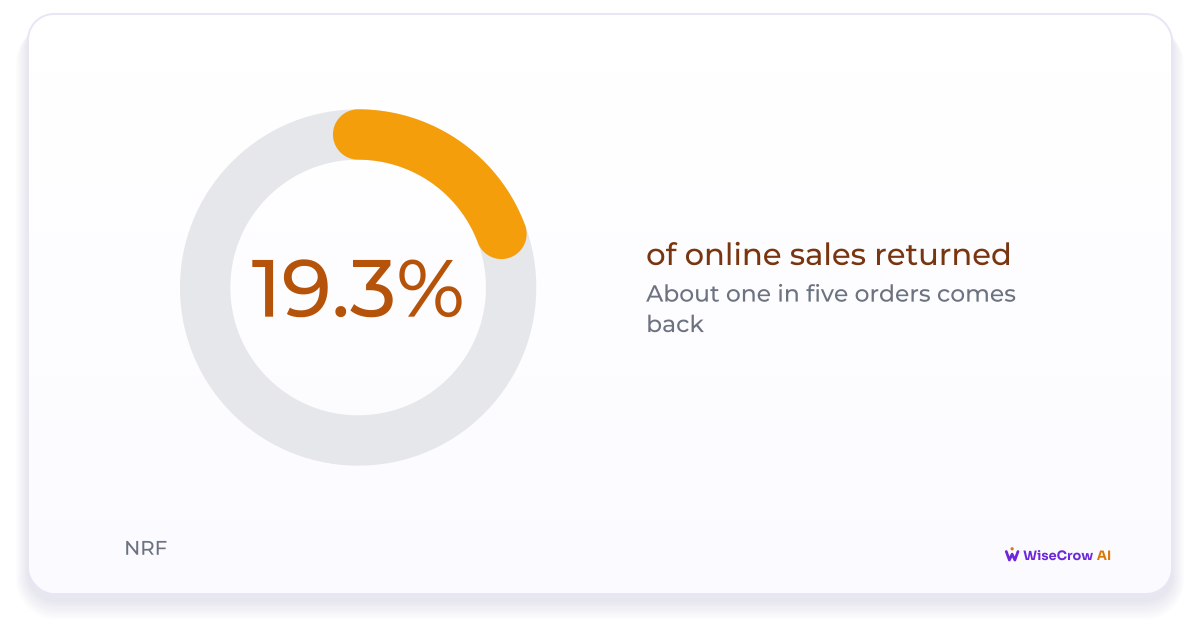
Returns cost online stores more than most owners expect. The NRF and Happy Returns estimated that 19.3% of online sales would be returned in 2025. Every one of those returns needs a label, an approval and a decision on what happens to the item.
Return portals already automate the label and the policy check with rules: inside the window, item not final sale, refund to original payment. AI adds two things. It suggests an exchange or store credit at the right moment, which keeps revenue in the store. It also spots patterns, such as a customer who returns most of what they buy or a size that keeps coming back with the same complaint. Feed those size complaints into the product page and you prevent the next round of returns.
Reviews and UGC
A thank-you reply to every five-star review is easy to template. The value sits in the reviews nobody has time to read. AI can tag each review by theme (fit, quality, shipping, packaging), flag low ratings that mention safety or damage and draft replies that address the actual issue.
For user-generated photos and videos, models can screen content before it goes on a product page, check that it shows the right product and suggest which ones to feature. Keep a person on final approval for anything that appears in ads, and get clear permission from the creator first.
Email, SMS, Ads and Promotions
Marketing automation is the oldest part of the ecommerce stack, and it’s where rules and AI blend the most.
Email and SMS Flows
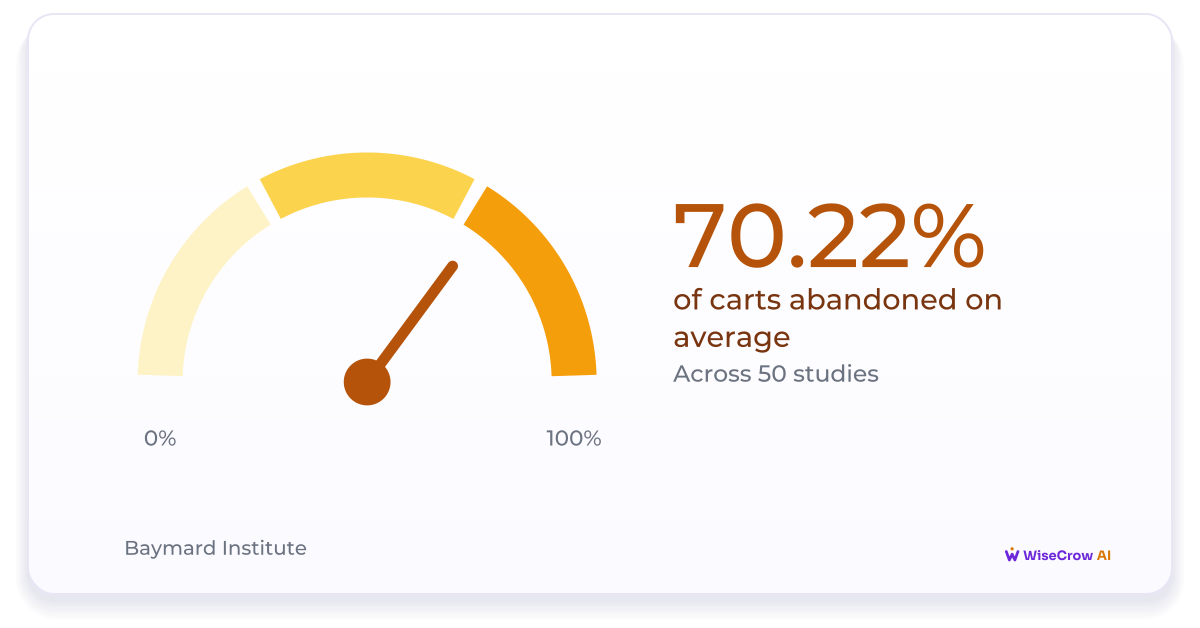
The core flows are rule-based and should stay that way: welcome series, browse abandonment, cart abandonment, post-purchase, win-back. Cart recovery alone matters a lot, since Baymard Institute puts the average documented cart abandonment rate at 70.22% across 50 studies. A simple three-message cart flow is worth building before any AI feature.
AI improves the flows you already have. Predictive fields in platforms like Klaviyo estimate when a customer will buy again and how much they’ll spend, so your replenishment email lands near the reorder date. Send-time models pick the hour each person tends to open. Product blocks show items based on what similar shoppers bought. For a ranked list of where these and other ideas pay back, see my overview of AI ecommerce use cases by ROI.
One honest note. Predictive segments need history. A store with 2,000 customers and one purchase each won’t get much from them yet. Keep the segments simple until the data is there.
Ad and Promo Operations
Ad platforms now run most bidding and targeting with their own AI. Your automation work sits around them. Rules can pause ads for out-of-stock products, push budget alerts when spend jumps and end promo codes on schedule. AI can write ad copy variants, flag campaigns where cost per order is drifting up and check whether a planned discount stacks with another one in a way that kills margin.
I’m careful with fully automated budget moves. A model chasing return on ad spend will happily pour money into returning customers who would have bought anyway. Let AI suggest the shift, and let a person approve it.
Reporting Without the Monday Spreadsheet
Many store owners start each week by pulling numbers from the store, the ad platforms, the email tool and the help desk into one sheet. A BI tool or an ecommerce analytics app can connect those sources and refresh a dashboard daily with no manual work.
AI adds a written layer on top. A daily or weekly summary explains what moved and why: “Revenue fell 9% week over week, mostly from the paused Meta campaign. Return rate on the linen range jumped after the new size chart.” The summary saves time only if the numbers below it are right, so check that each source tracks orders and refunds the same way before you trust any automated summary.
What Breaks When Automations Stack Up
A store with fifteen automations has fifteen things that can fail quietly. Most failures I get called in to fix come from workflows clashing with each other.
Tag loops are common. One flow adds a tag when an order is flagged, another removes it when the order is paid, and a third re-adds it on update. Orders bounce between states and fulfillment stalls. Duplicate messages are another. The help desk sends a shipping update, the email tool sends one too and the SMS tool adds a third. Customers notice, and some unsubscribe.
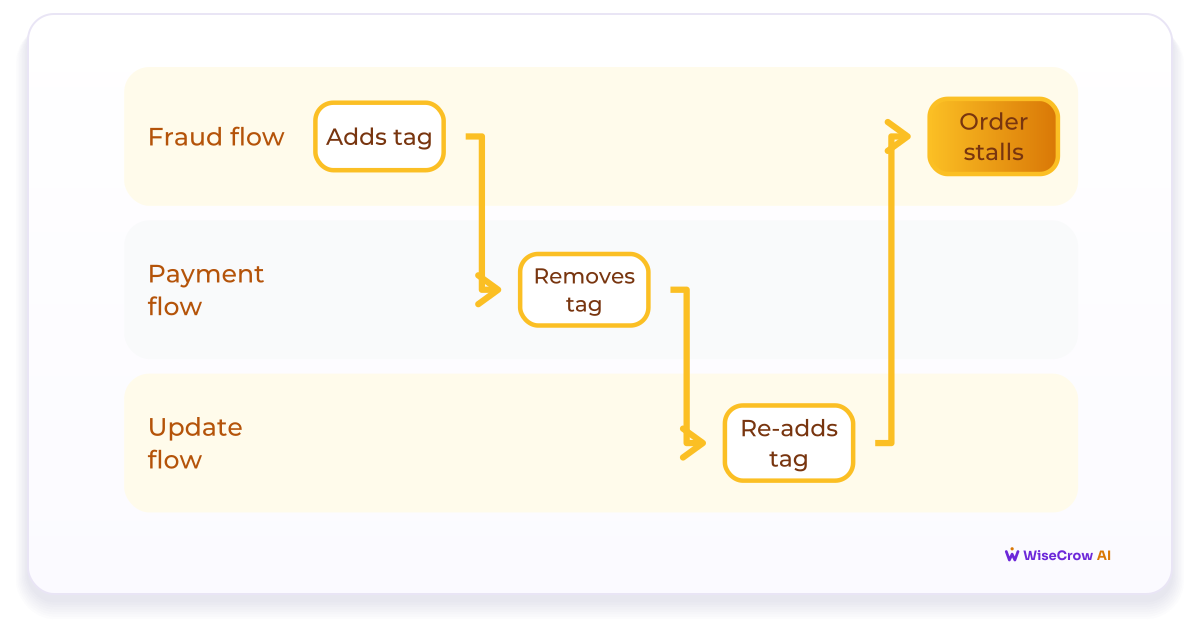
Then there’s drift. An AI support agent trained on last year’s return policy keeps quoting a 60-day window after you cut it to 30. A product feed rule built for one warehouse ignores the second one you added. Nothing errors out. The answers just get a bit more wrong each month.
Size the Hours Before You Build
Pick one workflow from the map, ideally the one your team groans about most, and enter its numbers below. Count how often the task happens each week and how long it takes per instance. Order-status replies, product uploads and return approvals are good places to start.
How Much Time Could You Save?
Move the sliders to match one repetitive task in your business.
Read the result as a ceiling. Some cases will still need a person, and someone has to review the AI’s work for the first few weeks. In my client work, a realistic saving lands somewhere between half and four fifths of the calculator figure, depending on how messy the inputs are.
Launch Checklist for Each Workflow
Run every new automation through these checks before it touches real customers or real orders. They take a few hours per workflow and save far more than that.
- The workflow has a named owner who gets alerts when it fails.
- You’ve written down the trigger, the logic and the action in plain words.
- You tested it on past orders or tickets, including weird ones like split orders and gift cards.
- AI outputs go to a review queue for the first two to four weeks.
- The AI step can only touch the fields and actions it needs.
- No other automation fires on the same trigger with a clashing action.
- Customers can always reach a person, and the hand-off passes the full history.
- You recorded one baseline number before launch.
- Product facts, prices and policies come from your live data, never from the model’s memory.
- There’s an off switch, and the owner knows where it is.
How to Choose Your First Ecommerce Workflow
Start with the job that has the most volume and the cheapest mistakes. For most stores I work with, that’s order-status support or post-purchase email. Both run hundreds of times a week, both draw on clean data and a bad answer is easy to correct with a follow-up.
Move to fraud or inventory once those run smoothly, or earlier if chargebacks or stockouts are already a line item you track. Leave fully automated ad budgets and unsupervised product publishing for later. Those need more trust, more data and a team that’s used to checking AI output.
If your store runs on Shopify, open Flow and see how much of your list it can do with plain rules first. Then pay for AI only where the rule runs out. My default plan for a mid-size store is one AI workflow live in the first month, a second in month two and a review of both before adding more.
Questions About AI Ecommerce Automation
What Is AI Ecommerce Automation?
It’s software that runs repeat store work for you, from routing orders and flagging fraud to answering order-status questions, writing product copy and timing marketing emails. Plain rules handle the predictable steps. AI handles the steps that need judgment, like reading a customer message or scoring a risky order.
Is Shopify Flow Enough, or Do I Need AI Tools?
Flow covers a lot. Tagging, routing, low-stock alerts and simple notifications all work with triggers, conditions and actions. You need AI once the input is messy or the decision depends on patterns, such as free-text support tickets, fraud in the gray zone, product copy or predicted reorder dates.
Which Ecommerce Workflow Should I Automate First?
Start where volume is high and mistakes are cheap to fix. For most stores that’s order-status replies or post-purchase emails. Fraud and inventory come next if chargebacks or stockouts already cost you money.
How Much Does Ecommerce Automation Cost?
Rule-based tools often cost little or nothing on top of your store plan. AI tools usually charge per seat, per ticket or by order volume, and prices change often. Compare the monthly bill with the hours you measured, and include setup and review time in the math.
Will AI Support Replies Upset My Customers?
They can if the bot guesses. Give it live order and tracking data, limit it to topics it can answer from that data and hand everything else to a person with the full thread attached. In my client work, customers complain about wrong answers far more than about who sent them.
Can AI Write All My Product Descriptions?
It can draft them fast from your specs, photos and brand rules. Have someone check sizes, materials, care instructions and any health or safety claims before anything goes live. Wrong product facts lead to returns and, in some categories, legal trouble.
How Do I Know If an Automation Is Working?
Pick one number per workflow and record it for two to four weeks before launch. Good choices are first-response time, chargeback rate, stockout days, return-to-exchange share and email revenue per recipient. Then compare the same weeks after launch and check the error log too.
Sources
- Shopify Help Center, Shopify Flow: help.shopify.com
- Baymard Institute, Cart Abandonment Rate Statistics (updated October 2026): baymard.com
- NRF and Happy Returns, Consumers Expected to Return Nearly $850 Billion in Merchandise in 2025 (October 2025): nrf.com
Disclaimer: This article is for general information only. Tool features, plans and prices change often, so check the vendor’s current terms before you buy, and get advice on consumer and data protection rules where you sell.
Did you find this helpful?
Thank you for your feedback.
Marlena leads the WiseCrow editorial team and works with our consultants to turn real client projects into practical guides on AI strategy, automation and governance. Before joining WiseCrow, she spent 12 years in B2B operations and SaaS content. She has since edited more than 400 articles on AI and automation and reviewed workflows from over 60 client projects. She is based in Austin, Texas.