Summary
- Score use cases on value, data and how much a wrong answer would cost you before you pick one.
- Build an evaluation set of real questions first and run it against every prototype and every change.
- Do the security review before the pilot, and treat prompt injection and data leaks as hard stops.
- Track cost per request, latency and quality in production, with fallbacks and versioned prompts.
The demo is the easy part of generative AI. I’ve seen a prototype answer twenty hand-picked questions beautifully in a Friday meeting, then give a confident, wrong answer to the twenty-first on Monday. The distance between those two days is what implementation is about, and it’s where most of the work in an enterprise generative AI consulting project goes.
Below is the path I follow for one use case, in nine phases. To keep it concrete, I’ll follow one example all the way through: an assistant that drafts answers to vendor security questionnaires for a sales team. It reads past questionnaires and security policies, drafts each answer and shows the sources, and a person approves every reply before it leaves the building.
The Nine Phases on One Page
| Phase | The question | You leave with |
|---|---|---|
| 1. Pick and Score the Use Case | Is it worth building? | One scored use case |
| 2. Check Knowledge Sources | Can the model find the answer? | A RAG-ready source list |
| 3. Choose Model and Platform | What runs it, at what cost? | A shortlist tested on your data |
| 4. Prototype With an Evaluation Set | Is it good enough yet? | A scored prototype |
| 5. Security Review and Guardrails | What could go wrong? | Signed-off controls |
| 6. Pilot With Real Users | Do people use it? | Usage and edit data |
| 7. Production Hardening | Will it hold up daily? | Monitoring and fallbacks |
| 8. Rollout and Adoption | Who gets it next? | Teams onboarded in waves |
| 9. Measure and Iterate | Is it still paying off? | A monthly scorecard |
Phases 2 and 3 overlap. Phases 4 to 7 run in order, each ending at a test you agree on before it starts. Phases 8 and 9 repeat for as long as the application runs. Gartner predicted that at least 30% of generative AI projects would be abandoned after the proof of concept by the end of 2025, citing poor data quality, weak risk controls, rising costs and unclear value, as THE Journal reported. Each of those four causes has a phase below that deals with it head-on.
Phase 1: Pick and Score the Use Case
Start with a list of five to fifteen candidates from the teams that would use them. Then score each from 1 to 5 on four things: how often the task happens, how much time it takes, how ready the data is and how cheap a wrong answer would be. The last one matters most with generative AI. A model will sometimes produce fluent text that’s wrong, so the best first use cases have a person reviewing the output anyway.
I multiply the four scores. Multiplying punishes a single weak area harder than adding does, and that’s on purpose. A task with huge volume but no usable data scores low, which is right, because you can’t fix the data in a pilot.
The questionnaire assistant scored well. Sales engineers fill in long questionnaires every week, the same questions repeat with small changes and every answer already gets reviewed before it goes out. Drafting the answer to a customer’s legal dispute scored badly on the last factor and stayed on the list for later.
Phase 2: Check Your Knowledge Sources for RAG
Most enterprise use cases need the model to answer from your documents. Retrieval-augmented generation (RAG) does that: it searches your sources for the passages that fit the question and hands them to the model with the prompt. The model can only be as right as what it retrieves.
Before any build, I check each source on five points. Is there one current version? Does it have an owner who’ll keep it current? Can it be split into sections that each answer one thing? Does it carry permissions the assistant has to respect? Can you reach it through an API or an export?
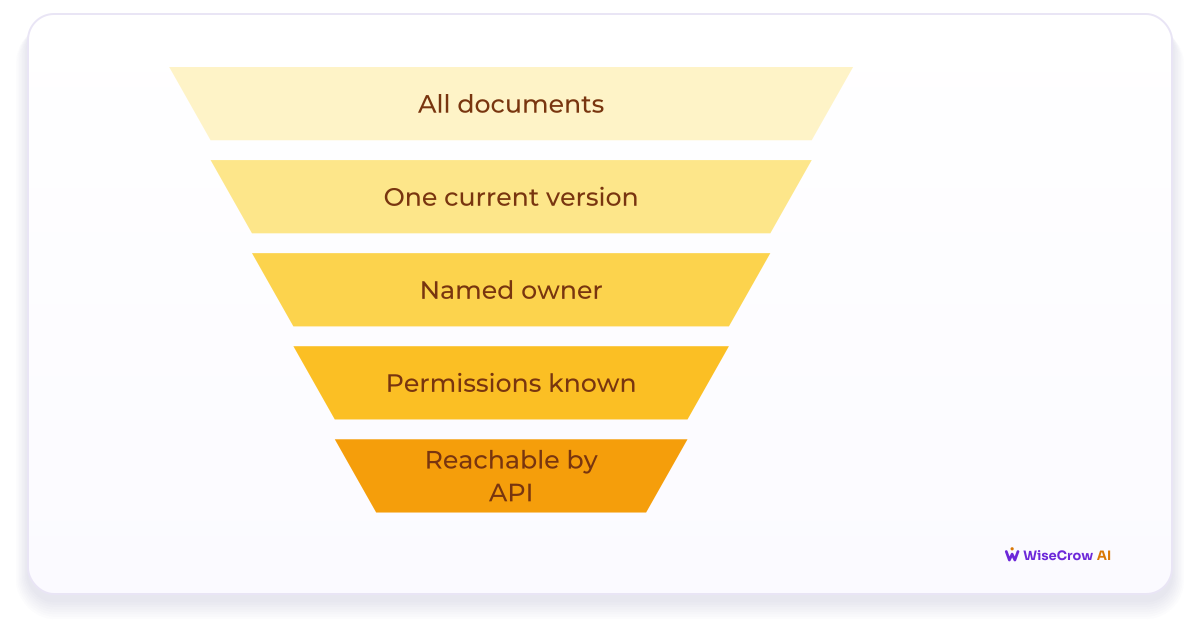
For the questionnaire assistant, the first check turned up three versions of the encryption policy and a folder of past questionnaires where nobody knew which answers had been approved. The team kept only questionnaires signed off in the last eighteen months, archived the rest and gave the security team ownership of the policy folder. Permissions are the point teams skip. If a source holds HR or board documents, the assistant must filter by the asking user’s access, or it will happily quote salary data to anyone.
Phase 3: Choose the Model and Platform
Pick the model last among your early decisions, after you know the task and the data. Then compare two or three options on your own questions, never on public benchmarks alone. I look at answer quality on a sample of the evaluation set, response time, cost per request, context window, data terms and where the data is processed.
The platform question is often bigger than the model question. Your company may already license a cloud AI service or a copilot with retrieval built in, and the contract may already cover data processing. If you’re weighing standalone products, my ranking of the best generative AI tools compares the main ones for text, image and video work.
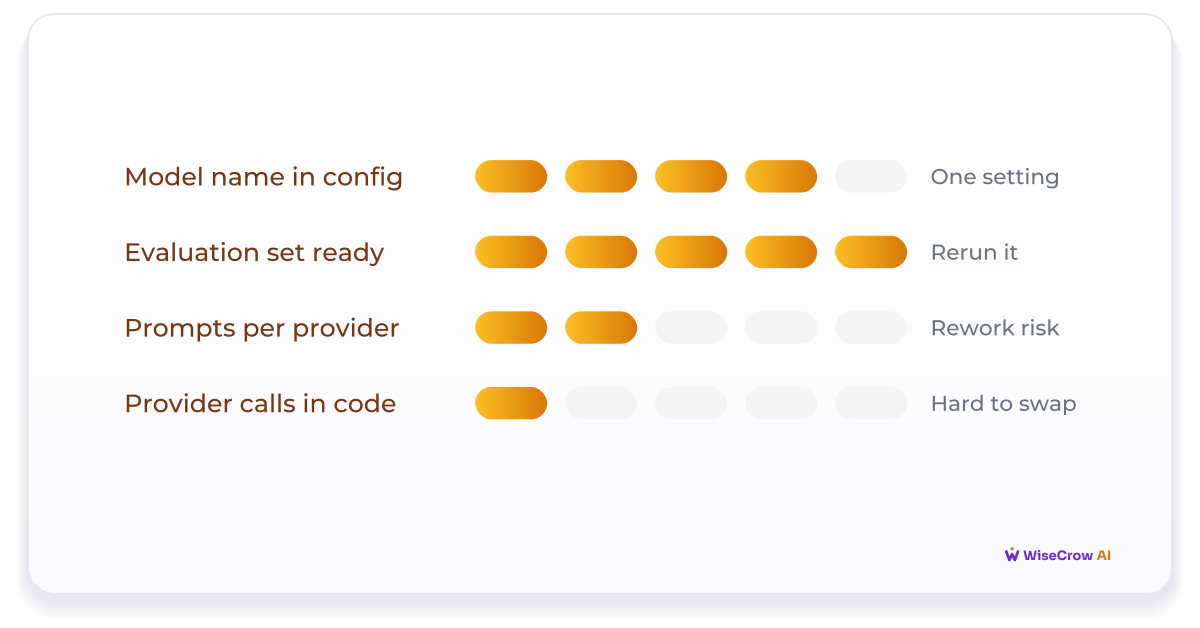
Keep the model swappable. Put a thin layer between your application and the provider, so a new model is a configuration change and a rerun of the evaluation set. Models get retired and repriced, and in my client work at least one model switch per year has been normal.
Phase 4: Prototype Against an Evaluation Set
Write the evaluation set before the first prompt. For the questionnaire assistant, a sales engineer and I pulled 80 real questions from recent questionnaires. We wrote down the approved answer and its source for each one, then added ten questions the assistant should refuse or hand back, such as anything about a customer’s own audit findings.
Then build the simplest version that could pass: retrieval, a system prompt and a format for the answer with its citations. Run the whole set, grade it and change one thing at a time. Most early gains in my projects came from better chunking and cleaner sources, with prompt tweaks a distant second.
Grade with people first. An LLM can help grade later, once you’ve checked that its grades match your reviewers on a sample. Two reviewers on the same twenty answers will show you quickly if your idea of “correct” is shared.
The Evaluation Gates I Use
Every stage from here on has a test and a pass bar, written down before the stage begins. The table shows the ones I set for most projects. Adjust the bars to your risk.
| Stage | What you test | Pass bar |
|---|---|---|
| Retrieval check | Right passage found | Most questions, top 5 |
| Prototype | Answers on eval set | Agreed score, two runs |
| Red team | Injection and leaks | Zero leaks |
| Pilot | Edits and repeat use | Light edits, steady use |
| Production | Latency, cost, errors | Inside agreed limits |
| Every change | Full eval rerun | No score drop |
The last row is the one that keeps quality from sliding after launch. A prompt change that fixes one complaint can quietly break ten other answers, and only a full rerun shows it.
Phase 5: Security and Privacy Review, Then Guardrails
Bring security and privacy in before the pilot, while changes are still cheap. The NIST Generative AI Profile (AI 600-1) is a useful checklist for that meeting. It lists risks that generative AI creates or makes worse, including confabulation, data privacy and information security, with suggested actions for each.
In practice, the review covers a handful of questions. What data goes to the provider, and is it kept or used for training? Who can see the logs? Can a document in the knowledge base carry hidden instructions that change the model’s behavior? Can a user get the assistant to reveal content they’re not allowed to see?
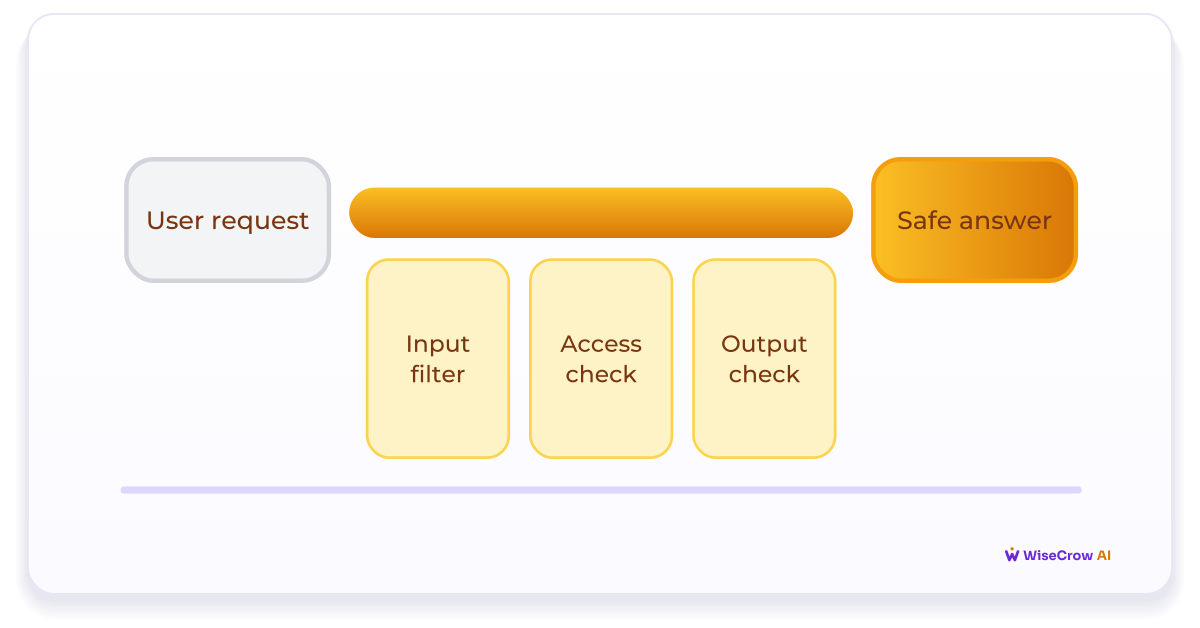
Then build the guardrails: input filters for obvious injection attempts, permission checks on retrieval, output checks for personal data and a rule that answers without a source get flagged. For the questionnaire assistant, I added one more. Any answer mentioning a certification had to match the current certification list word for word, because claiming an expired one in a signed questionnaire is a contract problem.
Phase 6: Pilot With Real Users
Give the assistant to a small group doing real work: for the questionnaire assistant, six sales engineers for six weeks. Keep the old way of working available. The pilot answers two questions the evaluation set can’t. Do people choose to use it, and how much do they change what it writes?
Log the edit distance between draft and final answer, or simply ask reviewers to tag each draft as used as is, lightly edited or rewritten. Rewrites tell you where the knowledge base is thin. In the questionnaire pilot, almost all rewrites clustered around two topics, data residency and subprocessors, and both traced back to policies nobody had updated since a vendor change.
Hold a short review each week with two or three pilot users. Ask what they stopped checking, too. When users stop verifying sources, they trust the tool, and that’s the moment a wrong answer slips through. Some healthy doubt in week six is a good sign.
Before the pilot starts, estimate what success is worth. Enter the minutes the task takes today, how often it happens, the share the assistant can draft and your staff cost.
How Much Time Could You Save?
Move the sliders to match one repetitive task in your business.
Keep the share realistic. A drafting assistant whose output still needs review saves part of the time, never all of it, and the review step should stay in your numbers.
Phase 7: Harden It for Production
A pilot can live with a developer watching the logs. Production can’t. Hardening is the least visible phase and the one I push hardest on schedules for. It covers four areas.
Monitoring
Track response time, error rate, refusals, answers without sources and user ratings, per day and per model version. Sample a few dozen real conversations each week and grade them against the same rubric as the evaluation set. Dashboards show you volume. Only reading answers shows you quality.
Cost per Request
Work out the cost of one request and multiply it out. Here’s an illustrative example with made-up prices. A questionnaire answer sends about 6,000 input tokens (the question plus retrieved passages) and gets 500 output tokens back. At $3 per million input tokens and $15 per million output tokens, one request costs about 1.8 cents for input and 0.75 cents for output, so roughly 2.6 cents. At 40,000 requests a month, that’s about $1,020. Double the retrieved context and the input cost doubles with it, which is why capping context length is the first cost lever I pull.
Add per-user rate limits and a budget alert. The OWASP Top 10 for LLM applications lists unbounded consumption as LLM10:2025, including attacks that run up usage-based bills on purpose. A runaway script inside your own company can do the same by accident.
Fallbacks
Decide what happens when the provider is slow or down: a retry, a second model, or a clear message that routes the user to the old process. Set a timeout. A user staring at a spinner for forty seconds will not come back.
Prompt and Version Control
Keep prompts, retrieval settings and model names in version control, with a changelog. Log which version produced each answer. When someone reports a bad answer three weeks later, you need to rebuild exactly what the assistant saw.
Phase 8: Roll Out and Build Adoption
Widen access in waves. After the six pilot engineers, the questionnaire assistant went to the rest of sales engineering, then to account managers who handle smaller questionnaires alone. Each wave got a one-hour session on their own questionnaires, a short page of do’s and don’ts and one named person to ask.
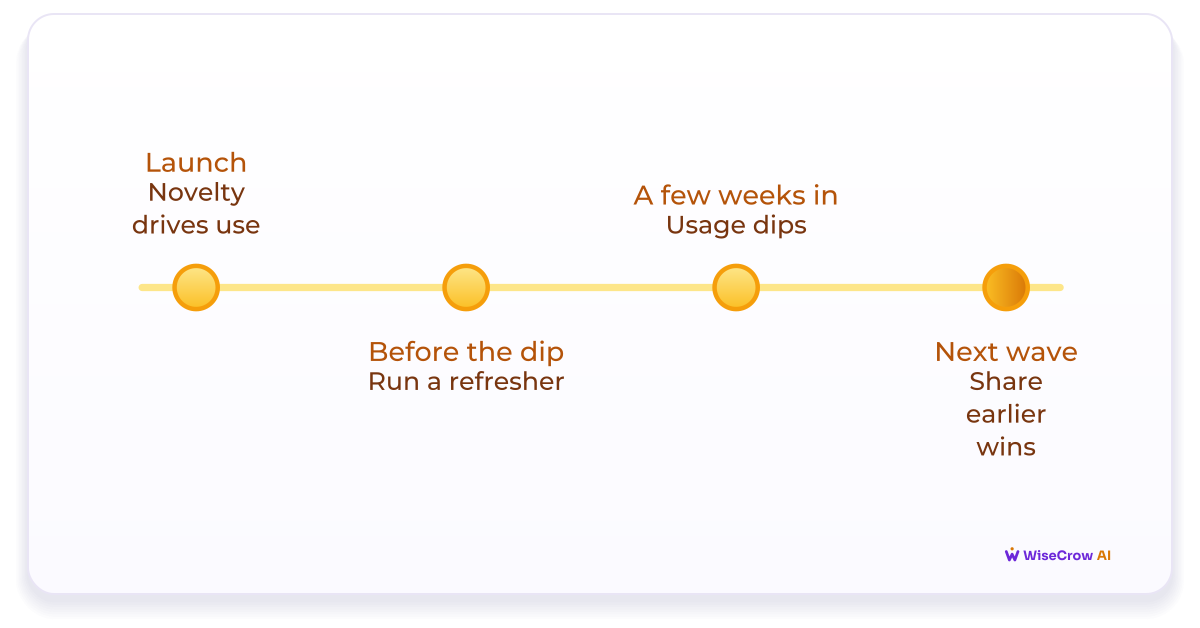
Adoption usually dips a few weeks after launch, once the novelty wears off. Plan a refresher before that happens, and share the time saved by the earlier waves, in their own words. If you’re planning several use cases across departments, my quarter-by-quarter enterprise GenAI roadmap shows how to sequence them so each one reuses the work of the last.
Write the usage rules down. Which data may go into the assistant, who approves answers before they reach a customer, how to report a bad answer. Keep it to one page, or nobody reads it.
Phase 9: Measure and Iterate
Report the same few numbers every month: active users, requests, share of drafts used with light edits, time per task against the baseline, cost per request and evaluation score. Put them on one page next to the numbers from before the pilot. My breakdown of generative AI ROI shows how to turn those numbers into a productivity figure finance will accept.
Every reported bad answer becomes a new item in the evaluation set. After a year, the set for the questionnaire assistant had grown from 90 items to several hundred, and it caught two regressions that would have reached customers, one of them after a routine model update.
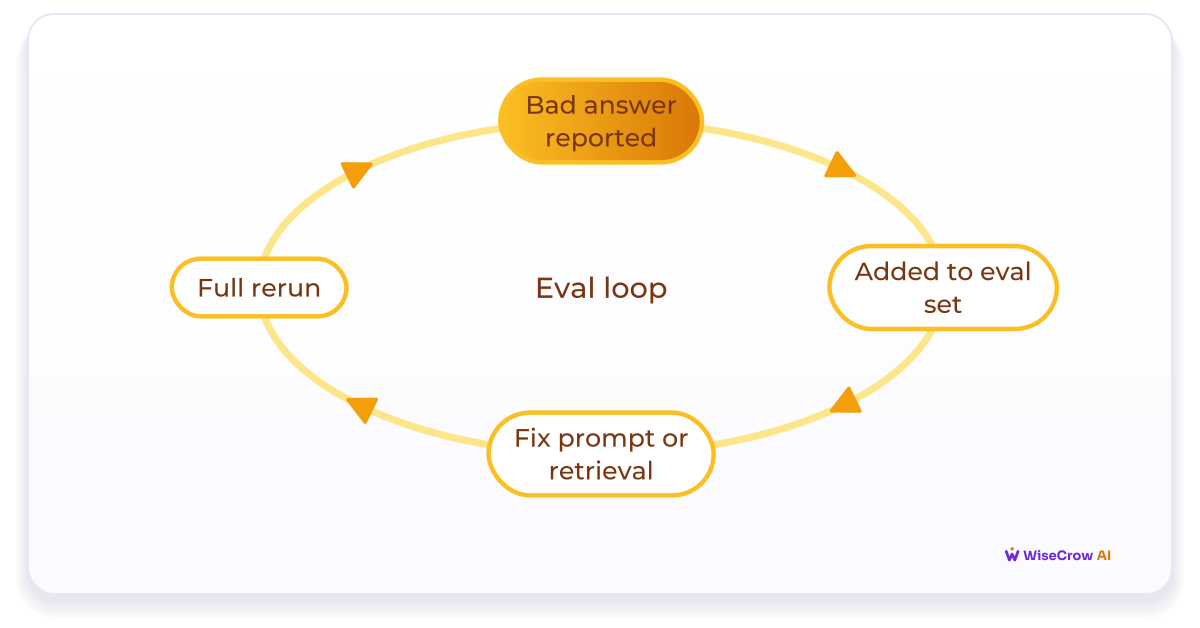
Review the use case itself once a quarter. Sometimes the right move is a bigger scope, such as drafting whole questionnaires from a single upload. Sometimes it’s retiring a feature nobody uses. Both decisions are easier with a scorecard you’ve kept honest.
How to Choose the Right Build Approach
The nine phases stay the same. What you build in phases 3 and 4 depends on the shape of the task:
| Task shape | Approach | Why it fits |
|---|---|---|
| Drafting from general skill | Off-the-shelf copilot | No company data needed |
| Answers from your documents | RAG assistant | Cites current sources |
| Fixed format, high volume | Workflow with API calls | Runs inside your systems |
| Narrow style or jargon | Fine-tuning, later | Only after RAG plateaus |
Most enterprise use cases I see land in the second row. If you’re unsure, build the RAG version first. Within weeks it shows you if your sources can carry the use case, and that answer is useful even if you change the approach later.
Then decide who builds it. You can run this plan in-house if you have three things: an engineer who has shipped an LLM application before, a business owner with time for weekly reviews and owners for every knowledge source. If one is missing, outside help pays off most in phases 2, 4 and 7, where the hidden work sits.
Questions About Taking GenAI to Production
How Long Does a Generative AI Implementation Take?
For one focused use case, plan on a few months from scoring to a production release, depending on how fast you get data access and security sign-off. In my client work, the build itself is rarely the slow part. Knowledge clean-up and reviews by security and legal set the pace.
What Is an Evaluation Set for Generative AI?
It’s a fixed list of real questions or tasks, each paired with what a good answer looks like and which source it should come from. You run the whole set against every prototype and every later change, so you can see if quality improved or slipped. Start with 50 to 100 items and grow it with every failure you find.
Do I Need RAG for My Generative AI Project?
You need retrieval-augmented generation (RAG) when answers must come from your own documents, such as policies, contracts or product data. Pure drafting tasks, like rewriting an email, usually don’t need it. If the right answer changes when your documents change, plan for RAG.
Should We Fine-Tune a Model or Use RAG?
Start with RAG and good prompts. They are cheaper to change and keep answers tied to current sources. Fine-tuning can help later with a narrow style, format or vocabulary, once your evaluation set shows that retrieval and prompting have stopped improving the scores.
How Do I Control the Cost of a Generative AI Application?
Measure cost per request from the prototype onward: input tokens, output tokens and any retrieval or tool calls. Then set per-user rate limits, cap the length of retrieved context and send simple requests to a cheaper model. A monthly budget alert catches runaway usage before the invoice does.
Who Should Own a Generative AI Application After Launch?
Name one business owner who decides what the assistant should do and one technical owner who runs it. Each knowledge source also needs an owner who keeps its content current. Without those three roles, quality drifts within a few months.
Why Do Generative AI Pilots Fail to Reach Production?
The usual causes are poor data, missing risk controls, rising costs and no clear proof of value. Gartner named those same four reasons in its 2024 forecast on abandoned GenAI projects. An evaluation set, an early security review and a cost-per-request number from day one address all four.
Sources
- THE Journal, Gartner: 30% of Gen AI Projects Will Be Abandoned (August 2024): thejournal.com
- NIST AI 600-1, Artificial Intelligence Risk Management Framework: Generative Artificial Intelligence Profile (July 2024): nist.gov
- OWASP GenAI Security Project, LLM10:2025 Unbounded Consumption: genai.owasp.org
Disclaimer: Disclaimer: Token prices and volumes in this article are illustrative examples, not quotes from any provider. Model pricing, data terms and AI regulations change often, so check the current terms and rules before you build. Nothing here is legal advice.
Did you find this helpful?
Thank you for your feedback.
Marlena leads the WiseCrow editorial team and works with our consultants to turn real client projects into practical guides on AI strategy, automation and governance. Before joining WiseCrow, she spent 12 years in B2B operations and SaaS content. She has since edited more than 400 articles on AI and automation and reviewed workflows from over 60 client projects. She is based in Austin, Texas.