Summary
- The quickest small-business wins are lead follow-up, inbox triage and invoice reminders, because they repeat every day.
- Most of these use cases run on tools you already pay for or on cheap add-ons.
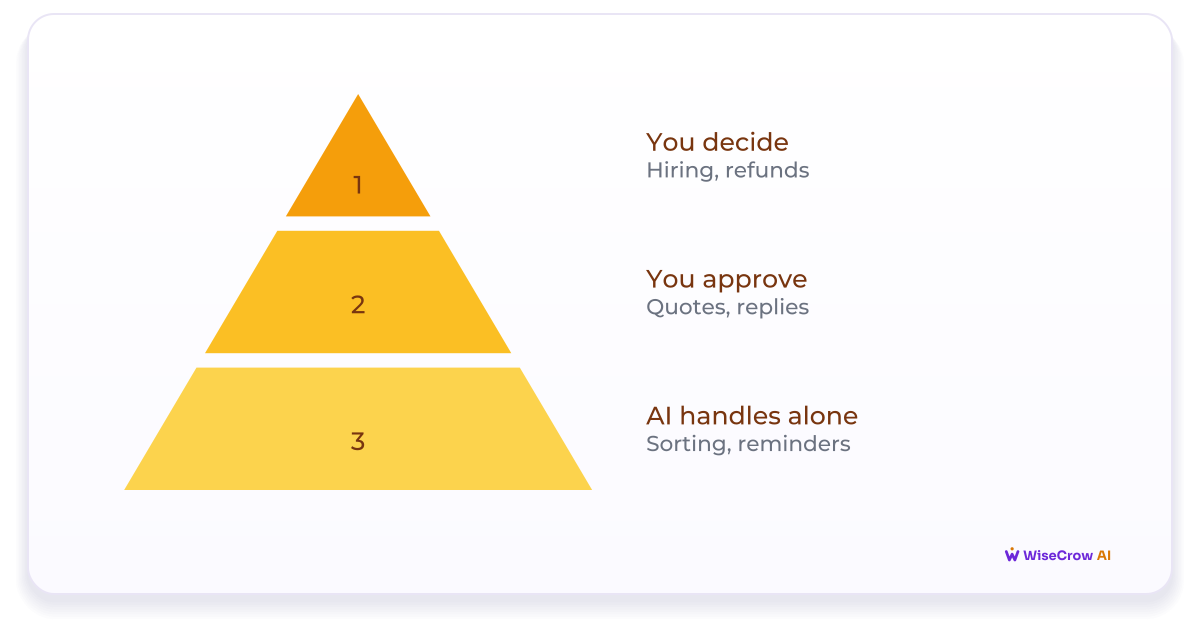
- Keep yourself in charge of prices, refunds, hiring decisions and anything a customer might take personally.
- Get one use case stable for a month before you add the next.
Small business owners don’t need an AI strategy deck. You need the quote written, the reviews answered and the late invoices chased, ideally without hiring anyone. The 11 use cases below are the ones I set up most often for small teams, and most run on low-cost tools you may already pay for. If you’d like help picking and building the first one, small business AI consulting can scope it with you.
I’ve grouped them by department, from sales to admin, with a rough monthly cost and setup time for each. Most of them don’t need a developer, and every one leaves you in charge of the decisions that matter.
Where AI Pays Off First in a Small Business
AI use is now normal for small firms. The U.S. Chamber of Commerce found that 58% of small businesses use generative AI, up from 23% in 2023. A lot of that use is still a chat window open in a browser tab, though. The real time savings come when AI sits inside a task you repeat and does the first draft every single time.
The table gives you the quick view. Costs are typical ranges for small-business plans in my client work, and setup time assumes you do it yourself with a few hours a week.
| Use case | Department | Tool price per month range | Setup time |
|---|---|---|---|
| 1. Lead Follow-Up | Sales | Free to $50 | 1 to 3 days |
| 2. Quotes and Proposals | Sales | $20 to $60 | Half a day to 2 days |
| 3. Review Replies | Marketing | Free to $50 | 1 to 2 hours |
| 4. Social Media Content | Marketing | Free to $40 | Half a day |
| 5. FAQ Chatbot | Customer service | Free to $100 | 1 to 2 weeks |
| 6. Inbox Triage | Customer service | Free to $30 per user | 1 to 3 days |
| 7. Bookkeeping Categorization | Finance & admin | Often included | A few hours |
| 8. Invoice Chasing | Finance & admin | Free to $30 | 1 to 3 hours |
| 9. Appointment Scheduling | Operations | Free to $20 per user | 1 to 2 hours |
| 10. Inventory Reorders | Operations | Free to $100 | 1 to 3 weeks |
| 11. Hiring Admin | Operations | Free to $50 | 1 to 2 days |
Treat the costs as a guide. Prices move every few months, and many tools bundle AI into plans you already have. For named picks on price, my roundup of cheap AI tools for small business compares the free and low-cost options.
Sales Use Cases That Stop Leads Going Cold
In a small business, sales usually means you. Leads arrive while you’re busy doing the actual work, and quotes get written whenever there’s a quiet hour. These two use cases close the gap between interest and a reply.
Lead Follow-Up
Most small businesses lose leads in the gap between a form submission and a reply. When you’re on a job or with a customer, a new enquiry can sit for hours, and by then the person has called someone else. An AI follow-up flow replies within minutes, asks one or two qualifying questions and puts the lead in front of you with a short summary.
In my client work, owners who set up instant follow-up are often surprised by how many leads were slipping away unnoticed. Keep the first reply short and honest about who’s writing. A message that says a person will call back by a set time works better than a bot pretending to be you.
How a New Lead Gets Handled
- A lead comes in through your website form, Facebook or a missed call.
- AI sends a short reply by text or email within a few minutes.
- It asks one or two questions about budget, location or timing.
- The answers and a one-line summary land in your CRM or a shared sheet.
- You get a notification with the lead’s details and the best time to call.
- If nobody books a call, a polite reminder goes out two days later.
Cheap Ways to Build It
A free or entry-level CRM such as HubSpot or Zoho handles the forms and the automated replies. If your leads arrive in several places, Zapier or Make can pull them together and pass the text to an AI model for the summary.
Quotes and Proposals
Writing quotes is the job most owners do late at night. AI can turn your site visit notes, a voice memo or a short call transcript into a draft quote that uses your own price list and standard terms. You check the numbers, adjust the scope and send it the same day.
The trick is to give the AI your real material: three or four past proposals you were happy with, your price list and your terms. Without those, you get generic text that sounds like nobody in particular. With them, a first draft takes minutes, and your quotes start to look consistent from one customer to the next.
From Site Visit to Sent Quote
- You record a voice note or jot down notes after the visit.
- AI turns the notes into a scope of work with line items.
- Prices come from your saved price list, never from the AI’s guess.
- The draft drops into your quote template with your terms attached.
- You review, adjust and send it from your quoting tool.
What It Runs On
A general AI assistant like ChatGPT or Claude can draft the text from your notes and past examples. Quoting tools for trades and services, plus most proposal software, now include AI drafting, so check yours before you add anything.
Marketing Use Cases for a One-Person Marketing Team
Few small businesses have a marketer on staff. Reviews and social posts end up on the owner’s list, right below everything urgent. AI works well here because the work is frequent, short and easy to check before it goes live.
Review Replies
Online reviews matter for local businesses, and replying to them shows new customers that someone is paying attention. Most owners know they should reply, then fall behind within a month. AI drafts a personal reply to each new review that mentions what the customer actually said, in a tone you’ve approved.
Positive reviews can get a quick thank-you you approve with one tap. Negative ones need you. I tell clients to let AI write the first draft of a tough reply and then rewrite it themselves, because an angry customer can spot a canned apology from a mile away. Never offer refunds or admit fault in an automated reply.
What Happens When a Review Lands
- A new review appears on Google, Facebook or Yelp.
- AI reads it and notes the rating and the main point the customer made.
- It drafts a short reply that refers to that point by name.
- Four- and five-star replies go to you for a quick approval.
- Low ratings get flagged for a personal reply within a day.
Tools That Keep Up with Reviews
Review management tools for local businesses pull in reviews from several sites and suggest AI replies. If you only use Google, your Business Profile plus a saved AI prompt is often enough to start.
Customer Service Use Cases for Repeat Questions
Most customer questions in a small business are repeats. Answering them well matters, but answering the same one for the fortieth time drains your day. Both use cases below keep a person in the loop for anything unusual.
FAQ Chatbot
Small businesses answer the same ten questions all day: opening hours, prices, delivery areas, booking rules. A chatbot trained on your own FAQ page and policies can answer those around the clock and hand anything unusual to you with the conversation attached.
The quality depends almost entirely on what you feed it. Write down your real answers first, including the awkward ones about cancellations and refunds. In my client work, the bots that disappoint are the ones launched on a thin website with no clear policies. Give customers an easy way to reach a person, and tell them up front they’re talking to a bot.
What Your Customer Experiences
- A visitor opens the chat window on your site.
- The bot answers from your FAQ, prices and policies.
- If it isn’t sure, it says so and collects the person’s contact details.
- Booking or order questions link straight to your booking page or shop.
- You get the transcript of every hand-off by email.
- Each month, you add answers for the questions it couldn’t handle.
Where to Get a Chatbot
Website chat and helpdesk tools such as Tidio, Intercom and Zendesk offer AI chat that learns from your help pages. Start with the one that plugs into the site or inbox you already use.
Inbox Triage
For many owners, the inbox is the real job. AI can sort incoming email into buckets for leads, customers, suppliers, invoices and noise. It drafts replies to routine messages and pulls out anything with a deadline.
You still read and send everything that matters. The difference is that you open your inbox to a short list of emails that need you, with drafts already waiting. Start with labels and drafts only. Let it send on its own after a few weeks of checking its work, and only for simple messages like booking confirmations.
How Your Inbox Gets Sorted
- New emails are read as they arrive.
- Each one gets a label: lead, customer, supplier, invoice or low priority.
- Routine questions get a draft reply in your tone.
- Invoices and receipts are forwarded to your bookkeeping inbox.
- Anything with a date or deadline becomes a task.
- You check the labels each morning and correct the misses.
Which Tools to Try
Gemini in Google Workspace and Copilot in Microsoft 365 both summarize and draft email inside the inbox you use today. For custom sorting rules, add an automation tool with an AI step that reads each message.
Finance and Admin Use Cases That Keep Cash Moving
Admin is where small business owners lose their evenings. Bookkeeping and payment chasing are rule-heavy, repetitive and easy to put off, which makes them a good fit for AI with a human check at the end.
Bookkeeping Categorization
Categorizing bank transactions is tedious, and mistakes cost you at tax time. Most accounting platforms now use AI to suggest a category for each transaction based on the vendor, the amount and how you coded similar items before. You confirm the suggestions in batches.
The suggestions get better the more you correct them, so the first month takes longer than you’d like. After that, most owners I work with only review the odd ones out. Keep your accountant in the loop. A quick monthly check from someone who knows the tax rules catches the miscoded items AI keeps repeating.
How Your Books Stay Current
- Bank and card feeds sync into your accounting software every day.
- AI suggests a category and matches receipts where it can.
- You review the suggestions once or twice a week.
- Rules are set for vendors that always go to the same account.
- Your accountant checks the month before you close it.
What You Probably Already Have
QuickBooks Online and Xero both include AI-assisted categorization and receipt matching. A receipt capture app can fill the gap if your current plan doesn’t read receipts.
Invoice Chasing
Chasing late payments is awkward, so it gets put off. An automated sequence sends friendly reminders before and after the due date, firms up the tone step by step and tells you which customers need a phone call.
AI helps in two places. It writes reminders that sound like you, and it can read customer replies, so a message saying the payment went out yesterday pauses the sequence. Keep the final step personal. In my experience, a call from the owner gets paid faster than a fifth automated email.
The Reminder Sequence
- An invoice goes out with clear payment terms and a payment link.
- A friendly reminder is sent three days before it’s due.
- On the due date, a second note goes out with the link again.
- AI reads replies and pauses reminders when a customer says they’ve paid.
- After two weeks overdue, you get a list of who to call.
Setting It Up
Most accounting tools include automatic payment reminders you can turn on in an afternoon. To read replies and adjust the sequence, connect your inbox to an automation tool with an AI step.
Operations Use Cases for Bookings, Stock and Hiring
Operations covers the work that keeps the doors open: getting customers booked in, keeping stock on the shelves and finding good people. The tools here are cheap, but each one needs a little more thought about rules and edge cases.
Appointment Scheduling
Back-and-forth emails to find a time eat more of your week than you think. A booking page lets customers pick a slot from your real calendar, and AI can handle the follow-ups: confirmations, reminders, reschedules and the questions you need answered before the visit.
For service businesses, fewer no-shows is often the bigger win. A text reminder the day before, with an easy reschedule link, keeps your calendar full. Add buffer time between jobs from the start, or the tool will happily book you back to back on opposite sides of town.
From Booking to Visit
- A customer picks a time from your booking page.
- They answer two or three intake questions as part of the booking.
- A confirmation goes out with the address and what to prepare.
- A reminder text arrives the day before, with a reschedule link.
- Cancelled slots reopen for other customers automatically.
Booking Tools Worth a Look
Calendly, Acuity and the booking features in Square or Google Calendar cover most small businesses. Pick the one that connects to the calendar and payment tool you already use.
Inventory Reorders
If you sell products, running out of a bestseller hurts more than most mistakes. AI can watch your stock levels and sales pace, then suggest when to reorder and how much, based on the lead time of each supplier.
You don’t need a full forecasting system for a small catalog. Low-stock alerts plus a simple reorder suggestion cover most of the value. Give it at least a few months of sales history and mark one-off spikes, like a big order from a single customer, so it doesn’t treat them as the new normal.
How a Reorder Comes Together
- Your shop or point-of-sale system tracks stock and sales.
- Each product gets a reorder point based on sales pace and supplier lead time.
- AI flags products that will run out before the next delivery.
- A draft purchase order is created for you to check.
- You approve, adjust quantities and send it to the supplier.
- Seasonal items get a manual review before busy periods.
Tools for Stock Control
Shopify, Square and most inventory apps offer low-stock alerts and reorder suggestions. Dedicated inventory tools add purchase orders and supplier lead times once your catalog grows.
Hiring Admin
Hiring one person can take dozens of hours of admin for a small team. AI can write a clear job post from your notes, summarize applications against the must-haves you set and take care of interview scheduling.
You still decide who to talk to and who to hire. Set clear, job-related criteria before you look at any summaries, and read the full application for anyone near the line. Check what local rules say about AI in hiring, because some places already regulate it, and tell candidates if AI is part of your process.
What the Hiring Process Looks Like
- You list the must-haves and nice-to-haves for the role.
- AI drafts a job post that you edit for tone and accuracy.
- Applications are summarized against your must-haves.
- You pick who to interview from the summaries and the full CVs.
- Shortlisted candidates book a slot from your calendar.
- Rejection and next-step emails go out from saved templates.
Tools for Small-Team Hiring
Job boards like Indeed and small-business hiring tools now include AI job post writing and applicant summaries. Pair them with the booking tool you use for customers to handle interview scheduling.
Work Out What Your Saved Hours Are Worth
Pick the use case from the list that would give you the most time back each week and put in your own numbers. Use your real hourly value as the owner. Your hours are the scarcest resource in the business, and the result often looks very different once you price them honestly.
How Much Time Could You Save?
Move the sliders to match one repetitive task in your business.
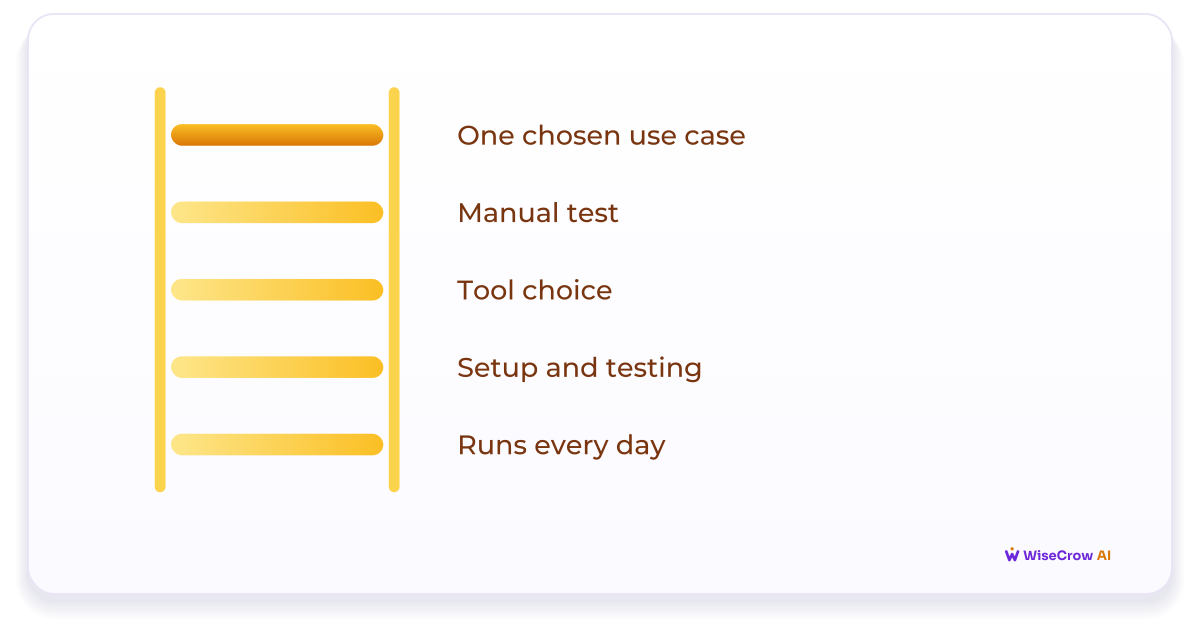
If the number looks worth chasing, the next question is how to get from idea to a tool that runs every day. My walkthrough of AI implementation for small business covers setup, testing and go-live step by step.
How to Choose Your First Small Business Use Case
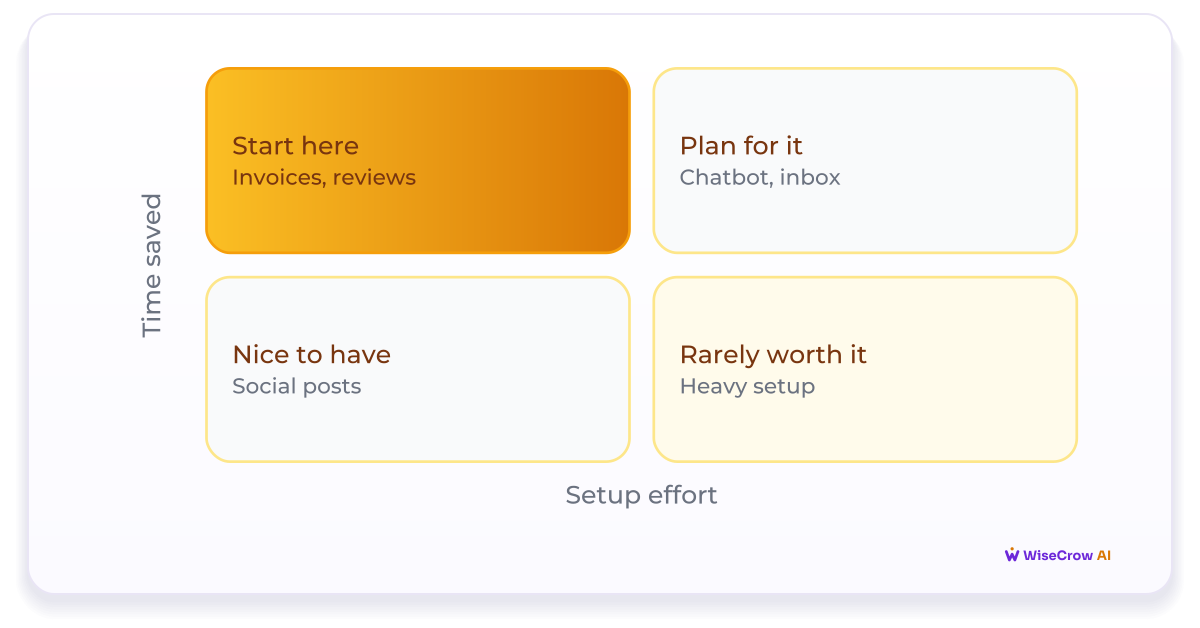
The most impressive idea is a poor guide. Start with the problem that costs you the most each week, in money or in evenings. Find your biggest headache in the table and begin with the matching use case.
| If your biggest headache is | Start with |
|---|---|
| Leads go quiet before you call back | 1. Lead Follow-Up |
| Evenings spent writing quotes | 2. Quotes and Proposals |
| The same questions all day | 5. FAQ Chatbot |
| Email eats your whole morning | 6. Inbox Triage |
| Cash stuck in unpaid invoices | 8. Invoice Chasing |
| No-shows and calendar ping-pong | 9. Appointment Scheduling |
| Bestsellers keep running out | 10. Inventory Reorders |
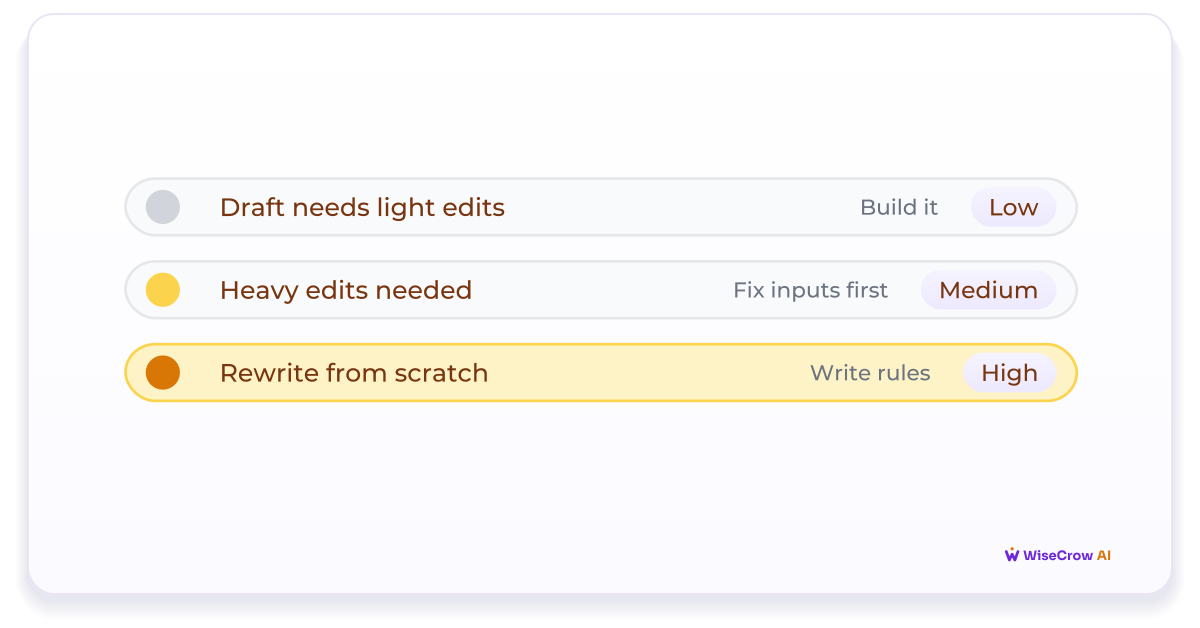
Before you pay for anything, run one test. Do the task by hand once with a general AI assistant and your real material: last week’s emails, a past quote, your actual price list. If the draft is good enough to edit, the automation is worth building. If you end up rewriting it from scratch, fix your inputs first. Usually that means writing down a price list, a policy or a tone guide that only lives in your head today.
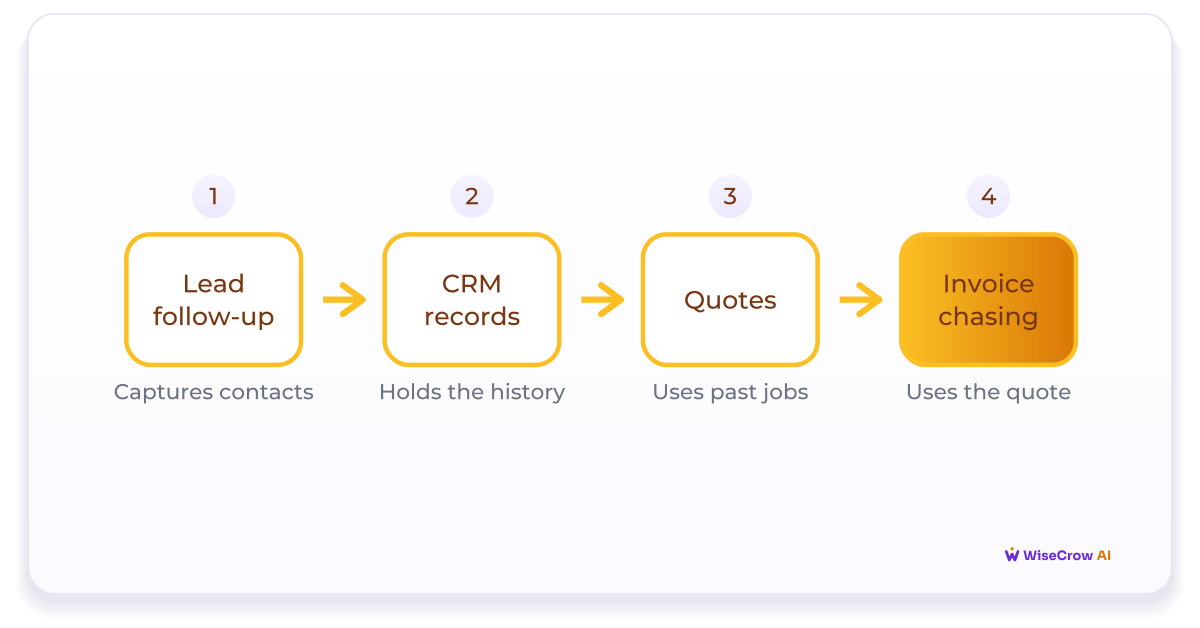
Then think about order. Each new use case should build on the last one, so lead follow-up feeds your CRM, which later feeds your quotes and invoices. My plan for AI strategy on a small budget shows how to sequence them across a year without overspending.
Questions About AI Use Cases for Small Business
What Is the Easiest AI Use Case for a Small Business to Start With?
Inbox triage and review replies are the easiest starting points I know. Both run on tools many owners already pay for, take an afternoon to set up and keep you approving every message before it goes out. Once you trust the drafts, move on to lead follow-up or invoice reminders.
How Much Does AI Cost a Small Business Each Month?
Many of the use cases in this guide run on free plans or add-ons in the range of $20 to $100 a month. Your total depends on how many tools you combine and how many users need access. Check what your current software already includes before you buy anything new, because AI features are now bundled into a lot of standard plans.
Do I Need Technical Skills to Use AI in My Business?
For most of these use cases, no. Review replies, scheduling, bookkeeping suggestions and invoice reminders are settings you switch on inside tools you already use. Connecting several tools with an automation platform takes a bit more patience, and that’s usually where owners ask for help.
Is It Safe to Put Customer Data into AI Tools?
It can be, with the right setup. Use business plans with clear data terms, turn off model training on your data where the tool allows it and keep sensitive details like payment or health information out of free consumer chat tools. If a vendor can’t tell you where your data is stored and who can see it, pick another one.
Will Customers Mind Talking to an AI Chatbot?
Most people don’t mind if the bot answers quickly and correctly and they can reach a person when they need one. What annoys customers is a bot that pretends to be human or traps them in a loop. Say up front that it’s an assistant and make the hand-off to you easy.
Can AI Replace an Employee in a Small Business?
In my client work, AI takes over tasks and the jobs stay. The owner gets evenings back, and staff spend less time on admin and more on customers. For a growing business, it often means you can delay your next admin hire, which is a different decision from cutting someone.
How Long Before I See Time Savings from AI?
Simple use cases like scheduling or review replies save time in the first week. Ones that learn from your corrections, such as bookkeeping categorization or inbox sorting, usually need a few weeks before they pay off. Track the hours you spend on the task before and after, so you know it’s working.
Sources
Disclaimer: The content in this article is for general information only and isn’t legal, financial or tax advice. Tool prices, plans and features change often, and the cost and setup ranges are typical estimates, so check current details with each provider before you decide.
Did you find this helpful?
Thank you for your feedback.
Marlena leads the WiseCrow editorial team and works with our consultants to turn real client projects into practical guides on AI strategy, automation and governance. Before joining WiseCrow, she spent 12 years in B2B operations and SaaS content. She has since edited more than 400 articles on AI and automation and reviewed workflows from over 60 client projects. She is based in Austin, Texas.
Social Media Content
Posting regularly is hard when you run the business too. Your photos and your voice still come from you. AI can take one piece of real material, like a finished project, a customer question or a new product, and turn it into a week of posts for different channels.
I find the best small-business posts still start with something true from your week. Give AI a photo and two lines of context, and it hands back captions, hashtag ideas and a short version for each platform. Batch the work once a week and schedule everything in one sitting, and social media stops following you into every evening.
Turning One Job into a Week of Posts
Low-Cost Tools for Social Posts
Canva and scheduling tools like Buffer include AI caption writing on their cheaper plans. A general AI assistant works too if you save a prompt that describes your tone and audience.