Summary
- Set latency, success and quality targets per model endpoint, and let the error budget decide when releases pause.
- Plan a fallback ladder for every feature, cap retries and keep peak traffic well under your provider limits.
- Pin model, prompt and index versions together, then ship changes through evaluation gates and a small canary.
- Watch latency, errors, cost and quality per feature, cap spend per request and drill your runbooks each quarter.
An AI feature that works for 50 pilot users can fall over at 5,000. The model itself rarely changes. What changes is everything around it: rate limits, retries, prompt edits, provider updates and a bill that grows with every extra token. Most of my AI infrastructure consulting work after launch comes down to a short list of habits that keep model endpoints steady under real load.
Below are the 10 AI infrastructure best practices I set up for production AI, borrowed in large part from site reliability engineering and adapted for model calls. The first table pairs each practice with what to do and what to avoid. A second table near the end gives you a metric to watch and an alert idea for each one. If you’re still sorting out what’s broken today, my post on common AI infrastructure challenges is the better place to start.
AI Infrastructure Best Practices at a Glance
Use this as a pre-launch review for any AI feature that real users will depend on. Each row links to the full practice below.
| Practice | Do this | Avoid this |
|---|---|---|
| 1. Endpoint SLOs | Latency and success targets per feature | “Always up” with no error budget |
| 2. Graceful degradation | A tested fallback ladder | A spinner when the API fails |
| 3. Capacity headroom | Peak well under your limits | Autoscaling with no ceiling |
| 4. Caching | Version-aware cache keys | Caching user-specific answers |
| 5. Versioning | Pinned models, prompts in Git | “Latest” aliases in production |
| 6. Canary releases | 1 to 5% of traffic, vs. control | Swapping prompts for everyone |
| 7. Evaluation gates | Hard gates that block a merge | Scores nobody reads |
| 8. Observability | Latency, errors, cost, quality | CPU and uptime only |
| 9. Cost guardrails | Per-request caps, team quotas | One shared key, no limits |
| 10. Runbooks and game days | Scripted drills each quarter | Runbooks nobody has tried |
Before Traffic Arrives: Practices 1 to 4
These four set the shape of your system on its worst day. They’re cheap to decide before launch and painful to retrofit after.
Set SLOs for Every Model Endpoint
A service level objective is a target for how well a service should behave, measured from the user’s side. For each model endpoint I set at least two. One covers latency, such as 95% of requests showing the first token within 1.5 seconds. The other covers success, such as 99.5% of requests returning a valid answer within the timeout. Google’s SRE book prefers percentiles over averages, because an average can obscure tail latencies. With model calls, the tail is where users suffer. A long answer or a busy provider pushes a few requests past 20 seconds while the mean still looks healthy.
The SLO gives you an error budget. Say an assistant handles 400,000 requests a month with a 99.5% success target. You can afford 2,000 failed requests that month. In Google’s approach, releases are temporarily halted when the budget runs out, and the team spends the time on reliability. I add a softer third target for quality, such as the share of sampled answers that pass review, since a model can return a fast, valid and wrong answer. Start loose and tighten later. The SRE book gives the same advice.
Plan a Ladder of Graceful Degradation
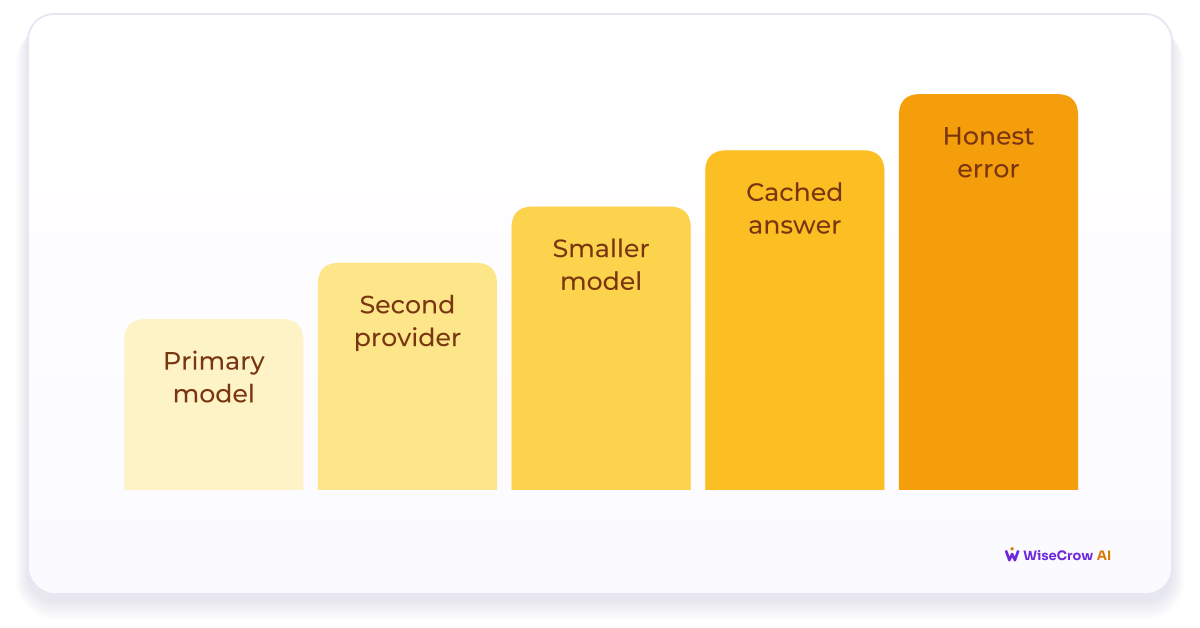
When the main model is slow or down, every feature needs a defined next step. I write it as a ladder. First comes the main model, then a smaller or second-provider model, then a cached answer, then a plain path such as search results or a form and last a clear message with a route to a person. Google’s chapter on handling overload describes the same idea for any service: serve degraded results when full ones aren’t possible. Users forgive a shorter answer. They don’t forgive a spinner that runs for 40 seconds.
Retries sit on the ladder too, and unlimited retries cause outages of their own. The same chapter caps each request at three attempts, keeps retries under 10% of a client’s requests and retries only at the layer right above the one that failed. One logistics client had retries in the app, the gateway and the SDK. A single provider hiccup turned into as many as 27 calls per user request, which kept them rate limited long after the provider recovered.
Keep Capacity Headroom and Cap Autoscaling
Hosted model APIs limit you by requests and tokens, per minute and per day. OpenAI’s documentation lists RPM, RPD, TPM and TPD limits and recommends exponential backoff with a cap on total retry time. Track your real peak against each limit, per model and per region. I aim to keep the busiest five minutes of the week under about 70% of the token limit. The gap absorbs a launch, a newsletter or the batch job somebody forgot to move to the night. Ask for higher limits weeks before you need them.
Reserved capacity has its own rules. Microsoft’s docs on provisioned throughput say a fully used deployment returns 429 errors, offer optional spillover to a standard deployment and warn that quota doesn’t guarantee capacity in a region. AWS suggests bounded retries and multi-Region or multi-model fallback on top of Bedrock’s cross-Region routing. If you self-host, give autoscaling a ceiling as well as a floor. A request loop can scale a GPU pool to its maximum in minutes. GPU supply and prices move fast, as I note in my look at AI infrastructure trends for 2026, so revisit your headroom every quarter.
Cache With Version-Aware Keys
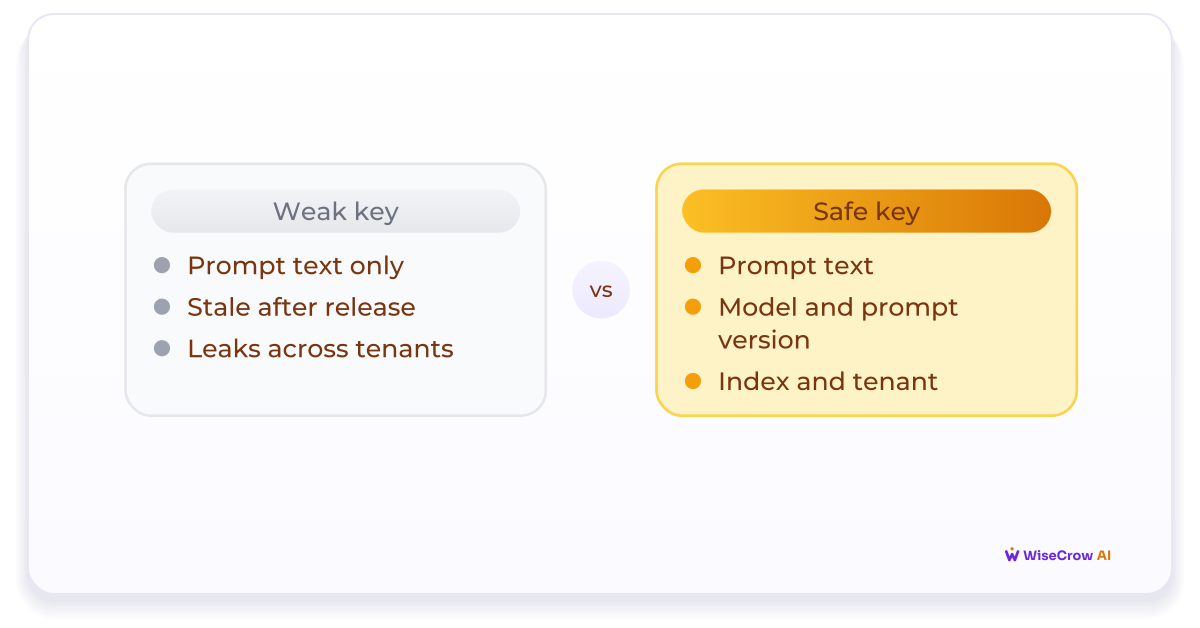
A cache cuts cost, and it also works as a reliability layer. When your provider is down, a cached answer to a common question still loads. Good candidates don’t depend on the user: product descriptions, policy summaries, labels for identical inputs and embeddings of documents that haven’t changed. Semantic caches, which match similar questions, save more and also return wrong answers more often, so I keep them to low-risk FAQs. Never cache answers built from one user’s private data under a shared key.
The mistake I find most is a cache key that leaves out the version. A team fixes a prompt, the old answers keep serving for days and everyone wonders why the fix “didn’t work.” Build the key from the normalized input plus the prompt, model and index versions. Set a time to live that matches how fast the source changes. Then watch the hit rate. A sudden drop usually means someone edited the start of a prompt.
When You Ship a Change: Practices 5 to 7
Most AI incidents I’ve worked on started with a change: a new prompt, a model update or a rebuilt index. These three make changes small, traceable and easy to undo.
Version Models, Prompts and Indexes Together
Production should never call a “latest” alias. Pin the exact model snapshot your provider offers, keep prompts in Git with an ID and a changelog and give each retrieval index a build number. Write all three into every trace. When quality drops on a Tuesday, you can see within a minute what changed. AWS’s Generative AI Lens lists versioning artifacts under its reliability pillar for the same reason.
Treat a release as a set, such as model snapshot, prompt v14 and index build 311, and roll back the whole set. Guessing which piece to revert wastes the first hour. Keep a calendar of your provider’s deprecation dates too. A healthcare client lost a week of work when a pinned snapshot reached its retirement date and the replacement read their extraction prompt differently. The date had been on the provider’s deprecation page for months.
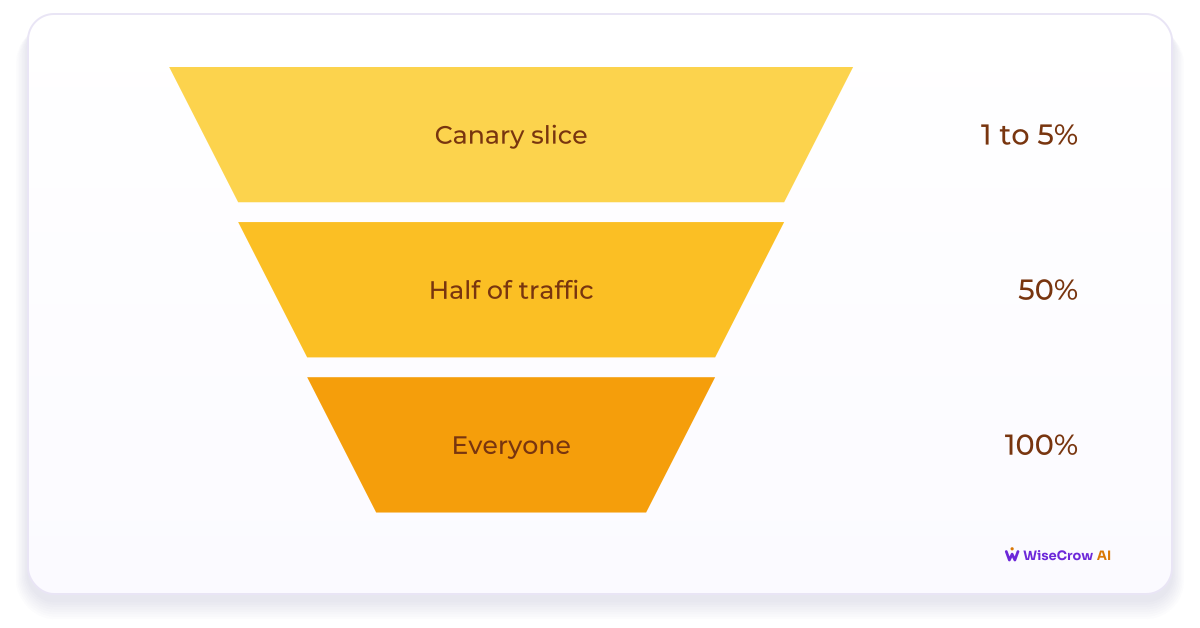
Release Every Change Through a Canary
Google’s SRE workbook defines canarying as a partial and time-limited deployment of a change, followed by an evaluation. In an AI system, the change can be a model, a prompt, a retrieval setting or an index. Send 1 to 5% of traffic to the new version, keep the rest on the current one and compare both on error rate, p95 latency, cost per request and sampled quality scores.
Run the canary through a real peak. A canary that runs from 2 a.m. to 3 a.m. sees short, easy requests and tells you little. The workbook also advises one canary at a time, and with prompts that matters more than it sounds, since two overlapping canaries make every result ambiguous. Agree on the rollback rule before you start, such as an error rate more than half a point above control, and let the gateway shift traffic back on its own.
Gate Releases With Evaluations in CI
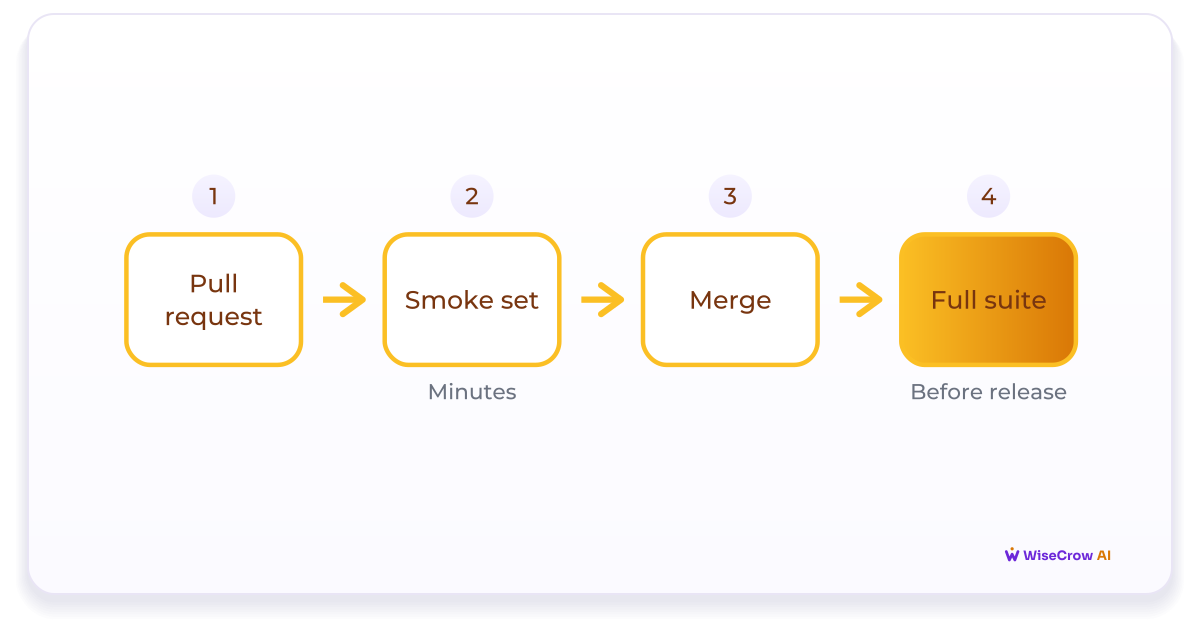
Every pull request that touches a prompt, a model setting or retrieval code should run an evaluation suite, and some results should block the merge. I split checks into hard gates and tracked scores. Hard gates pass or fail: valid JSON, no leaked system prompt, refusals on a set of harmful inputs and no citations outside the allowed sources. Tracked scores, such as answer quality graded by an LLM judge, get a threshold against the current baseline.
Keep two suites. A smoke set of 30 to 50 cases runs on every pull request in a few minutes. The full set of several hundred cases runs nightly and before each canary. LLM judges are noisy, so grade each judged case two or three times or allow a small tolerance band. Skip that step and your team learns to rerun the pipeline until it turns green, and the gate stops meaning anything.
While the System Runs: Practices 8 to 10
The last three cover daily operations. They decide how fast you notice trouble, how much it costs you and how calmly your team responds.
Watch Latency, Errors, Cost and Quality per Feature
Classic dashboards show CPU, memory and uptime. For model endpoints, I want four signals on one screen, split by feature: latency as time to first token and total time, errors by type, cost per request and a quality signal from sampled scores or user feedback. Break errors into rate-limit responses, provider 5xx errors, timeouts, refusals and malformed output, since each one has a different fix. A rising share of malformed JSON often shows up a day before users complain.
Page people when the error budget burns fast. For a 99.9% SLO, Google’s SRE workbook suggests paging at 2% of the budget in one hour or 5% in six hours, and a ticket at 10% over three days. In my client work, switching to budget-based alerts cuts night pages sharply, because short blips stop waking people up. For the tracing and dashboard products, my comparison of AI infrastructure tools scores the main options.
Set Cost Guardrails and Quotas
A cost spike is a reliability incident with a slower fuse. I put limits at three levels. Each request gets a cap on output tokens, a maximum context size and, for agents, a step limit. Each key or team gets a daily token quota with a soft alert at 80% and a hard stop at 100%. The whole account gets a budget alert at the provider or cloud level as the last net.
Give each app its own key, so a quota hit on an internal tool can’t throttle your customer-facing assistant. Decide ahead of time what a hard stop does. An internal summarizer can pause until tomorrow. A checkout assistant should drop down the ladder from practice 2 and page someone. I once watched a retrieval bug pull the same 40-page document into every prompt for a whole weekend. A context cap per request would have caught it in minutes. The team only had a monthly budget alert.
Write Runbooks and Run Game Days
Write a short runbook for each failure you can predict: a provider outage, a rate-limit storm, a quality drop after a model update, a cost spike and a bad index build. Each one names the signal, the first three actions, who decides and how to roll back. Google’s SRE book lists postmortem triggers worth copying, including user-visible degradation, data loss and any on-call intervention such as a rollback or a traffic reroute.
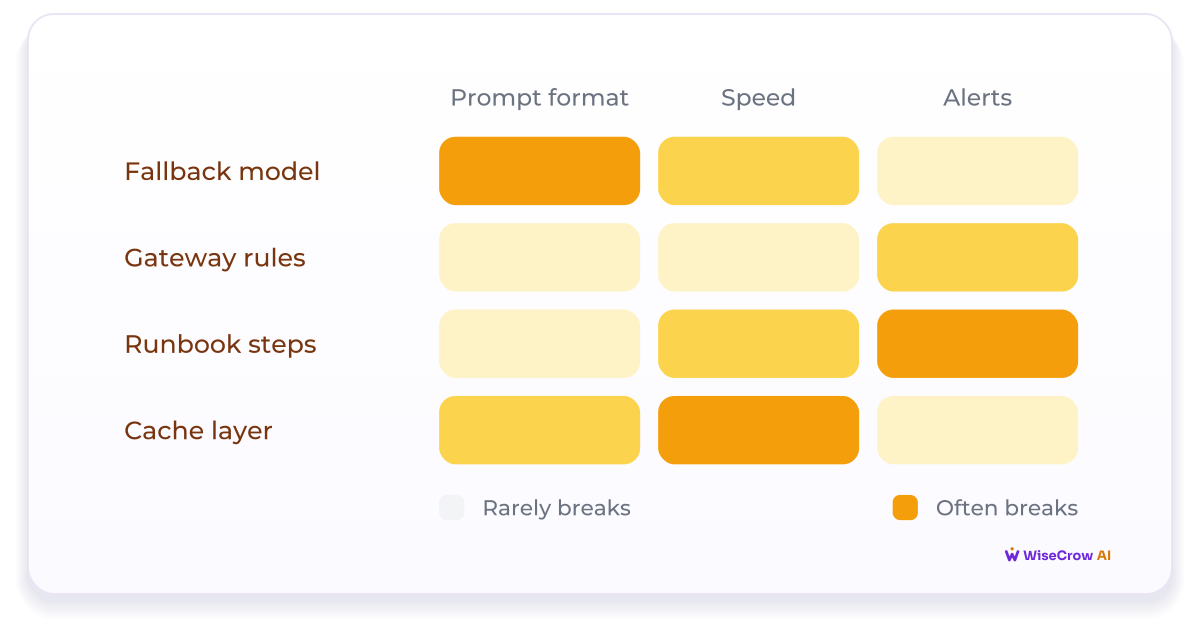
Then test the runbooks. AWS’s Well-Architected Framework recommends regular game days in production-like environments with the same teams who’d handle the real event, and it names documented procedures that nobody exercises as an anti-pattern. My first AI game day with a client is usually simple: block the main model at the gateway in staging for 30 minutes during business hours and watch. Something always breaks. Most often it’s a fallback model that rejects the prompt format.
Metrics and Alert Ideas for Each Practice
A practice you don’t measure fades within a quarter. The table gives you one metric per practice and a starting alert. The thresholds are my defaults from client work. Tune them to your traffic and your SLOs.
| Practice | Metric to watch | Alert idea |
|---|---|---|
| 1. Endpoint SLOs | Error budget burn rate | Page on fast burn |
| 2. Graceful degradation | Share served by fallback | Ticket above 5% for a day |
| 3. Capacity headroom | Peak tokens vs. limit | Warn at 70% of limit |
| 4. Caching | Cache hit rate | Ticket on a sharp drop |
| 5. Versioning | Calls to unpinned models | Block any in production |
| 6. Canary releases | Canary vs. control gap | Auto-rollback past limit |
| 7. Evaluation gates | Gate pass rate | Block below baseline |
| 8. Observability | Requests without a trace | Ticket above 1% |
| 9. Cost guardrails | Cost per request | Alert at 2x weekly average |
| 10. Runbooks and game days | Time to mitigate | Review if over target |
Route the alerts to the right place. Fast budget burn and canary rollbacks go to whoever is on call. Fallback share, cache hit rate and cost per request belong in a weekly review, where someone looks for slow drift. The “time to mitigate” row is the one teams skip, and it’s the best single measure of how well your runbooks and drills work.
Choosing Your Starting Point
Ten practices at once will stall a small team. Pick by how much users depend on the feature today:
- One internal feature on one provider: start with SLOs, version pinning and the four-signal dashboard (practices 1, 5 and 8).
- A customer-facing assistant: add the fallback ladder, canary releases and a first game day (practices 2, 6 and 10).
- Several teams sharing models: add capacity headroom and cost guardrails with a key per app (practices 3 and 9).
- Frequent prompt and model changes: add caching with versioned keys and evaluation gates in CI (practices 4 and 7).
If you haven’t reached production yet, my roadmap from pilot to production puts the groundwork in order. One trade-off I push back on often: teams want multi-provider failover before they have a single SLO. I’d rather see pinned versions, a cached fallback and an honest error message first. They cost a fraction of the effort and cover most of the outages I see.
Questions About AI Infrastructure Best Practices
What Are the Most Important AI Infrastructure Best Practices?
If I could keep only three, I’d keep SLOs per model endpoint, pinned versions for models and prompts and a tested fallback for each customer-facing feature. SLOs tell you when something is wrong. Version pinning tells you what changed. The fallback keeps users working while you fix it. The other seven practices make the system cheaper and calmer to run, but those three decide how long an incident lasts.
What Is a Good SLO for an LLM Endpoint?
Start with two targets per feature: a latency target at a high percentile, such as 95% of requests showing the first token within 1.5 seconds, and a success target, such as 99.5% of requests returning a valid answer within the timeout. Pick numbers that match what users need, set them a little loose and tighten them after a month of real data. Add a sampled quality target once you have an evaluation process.
How Do You Handle a Model Provider Outage?
Let your gateway detect the failure and move traffic down a fallback ladder you planned ahead: a second model or provider, then cached answers, then a simple non-AI path and a clear message. Cap retries so the outage doesn’t multiply your traffic. Follow the runbook, tell users what still works and hold a short review afterward to fix whatever the outage exposed.
Should You Use More than One Model Provider?
For customer-facing features with a strict SLO, a second provider or region is worth it, as long as you test your prompts on the fallback model first. For internal tools, a second model from the same provider and a clear error message are often enough. Multi-provider setups add testing and contract work, so match them to the cost of downtime for each feature.
How Do You Test Prompt Changes Before Production?
Store prompts in Git and run an evaluation suite on every pull request that touches them. A small smoke set with hard pass or fail checks should block the merge, and a larger set should run nightly and before each release. Then ship the change to a small canary share of traffic and compare it with the current version on errors, latency, cost and quality.
How Do You Stop AI Costs from Spiking?
Put limits at three levels: a cap on output tokens, context size and agent steps per request, a daily quota per app or team and a budget alert on the whole account. Give each app its own key, and watch cost per request by feature. A doubling against the weekly average usually means a bug, a loop or a prompt that grew.
How Often Should You Run AI Game Days?
I suggest once a quarter for systems that serve customers, and after any big change to your models, gateway or fallbacks. Keep the first one simple, such as blocking the main model in a staging environment for half an hour. Invite the people who’d handle the real incident, including someone from the business side, and turn every surprise into a fix or a runbook update.
Sources
- Google SRE Book: Service Level Objectives
- Google SRE Book: Embracing Risk
- Google SRE Book: Handling Overload
- Google SRE Book: Postmortem Culture
- Google SRE Workbook: Canarying Releases
- Google SRE Workbook: Alerting on SLOs
- OpenAI API Docs: Rate Limits
- Microsoft Learn: Provisioned Throughput for Foundry Models
- AWS: Amazon Bedrock Cross-Region Inference
- AWS Well-Architected Reliability Pillar: REL12-BP05 Conduct Game Days Regularly
- AWS Well-Architected Generative AI Lens (November 2025)
Disclaimer: This article is general information. Provider rate limits, capacity options and documentation change often, so check current provider docs before you set targets, limits or budgets.
Did you find this helpful?
Thank you for your feedback.
Marlena leads the WiseCrow editorial team and works with our consultants to turn real client projects into practical guides on AI strategy, automation and governance. Before joining WiseCrow, she spent 12 years in B2B operations and SaaS content. She has since edited more than 400 articles on AI and automation and reviewed workflows from over 60 client projects. She is based in Austin, Texas.