Summary
- Gartner expects inference to pass training in AI-optimized cloud spending in 2026, at $23.3 billion against $19 billion, so running models now costs more than building them.
- Custom chips from Google, AWS and Microsoft and fast-growing neoclouds give you real alternatives to renting scarce GPUs from one provider.
- Power is the hard limit: the IEA expects data center electricity use to more than double to around 945 TWh by 2030.
- Smaller, open-weight and on-device models cut cost per task, and 98% of FinOps teams now manage AI spend, up from 31% in 2024.
AI infrastructure used to come down to one question: how many GPUs can you get? In 2026 the questions have changed. Where should each model run, what does every answer cost and does the power exist to run it at all? Sorting the real shifts from vendor noise is a big part of AI infrastructure consulting, and it’s what I do here for eight trends.
I grouped them by the layer of your stack they hit: the cloud bill, the chips and power underneath it, and the models and devices at the edge. The budget table comes first, because the question I hear most from finance and IT leads is what each trend does to next year’s numbers. Every figure links to its source, and the full list sits at the end.
What Each Trend Changes for Your Budget
The direction column shows what I expect for a typical mid-sized company that buys AI as a service and runs a few models of its own. Your mix will differ, so treat it as a starting point for your own planning.
| Trend | Budget line | Direction | When to act |
|---|---|---|---|
| Inference passes training | Model usage | Up | Now |
| Neoclouds | GPU capacity | More options | Now |
| AI FinOps | Cost tracking | Down over time | Now |
| Custom chips | Cloud compute | Down per task | Test |
| Power limits | Capacity and regions | Up | Plan |
| Smaller models | Cost per task | Down | Now |
| Open-weight models | Hosting and staff | Shifts | Test |
| On-device AI | Laptop refresh | Shifts | Plan |
Two patterns stand out. The trends that push costs up are mostly outside your control, since you can’t change power markets or what the big clouds charge for GPUs. The trends that push costs down are almost all choices you make yourself: which model, which chip, which provider and how closely you watch the bill.
Cloud Trends: Where Your AI Spend Goes Now
The first three trends live on your cloud invoice. They’re the easiest to act on, because the data you need is already in your billing exports.
1. Inference Overtakes Training in Cloud AI Spend
For years, the headlines were about training: bigger clusters, longer runs, bigger models. Spending has now tipped the other way. In its August 2026 forecast, Gartner put worldwide spending on AI-optimized infrastructure as a service at about $42 billion for 2026, up 96%. Within that, it expects $23.3 billion for inference against $19 billion for training. Inference takes 55% of the category in 2026 and 59% in 2027, by the same forecast.
Zoom out and the scale gets harder to grasp. Gartner’s broader forecast puts worldwide AI spending at $2.67 trillion in 2026, and nearly $1.5 trillion of it goes to infrastructure.
Most companies I work with have never trained a model, and they never will. Their AI bill is pure inference: every chat reply, every document summary, every agent step. Training is a project with an end date. Inference grows with your users, and it keeps growing for as long as the feature lives. In my client work, the classic surprise is a pilot that cost almost nothing for three months and then jumped the moment the feature reached the whole company.
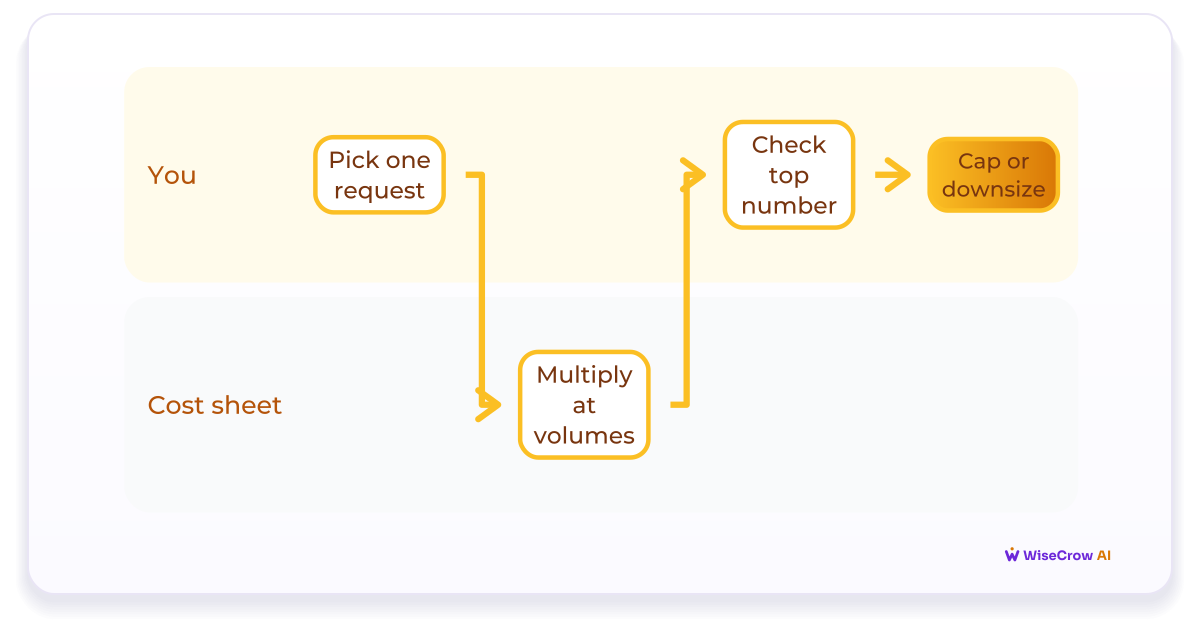
The fix is to model cost per task before go-live. Take one real request, count the tokens or GPU seconds it uses and multiply it out at three volumes: pilot, full rollout and double the rollout. If the top number scares you, you’ve found the feature that needs a smaller model, caching or a usage cap before launch.
2. Neoclouds Become a Real Option for GPU Capacity
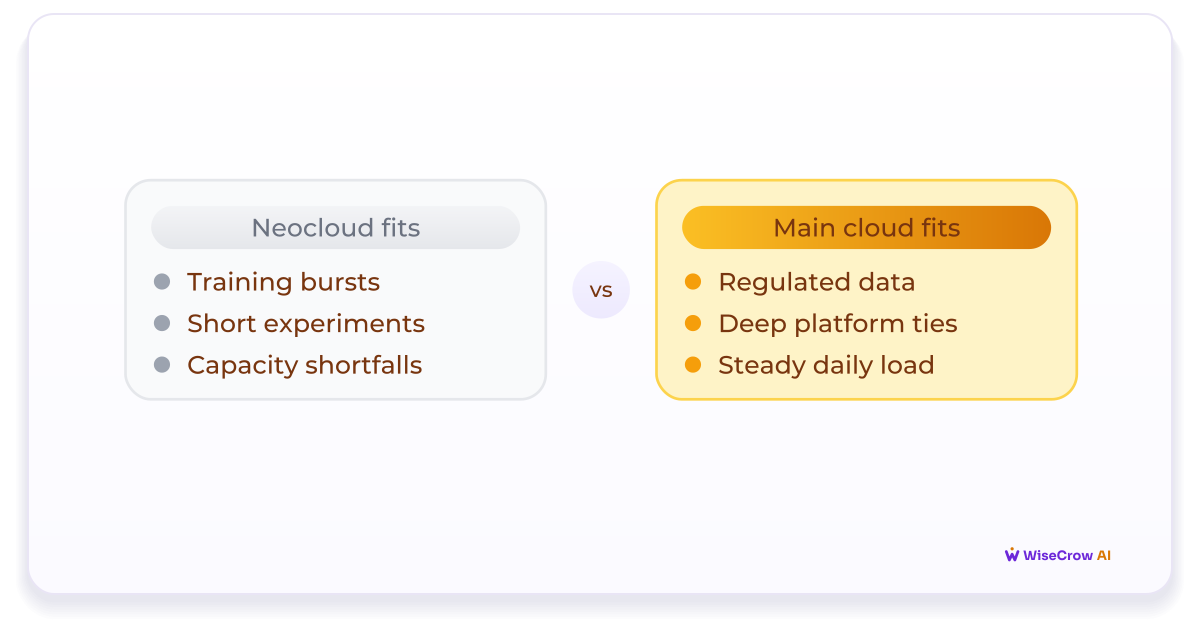
Neoclouds are cloud providers built almost entirely around GPUs for AI. CoreWeave, Lambda, Nebius and Crusoe are the best-known names. A few years ago, they were where you went when AWS, Azure or Google Cloud had no GPUs left. Today they run some of the largest AI clusters in the world.
CoreWeave’s numbers show how fast the segment has grown. The company reported second-quarter 2026 revenue of $2.575 billion, up about 112% on the year before, and a revenue backlog of roughly $104 billion. It had 1.5 GW of active power and about 3.7 GW under contract at the end of June.
For a business buyer, neoclouds bring faster access to current GPUs and pricing that’s often simpler to read. The trade-off is a thinner layer of managed services around the hardware, plus data transfer fees if your data lives on another cloud. Contract terms vary a lot. Some of the best prices only come with long commitments, which can hurt if your demand turns out to be smaller than you planned.
I treat a neocloud as a second source. It’s a good fit for a burst of fine-tuning, a batch job or a steady inference workload that needs plenty of GPUs. Keep your core data and apps where they are, and price the egress before you sign anything. If you’re comparing providers and platforms, my shortlist of AI infrastructure tools scores the main options side by side.
3. AI FinOps Becomes Standard Practice
Cloud cost teams used to treat AI as a side topic. Two years moved it to the center of their work. In the FinOps Foundation’s State of FinOps 2026 data, 98% of respondents manage AI spend, up from 63% in 2025 and 31% in 2024.
AI spend is harder to manage than classic cloud spend. Model APIs bill per token, GPUs bill per hour even when they sit idle, and one product feature can call three different models in a single request. Without tags, nobody can say which feature costs what.
The first useful dashboard I build with a client usually shows the same thing: one or two features eat most of the AI bill, and nobody had noticed. The practical setup is simple to describe. Tag every model call and GPU by product feature, track cost per task next to usage, set budget alerts per team and review the top spenders every month. The tagging and alerting rules I recommend are part of my AI infrastructure best practices.
Chip and Power Trends: What Sits Under Your Workloads
The next two trends happen far below your applications. You may never buy a chip or sign a power contract, but both decide what your cloud provider can sell you and at what price.
4. Custom Chips Challenge the GPU Default
NVIDIA GPUs still run most AI work. The big clouds now design their own chips as well, mainly to cut the cost of inference.
Google’s TPUs are the most mature example. In October 2025, Anthropic announced plans to use up to one million Google TPUs in a deal worth tens of billions of dollars, with well over a gigawatt of capacity coming online in 2026. Anthropic describes its approach as diversified across Google’s TPUs, Amazon’s Trainium and NVIDIA’s GPUs.
AWS made its Trainium3 UltraServers generally available in December 2025. Amazon claims about 4.4 times the compute and four times the energy efficiency of the Trainium2 generation, and says Trainium customers cut training and inference costs by up to half. Microsoft followed in January 2026 with Maia 200, an inference chip it says delivers 30% better performance per dollar than the latest hardware in its fleet. It serves models including OpenAI’s GPT-5.2 family and Microsoft 365 Copilot.
All three sets of numbers are vendor claims, and I’d read them that way. Still, the direction is clear. If you use managed model services such as Amazon Bedrock, Vertex AI or Microsoft Foundry, you may already run on these chips without knowing it, and you benefit through the price per token.
If you run your own models, portability is the real question. Code written tightly around NVIDIA’s CUDA tools takes work to move. I tell clients to benchmark one real inference workload on two chip types before they sign a long commitment, and to count the engineering hours of the switch next to the hourly savings.
5. Power Becomes the Hard Limit on AI Capacity
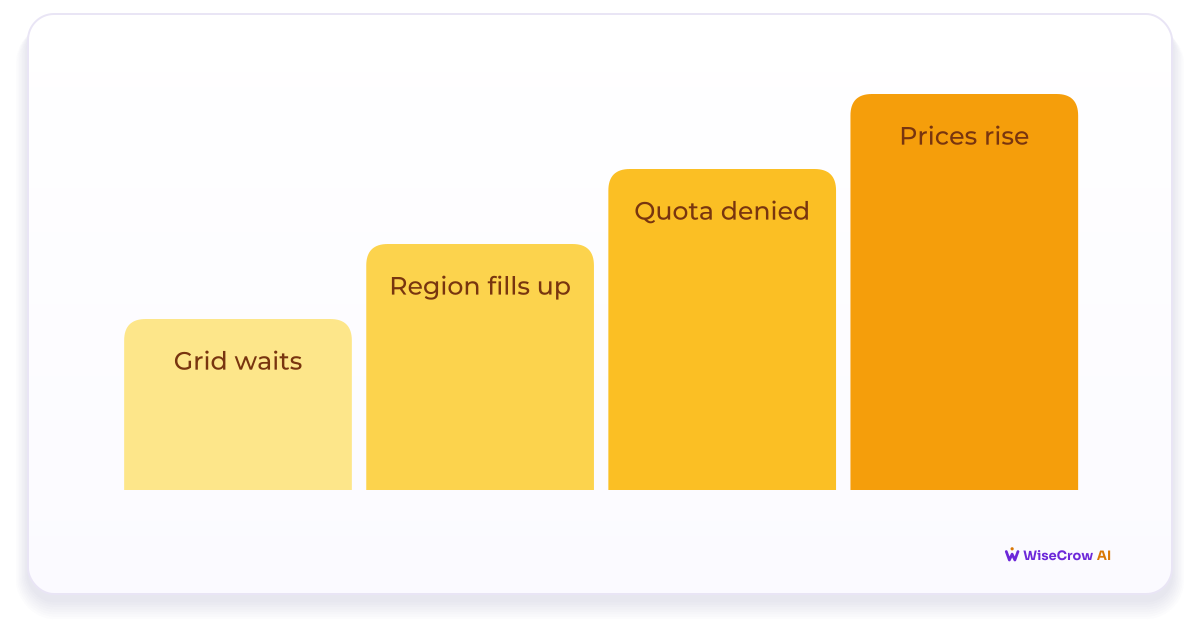
Chips can be ordered. Power plants and grid connections take years. The International Energy Agency estimates that data centers used around 415 TWh of electricity in 2024, about 1.5% of global consumption, and expects that to more than double to around 945 TWh by 2030. In the United States, the IEA expects data centers to account for nearly half of electricity demand growth over the same period.
Operators feel it already. Uptime Institute’s 2025 global survey describes an industry facing worsening power constraints and rising costs, with operators planning to expand despite major limits on power availability. Average rack densities keep climbing, with more racks in the 10 to 30 kW range, although few facilities go above 30 kW so far.
For you, power shows up in indirect ways. Popular cloud regions run out of GPU capacity first. Colocation space with enough power takes longer to deliver and costs more. And if you plan to bring GPU servers into your own building, the server room that ran your file servers for a decade often can’t power or cool even one modern AI rack. I’ve seen an on-premises plan stall for months over an electrical upgrade nobody had priced. Power and cooling sit high on my list of common AI infrastructure challenges for exactly that reason.
Model and Edge Trends: Doing More With Less Compute
The last three trends work in your favor. They lower the amount of compute each task needs, and they give you more choice over where it runs.
6. Smaller Models and Quantization Cut the Cost per Task
The price of a given level of AI quality has fallen faster than almost anyone predicted. Stanford’s 2025 AI Index found that the inference cost for a system performing at the level of GPT-3.5 dropped over 280-fold between November 2022 and October 2024. The same report says hardware costs have declined by 30% a year and energy efficiency has improved by 40% each year. Increasingly capable small models drive much of the drop.
Quantization adds to the effect. It stores a model’s numbers at lower precision, for example 8-bit or 4-bit in place of 16-bit. The model needs less memory, runs faster and fits on cheaper hardware. Quality can slip a little, and the only way to know how much is to test on your own tasks.
The biggest saving I see comes from routing. Most companies send every request to their largest model out of habit. Classification, extraction and short summaries rarely need it. In my client work, moving those simple tasks to a small model is usually the single fastest cut in the AI bill, and users rarely notice a difference when the switch is tested properly.
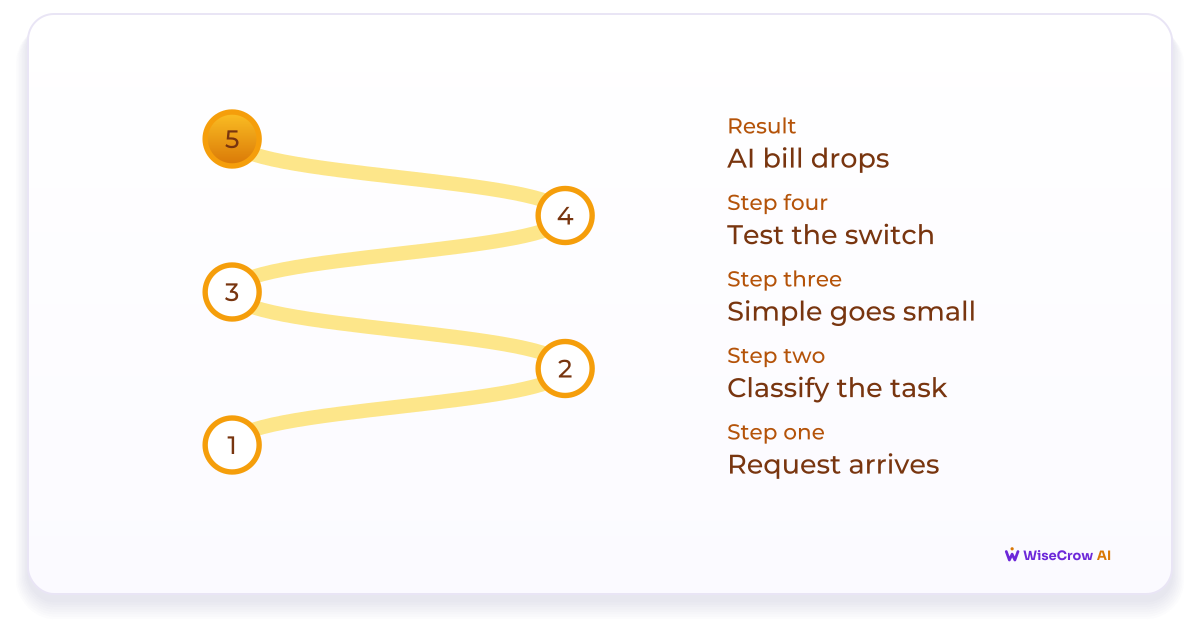
Before you switch, build a test set of 100 to 200 real tasks with known good answers. Run the large model, the small model and a quantized version against it, and compare quality, speed and cost on one sheet. Keep the set, because you’ll reuse it every time a new model comes out.
7. Open-Weight Models Make Self-Hosting Realistic
Open-weight models used to trail the closed ones by a wide margin. The 2025 AI Index found the gap between them on some benchmarks fell from 8% to 1.7% in a single year. Adoption followed. Meta’s Llama models passed 1 billion downloads in March 2025, up from 650 million in December 2024.
Self-hosting an open-weight model gives you control. Your data stays in your environment, you can fine-tune the model on your own material and your costs follow the hardware you choose. For regulated industries, the data argument alone often decides it.
Here’s my less popular view: most companies shouldn’t self-host yet. Running models yourself means you own uptime, scaling, security patches and GPU utilization. At low or uneven volume, idle GPUs and engineering time cost more than a hosted API. I recommend it when usage is steady and large, when data can’t leave your environment or when a fine-tuned model clearly beats the hosted options on your tasks. In every case, someone on your team has to own the platform.
A middle path works for many teams: use a hosted API to start, then run the same open-weight model through a managed service before you take over the hardware. The step-by-step sequence from pilot to production is laid out in my AI infrastructure roadmap.
8. Edge and On-Device AI Move Work Onto NPUs
Some AI work is leaving the data center altogether. Laptops and phones now ship with neural processing units, or NPUs, chips built to run AI models with little power. Microsoft’s Copilot+ PCs require an NPU with more than 40 TOPS, meaning 40 trillion operations per second. Microsoft’s own developer guide notes that many NPUs only support lower-precision integer math, such as INT8, so models have to be quantized to run on them. Trend six and trend eight are closely linked.
The hardware is spreading fast. Gartner forecast that AI PCs would make up 31% of the PC market in 2025 and reach about 143 million units, or roughly 55% of shipments, in 2026. Gartner expects AI PCs to become the norm by 2029.
On-device AI suits tasks that are frequent, private and small: transcribing a meeting, summarizing a document, searching local files, blurring a video background. Each one that runs on the laptop is one less call on your cloud bill, and the data never leaves the device. The catch is a mixed fleet. Software has to work on machines with and without capable NPUs, and IT has to manage models on thousands of endpoints.
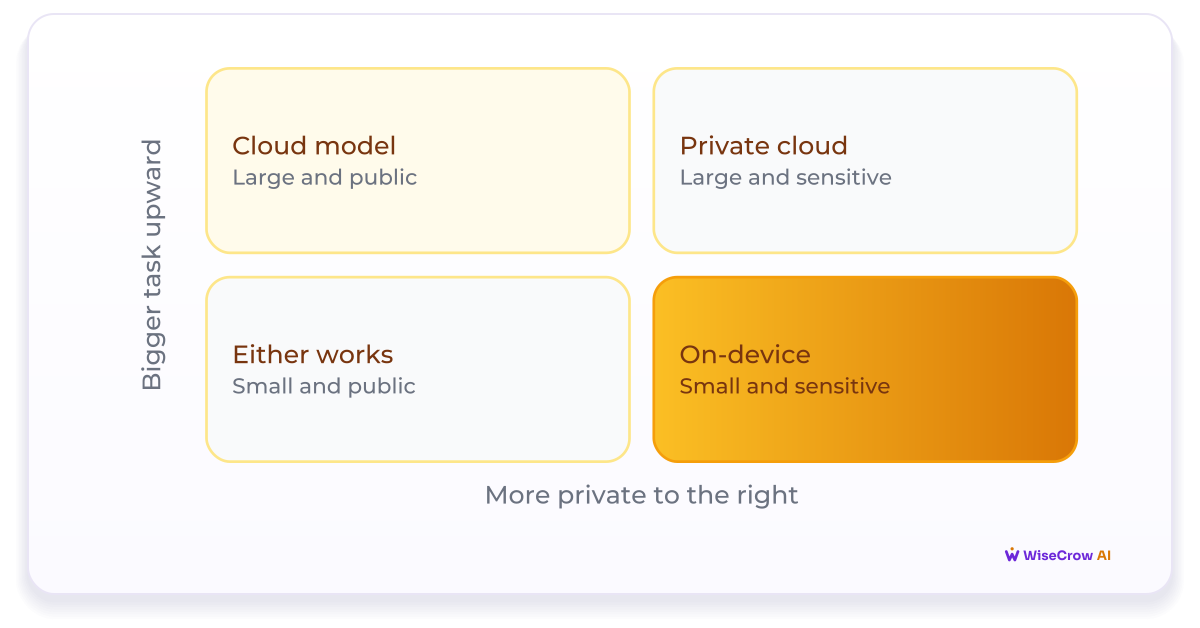
My advice is to add an NPU requirement to your next laptop refresh, so the capability is there when your software uses it. Don’t replace working machines early just for the chip. Buy the fleet when the apps your people rely on actually run on the NPU.
How to Choose Which AI Infrastructure Trends to Act On
Eight trends is too many to work on at once, and you don’t need to. I run each one through four checks with clients before any budget moves:
- Does it change a line on your current AI bill, or only a future one?
- Can you measure the effect with data you already collect, such as cost per task or GPU utilization?
- Can you test it on one workload without a long contract or new hardware?
- Is there a person on your team who will own it after the test?
For most companies, the answer points to the same starting set: tag your AI spend, route simple tasks to smaller models and model the inference cost of every feature before launch. Those three need no new vendors, and they make every later decision easier, because you’ll know what each workload costs.
Custom chips, neoclouds and self-hosting come next, once you have steady workloads worth moving. Power limits and on-device AI belong in your 12 to 24 month plan, with a check-in every quarter. Infrastructure decisions last for years, so a slower, measured start beats a fast, expensive one.
Questions About AI Infrastructure Trends
What Is the Biggest AI Infrastructure Trend in 2026?
The shift of spending from training models to running them. Gartner expects inference to reach $23.3 billion of AI-optimized cloud infrastructure spending in 2026, ahead of $19 billion for training. For most companies, the AI bill now grows with every user and every request, so cost per task matters more than raw GPU capacity.
What Is a Neocloud?
A neocloud is a cloud provider built mainly around GPU capacity for AI, such as CoreWeave, Lambda, Nebius or Crusoe. They often offer GPUs faster or at simpler prices than the big three clouds, but with fewer managed services around them. Many teams use one as a second source for training runs or heavy inference.
Should I Use Custom AI Chips Like TPUs or Trainium Over NVIDIA GPUs?
Test before you switch. Google, AWS and Microsoft all claim better price performance for their own chips, and many managed model services already run on them without you noticing. If you run your own models, benchmark one real workload on two chip types and check how much code you’d need to change before you commit.
Will Power Shortages Affect My AI Projects?
They can, even if you never build a data center. Power limits decide which cloud regions have spare GPU capacity, how long colocation space takes to deliver and what it costs. If you plan to run GPU servers on premises, check early that your building can power and cool them.
Is It Cheaper to Self-Host an Open-Weight Model?
Only at steady, high volume with someone who owns the platform. At low or spiky volume, a hosted API is usually cheaper once you count GPUs sitting idle, engineering time and on-call duty. Self-hosting makes the most sense when data must stay in your environment or your monthly usage is large and predictable.
What Is Quantization in AI?
Quantization stores a model’s numbers at lower precision, for example 8-bit or 4-bit in place of 16-bit. The model needs less memory, runs faster and fits on smaller or cheaper hardware. Quality can drop slightly, so test the quantized model on your own tasks before you put it into production.
Do I Need AI PCs with NPUs for My Team?
Not yet for most teams, but it’s worth adding to your next laptop refresh. Microsoft’s Copilot+ PCs need an NPU with more than 40 TOPS, and Gartner expects AI PCs to make up about 55% of shipments in 2026. Wait to buy them until your software actually uses the NPU.
Sources
- Gartner forecast of AI-optimized IaaS spending (August 2026), as reported by TechPartner.News: techpartner.news
- Gartner forecast of worldwide AI spending (September 2026), as reported by Campus Technology: campustechnology.com
- CoreWeave, second quarter 2026 results (August 2026): investors.coreweave.com
- FinOps Foundation, State of FinOps 2026 data: data.finops.org
- Anthropic, expanding its use of Google Cloud TPUs (October 2025): anthropic.com
- Amazon, Trainium3 UltraServers now available (December 2025): press.aboutamazon.com
- Network World, Microsoft launches Maia 200 (January 2026): networkworld.com
- International Energy Agency, Energy and AI executive summary: iea.org
- Uptime Institute, Global Data Center Survey 2025 press release (July 2025): silicon.co.uk
- Stanford HAI, AI Index Report 2025: hai.stanford.edu
- TechCrunch, Meta’s Llama models hit 1 billion downloads (March 2025): techcrunch.com
- Microsoft Learn, Copilot+ PCs developer guide: learn.microsoft.com
- Gartner AI PC forecast (August 2025), as reported by DIGIT: digit.fyi
Disclaimer: This article is for general information only. Spending forecasts, chip specifications, vendor performance claims and survey results change often, so check the original sources for the latest figures before you make infrastructure or purchasing decisions.
Did you find this helpful?
Thank you for your feedback.
Marlena leads the WiseCrow editorial team and works with our consultants to turn real client projects into practical guides on AI strategy, automation and governance. Before joining WiseCrow, she spent 12 years in B2B operations and SaaS content. She has since edited more than 400 articles on AI and automation and reviewed workflows from over 60 client projects. She is based in Austin, Texas.