Summary
- Finance, customer support and operations offer the fastest, most measurable AI automation wins.
- The strongest examples keep a person reviewing the exceptions the AI flags.
- Start with frequent, rule-based work where mistakes are costly, then expand from there.
- Measure hours saved and error rates from day one, so you can prove the return.
Mid-sized companies now use AI automation to read invoices, route support tickets, update CRMs and forecast stock, often with tools they already pay for. The difference between projects that pay off and ones that stall usually comes down to picking the right process, which is why every good AI automation consulting engagement starts there.
Below are 12 AI automation examples I see deliver results again and again, grouped by department. Each one includes the typical outcome and a step-by-step look at how it works, so you can judge which ones fit your business.
What Counts as AI Automation?
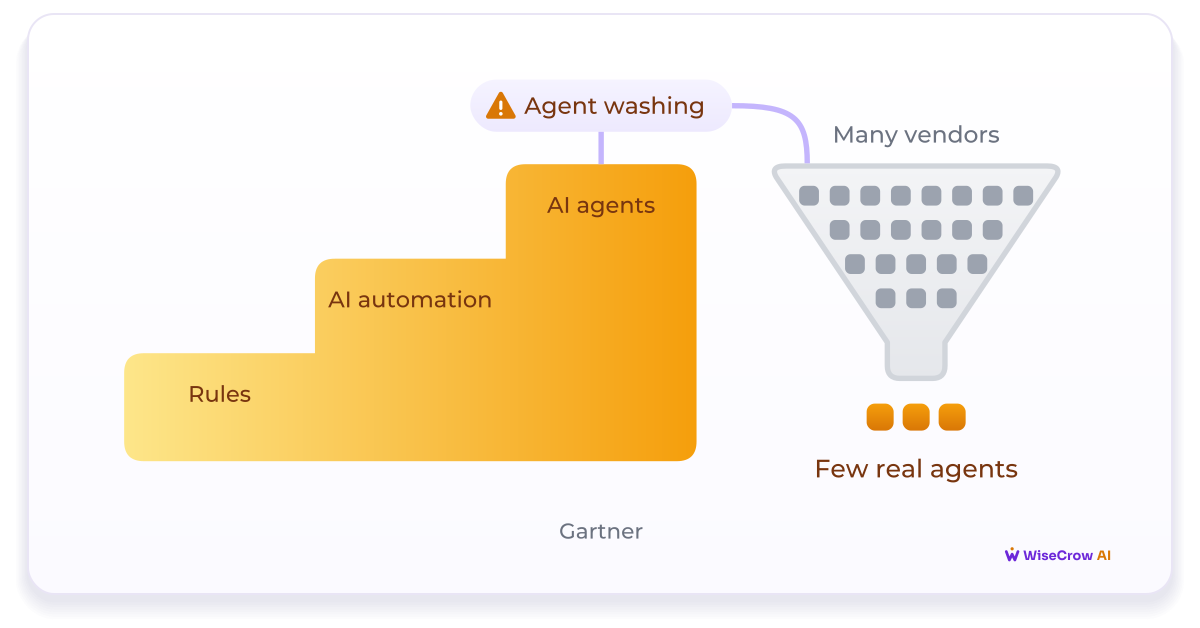
Not every automation needs AI. Before you look at the examples, it helps to know the three levels, because each one suits a different kind of work.
| Level | How it works | Best for |
|---|---|---|
| Rule-based automation | Follows fixed if-then rules, including RPA. Fast and reliable while inputs never change, but it breaks when a form or email looks different. | Structured, predictable tasks, such as copying form data into a spreadsheet |
| AI automation | Reads emails, documents and chat messages, makes judgment calls within your limits and sends uncertain cases to a person. | High-volume work with some variation, such as reading invoices in any layout |
| AI agents | Plan and carry out several steps on their own, such as researching a request, updating systems and following up. They need clear guardrails and oversight. | Multi-step tasks across tools, such as resolving a refund request end to end |
In practice, your best automations will combine these levels: AI reads the document, simple rules check the numbers and a person approves anything unusual. Agents are the newest of the three and still change quickly, which is why I track them in my overview of AI automation trends.
12 AI Automation Examples You Can Use Today
For each example, you see what changes in your team’s day, the typical outcome I see in practice and how the workflow runs. Treat the outcomes as a starting point and check them against your own volumes. If you’d like the same ideas ranked by payback, my AI automation use cases guide does exactly that.
| Example | Department | Typical result |
|---|---|---|
| 1. Invoice Processing | Finance | 60 to 80% less manual data entry |
| 2. Expense Report Review | Finance | Most reports approved without manual checks |
| 3. Payment Reconciliation | Finance | Days to hours for month-end matching |
| 4. Support Ticket Triage | Customer support | 30 to 50% faster first response |
| 5. AI Help Assistant | Customer support | 20 to 40% of questions resolved without an agent |
| 6. Lead Scoring and CRM Updates | Sales & Marketing | 3 to 5 hours saved per rep each week |
| 7. Personalized Follow-Up Emails | Sales & Marketing | Same day follow-up after every meeting |
| 8. Candidate Screening and Scheduling | HR | About half the time spent scheduling interviews |
| 9. Employee Help Desk | HR | Up to 40% fewer routine HR questions |
| 10. Demand Forecasting | Operations | 10 to 30% less excess inventory |
| 11. Contract and Document Extraction | Operations | Minutes per contract, down from hours |
| 12. IT Alert Triage | IT | 50 to 70% less alert noise |
Invoice Processing
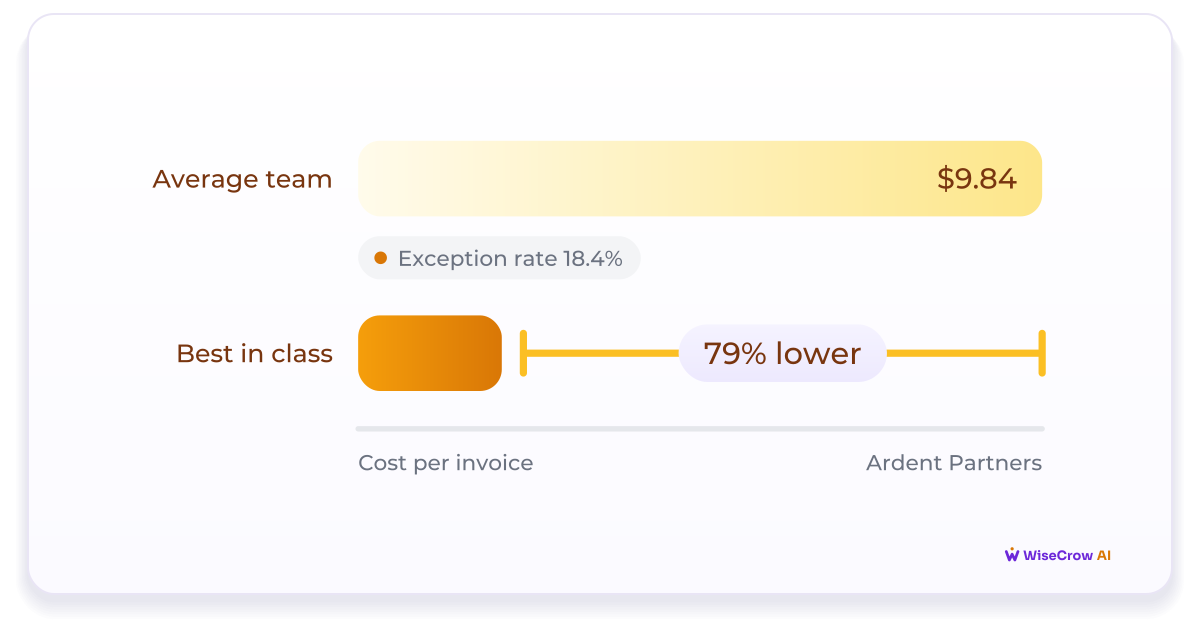
If your team still types invoice details into the accounting system, this is the example I would start with. AI reads every invoice in any layout (PDF, scan or email body), pulls out the vendor, dates, totals and line items, checks them against the purchase order and posts clean matches straight to your books. In the projects I see, manual data entry drops by 60 to 80% once the matching rules settle in.
In practice, your accounts payable team stops typing and starts checking: most invoices are matched and posted before anyone looks at them. Just decide upfront who reviews mismatches, or the savings fade quickly.
How the Workflow Runs
- Invoices arrive by email or upload into a shared inbox.
- AI reads each invoice, whatever the layout, and extracts vendor, dates, totals and line items.
- The extracted data is checked against the purchase order and goods receipt.
- Matching invoices are coded to the right accounts and cost centers.
- Clean invoices post to your accounting system automatically.
- Mismatches and low-confidence reads go to a person for review.
Tools That Handle Invoices Well
A document AI service reads the invoices, and an integration posts them into QuickBooks, Xero or NetSuite. If you already use an accounts payable platform, check its built-in AI features first, because they often cover most of this.
Expense Report Review
AI compares each expense against your policy, spots duplicates and flags anything unusual. In my experience, reviewers end up seeing only the small share of reports that really need a human decision. Most reports then go through without any manual check.
Most reports are routine, so you only see the unusual ones, such as a duplicate receipt or a weekend charge. Make sure your expense policy is written down first, because AI can only apply rules it can read.
What Happens Behind the Scenes
- Employees snap a photo of each receipt on their phone.
- AI reads the receipt and checks amount, category and policy limits.
- Duplicates and unusual charges are flagged with the reason highlighted.
- Compliant reports are approved and queued for payment.
- A reviewer handles only the flagged items.
Prerequisites to Set It Up
Most modern expense platforms now include AI receipt review, so you may already have it. You mainly need your expense policy written as clear rules that the system can check.
Payment Reconciliation
Month-end matching is one of the most tedious jobs in finance. AI matches bank transactions to open invoices even when references are missing, misspelled or split across several payments, so you only handle the leftovers. Month-end matching that used to take days usually comes down to hours.
AI learns from how your team matched payments before and gives each suggestion a confidence score. You decide where the cut-off is, and the exception list gets shorter as the system learns from your corrections.
Step by Step
- Bank feeds and open invoices sync every day.
- AI suggests matches using amounts, names, dates and past patterns.
- Each suggestion gets a confidence score.
- Matches above your threshold are applied automatically.
- Split and partial payments are grouped and matched together.
- Everything else appears on a short exception list for your team.
The Tools Behind It
You need bank feeds connected to your accounting system and a matching layer on top. Several accounting platforms offer AI matching built in, while larger teams often add a dedicated reconciliation tool.
Support Ticket Triage
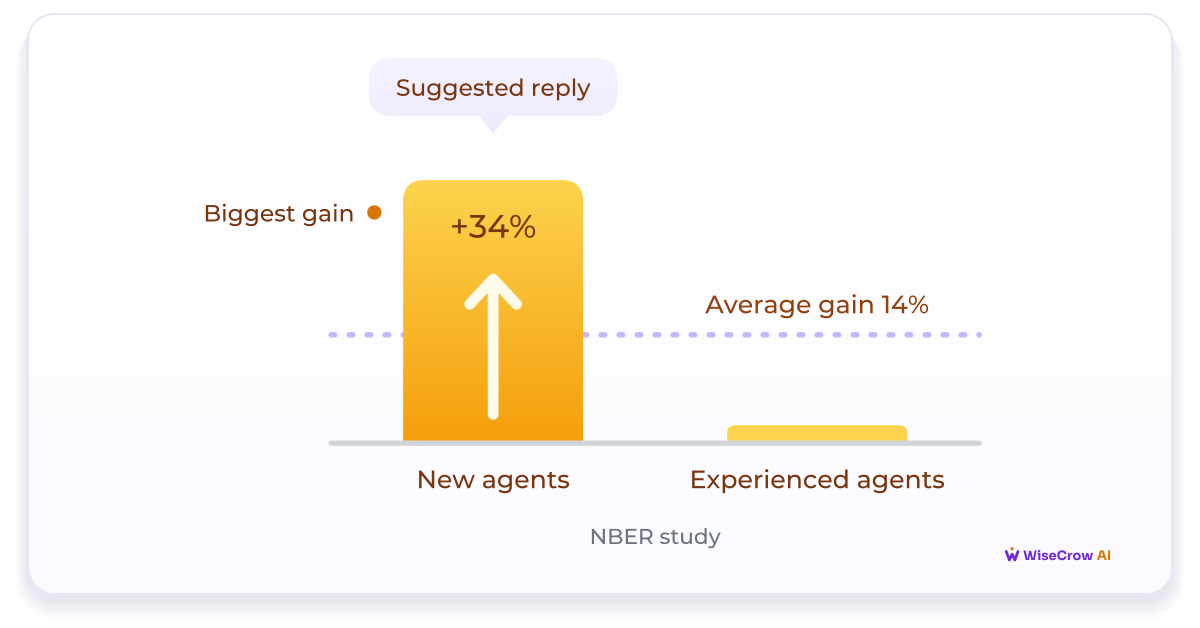
Every new ticket is read, tagged by topic, urgency and language, and routed to the right person within seconds. I like this example because your customers notice the difference right away, and your agents get a drafted first reply they only need to check and send. Teams I work with typically see first responses get 30 to 50% faster.
A billing question goes to billing, an upset key account goes to a senior agent and a Spanish request goes to someone who speaks Spanish. I suggest you let agents confirm the suggestions for a few weeks before you switch to automatic routing.
How a Ticket Moves Through the System
- A ticket arrives by email, chat or web form.
- AI detects the language and classifies the intent and urgency.
- The customer’s account value and history are pulled from your CRM.
- The ticket is routed to the best-placed agent or team.
- A suggested reply and relevant help articles appear for the agent.
What You Can Build It With
Helpdesks like Zendesk, Freshdesk and Intercom all offer AI triage and reply suggestions. For custom routing rules, you can add a language model through an automation tool such as Zapier or Make.
AI Help Assistant
A chat assistant trained on your help center answers common questions about orders, accounts and features around the clock. When it can’t help, it hands the conversation to a person with the full context attached, so your customer never has to repeat themselves. Once your help content is in shape, expect it to resolve roughly 20 to 40% of questions without an agent.
Your customers get answers they would never have found by searching your help center. The assistant is only as good as your content, so review your top help articles and decide which topics always go to a person before you launch.
What the Customer Experience Looks Like
- Your help articles, policies and FAQs are connected as the knowledge source.
- Customers ask questions in chat on your site or in your app.
- The assistant answers in plain language and links to the source article.
- If the customer is still stuck, it asks a clarifying question.
- Complex or sensitive requests transfer to a human agent with the full conversation attached.
- Unanswered questions are logged, so you know which help articles to write next.
- Your team reviews a sample of conversations every week to keep quality high.
Tools for Your Help Assistant
Most helpdesk platforms include an AI chat assistant that reads your help center. If you need more control over answers and handovers, a dedicated conversational AI platform is the next step up.
Lead Scoring and CRM Updates
AI scores your inbound leads using company data and behavior, fills in missing fields and writes call summaries back into the CRM. Your reps stop doing admin after every call and spend their time on the conversations most likely to close. That is usually worth 3 to 5 hours per rep every week.
Your reps hate CRM admin, and this removes most of it. As a bonus, your pipeline data becomes complete and consistent, so your forecasts finally reflect what is really happening in each deal.
How It Fits into Your Sales Process
- New leads are enriched with company size, industry and role.
- A scoring model ranks them by fit and buying signals.
- Top leads are assigned to reps with a short briefing.
- After each call, AI logs notes, next steps and deal changes in the CRM.
Where This Lives in Your Stack
HubSpot and Salesforce both offer AI lead scoring and enrichment out of the box. Pair them with a call recording tool that writes summaries straight into the CRM.
Personalized Follow-Up Emails
Based on meeting notes and CRM history, AI drafts a tailored follow-up with the agreed next steps. Your rep edits and sends it, so nothing reaches a customer without a human check, and no deal stalls because a follow-up slipped through the cracks. With this in place, every meeting gets a follow-up the same day.
Deals rarely stall because of price, but because momentum fades after a good meeting. A tailored follow-up the same afternoon keeps the conversation moving, and your rep adds the personal touch before sending.
From Meeting to Follow-Up
- The meeting is recorded, or notes are added to the CRM.
- AI summarizes the main points, objections and agreed next steps.
- It drafts a follow-up in the rep’s tone, using the deal history.
- The rep reviews, adjusts and sends it in one click.
- Open tasks and reminders are created in the CRM automatically.
Tools You Can Use
Meeting assistants record and summarize your calls, and CRM email tools turn those summaries into drafts. Many sales teams start with the AI features already included in their CRM.
Candidate Screening and Scheduling
AI summarizes each application against the role’s must-have criteria and handles the back-and-forth of interview scheduling. Your hiring managers still make every decision, and I always recommend building bias checks into the process from the start. For most roles, it cuts the time spent scheduling interviews about in half.
For popular roles, this saves your recruiters days of reading and calendar ping-pong. Because hiring affects people’s lives, use clear job-related criteria, check for bias regularly and keep every final decision with a person.
How the Hiring Workflow Changes
- Applications arrive through your applicant tracking system.
- AI summarizes each one against the criteria agreed with the hiring manager.
- Recruiters review the summaries and choose who to invite.
- Shortlisted candidates pick an interview slot from live calendars.
- Reminders and interview details are sent automatically.
- Every AI summary is logged, so you can audit the process for bias.
What the Setup Looks Like
Your applicant tracking system handles applications, and a calendar integration takes care of scheduling. Choose screening features that keep audit logs, so you can review every AI summary later.
Employee Help Desk
Your employees get instant answers about leave, benefits, expenses and policies from an assistant that reads your handbook. Your HR team gets its time back for the conversations that genuinely need a person. In my client work, that removes up to 40% of the routine questions HR used to answer.
Your employees can ask quick questions without feeling they are bothering anyone. Just make sure personal topics, such as health, conflicts or pay, always go to a person in HR, privately and quickly.
What Employees See
- Your handbook and policy documents are connected.
- Employees ask questions in Slack, Teams or the intranet.
- The assistant answers and links to the exact policy.
- Personal or sensitive cases are routed to HR privately.
Tools for an HR Assistant
An assistant connected to Slack or Teams and your internal documents covers most of this. Many HR platforms now offer one built in, which keeps employee data in a system you already trust.
Demand Forecasting
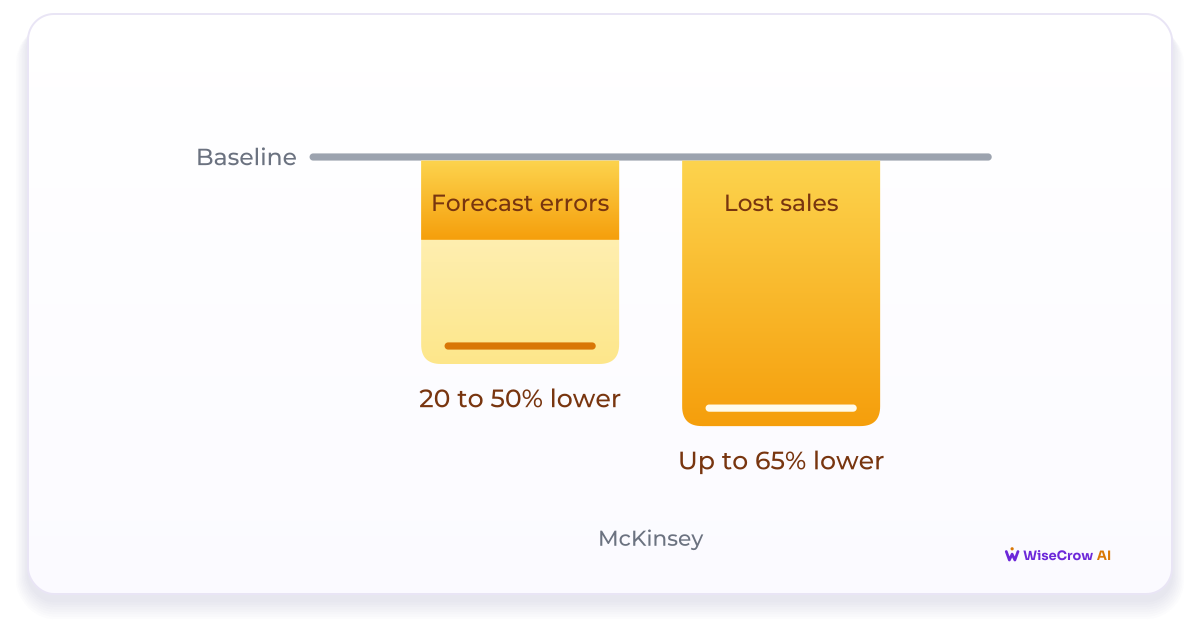
Forecasting models use your sales history, seasonality, promotions and lead times to predict what you will need and when. Your buyers get reorder suggestions each week from the same data they used to rebuild by hand, and less of your cash sits in stock. Teams typically carry 10 to 30% less excess inventory once they trust the forecast.
You won’t get a perfect forecast, but you will get a consistently better one. Your buyers stay in charge of the final order and spend their time on the products where the model is uncertain.
How the Forecast Comes Together
- Sales, stock and supplier data are combined in one place.
- Seasonality, promotions and lead times are added as signals.
- A model forecasts demand by product and location.
- Reorder suggestions are generated with confidence levels.
- Buyers approve or adjust orders before they are placed.
- Forecast accuracy is tracked, and the model is retrained regularly.
- Products with unusual demand are flagged for a closer look.
Prerequisites for Forecasting
Forecasting works best on top of your inventory or ERP system, where your sales and stock data already live. Many ERP platforms include forecasting modules, and specialist tools add more accuracy for complex catalogs.
Contract and Document Extraction
AI pulls key terms such as parties, dates, renewal clauses and payment terms from your contracts into a searchable tracker. You get a reminder before each notice period ends, so auto-renewals stop catching you by surprise. Pulling the key terms then takes minutes per contract, down from hours.
The same setup works for leases, supplier agreements and insurance policies. Keep a person confirming the extracted terms, especially unusual clauses, and you always know what you have committed to.
From Upload to Reminder
- Contracts are uploaded or synced from a shared drive.
- AI extracts parties, dates, renewal terms and payment terms.
- Unusual or risky clauses are highlighted.
- A reviewer confirms the extracted data.
- Reminders are scheduled for renewals and notice periods.
Tools That Read Contracts
A document AI service extracts the terms, and a contract repository or simple tracker stores them. Connect reminders to your calendar or task tool, so deadlines reach the right person on time.
IT Alert Triage
AI groups related alerts from all your monitoring tools, points to the likely cause and opens a single ticket with the context attached. Your on-call team stops chasing noise and fixes the real problem faster. Alert noise typically drops by 50 to 70%.
Fewer, better alerts also mean less burnout. Engineers who are only woken up for real problems respond faster and make better decisions, which is why IT teams I work with adopt this example quickly.
How an Incident Gets Handled
- Monitoring tools send all alerts into one pipeline.
- AI groups related alerts into a single incident.
- The likely root cause and affected services are summarized.
- A ticket opens for the on-call engineer with suggested next steps.
The Tools Behind It
AIOps features in monitoring platforms group alerts and suggest root causes. Connect them to your ticketing system, so every incident opens with the context already attached.
Estimate Your Own Time Savings
Pick one task from the examples above that your team repeats every week. The calculator shows you roughly how much time and money automating it could free up. Once a first automation proves its value, the AI automation roadmap shows how to take it to more teams.
How Much Time Could You Save?
Move the sliders to match one repetitive task in your business.
How to Choose Your First AI Automation
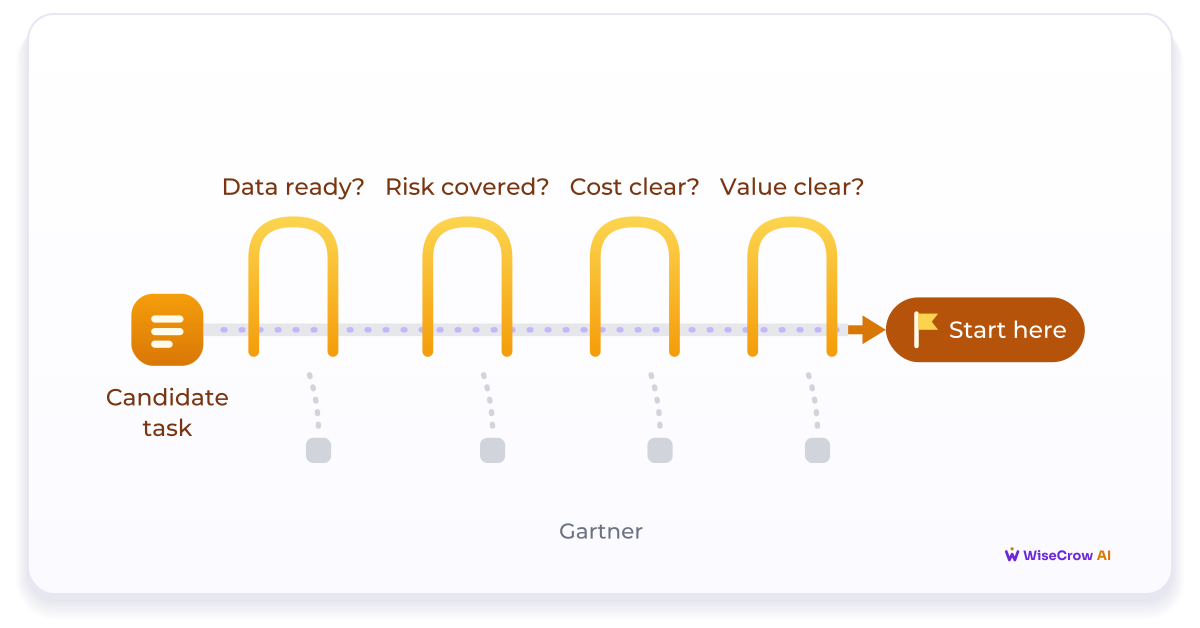
In my experience, the examples that deliver the fastest return share four traits. Before you commit budget, check your shortlist against them:
- The task happens dozens or hundreds of times a week.
- Mistakes are costly, so better accuracy has a clear value.
- The data you need already exists in your systems.
- A person can easily review the cases the AI is unsure about.
If you want to turn these traits into a number, the scoring formula in my AI automation strategy guide does that for every process on your list.
Once you have a shortlist, check which of your current platforms already covers each example. Where none does, my ranking of AI automation tools compares the main options side by side. If you would rather have experts do the analysis, the consultants I work with offer a free review of your workflows.
Questions About AI Automation Examples
What Is the Most Common Example of AI Automation?
Document processing is the example I see most often, such as reading invoices, receipts and forms. It is high volume, easy to measure and keeps a person in the loop for the exceptions, which makes it an ideal first project for most businesses.
How Much Does AI Automation Cost?
A focused first project usually costs far less than a full platform rollout. Your cost depends on the number of systems involved, your data quality and how much human review you need. I always suggest you start with a scoped audit and a fixed quote, so you know the price before anything is built.
What Is the Difference Between RPA and AI Automation?
RPA follows fixed rules and breaks when inputs change. AI automation can read unstructured content, such as emails and documents, and make judgment calls within limits you set. Many of the examples in this guide combine both.
Which Department Should Automate First?
Finance and customer support are often the best places for you to start, because their work is frequent, rule-based and easy to measure. That said, the right answer depends on where your team loses the most time, so map your busiest processes first.
Is AI Automation Safe for Sensitive Data?
It can be, if you set it up properly. Use access controls, keep data in your own environment where possible, log every decision and add human review for anything high risk. If a vendor can’t explain how your data is handled, I would walk away.
When Will We See Results?
With a well-scoped first project, you can usually see results within a few weeks of going live. Track hours saved, error rates and processing times from day one, so you can prove the return and decide what to automate next.
Will AI Automation Replace My Team?
In the examples I see, AI takes over repetitive tasks and the roles stay. Your people stop retyping data and chasing routine updates, and spend that time on customers, decisions and growth. The best results come when your team helps design the workflows.
General information only: this is not legal, financial or tax advice. Examples and numbers reflect typical projects; check the specifics with your advisers before deciding.
Did you find this helpful?
Thank you for your feedback.
Marlena leads the WiseCrow editorial team and works with our consultants to turn real client projects into practical guides on AI strategy, automation and governance. Before joining WiseCrow, she spent 12 years in B2B operations and SaaS content. She has since edited more than 400 articles on AI and automation and reviewed workflows from over 60 client projects. She is based in Austin, Texas.