Summary
- Invoice processing and reconciliation usually pay back fastest, because volume is high and savings are easy to measure.
- Rank use cases by volume, time per task, error cost and build effort, not by how impressive they sound.
- HR use cases pay off best when you hire often or answer the same questions every week.
- Forecasting has a large upside, but only once your sales and stock data are reliable.
Most businesses don’t need more AI ideas. They need to know which ones pay off first. That is the first question in any AI automation consulting project, and it is the question this guide answers for finance, HR and operations.
I ranked the seven use cases below by how quickly they typically return your investment, based on volume, time saved, error cost and build effort. Your own order may differ, so use the scoring section and the calculator to check it against your numbers.
How I Ranked These Use Cases
A use case earns its place near the top when the work is frequent, the steps are repeatable and the savings are easy to prove. I looked at four factors for each one:
- Volume: how often the task happens each week or month.
- Time per task: how many minutes a person spends on it today.
- Error cost: what a mistake costs in money, rework or customer trust.
- Build effort: how many systems, rules and reviews you need to get it live.
Here is how the seven use cases score on those four factors. Low build effort is good; everything else counts in your favor when it is high.
| Use case | Volume | Time per task | Error cost | Build effort |
|---|---|---|---|---|
| 1. Accounts Payable Invoice Processing | High | Medium | High | Low |
| 2. Bank and Payment Reconciliation | High | Medium | High | Low |
| 3. Order and Document Intake | High | Medium | High | Medium |
| 4. Employee Onboarding | Medium | High | Medium | Medium |
| 5. HR and Internal Help Desk | Medium | Low | Low | Low |
| 6. Month-End Reporting and Variance Commentary | Low | High | Medium | Medium |
| 7. Inventory and Demand Forecasting | Medium | Medium | High | High |
If you want to turn these factors into a repeatable scoring formula for your own processes, my guide to AI automation strategy walks you through it step by step.
7 AI Automation Use Cases Ranked by ROI
Each use case shows where the return comes from, how the workflow runs and which tools you can build it with. If you want to see how real teams apply them, my collection of AI automation examples adds more detail by department.
Accounts Payable Invoice Processing
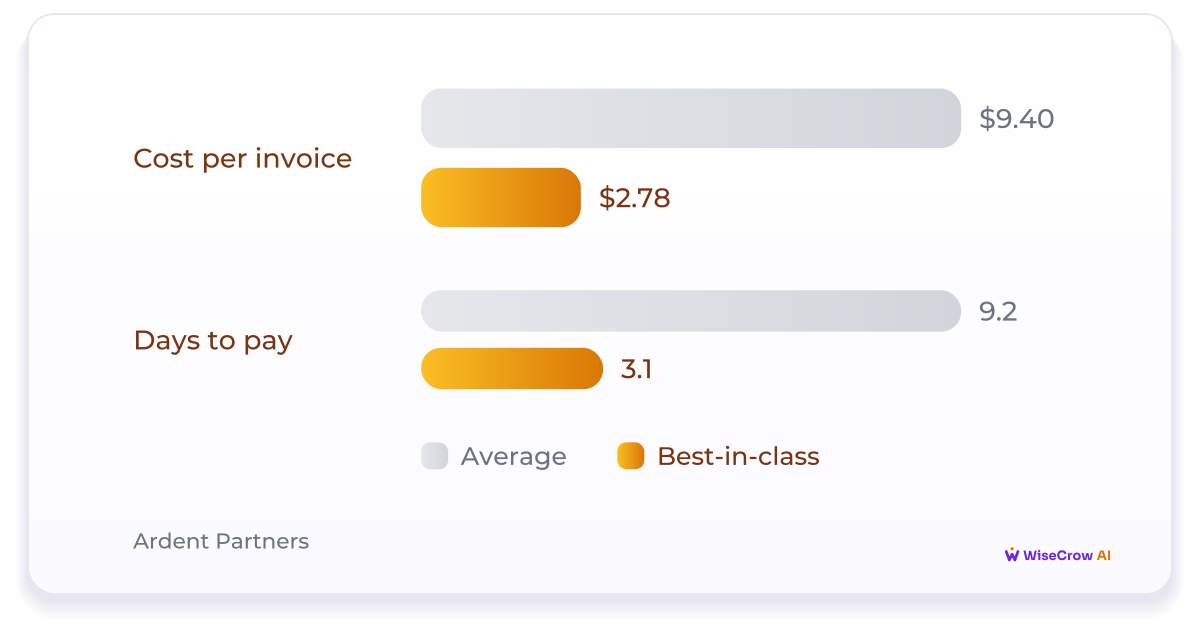
Invoice processing tops my list because almost every business has it, the volume is high and every minute saved repeats hundreds of times a month. AI reads invoices in any layout, extracts the vendor, totals and line items, matches them to purchase orders and posts the clean ones to your books.
You see the return quickly because the baseline is easy to count: invoices per month, minutes per invoice and the cost of late or duplicate payments. Keep a person reviewing mismatches and low-confidence reads, and your team moves from typing to checking.
How the Invoice Flow Works
- Invoices arrive in one shared inbox or upload folder.
- AI extracts vendor, dates, totals and line items from each document.
- The data is matched against the purchase order and goods receipt.
- Clean matches are coded and posted to your accounting system.
- Exceptions land in a review queue with the mismatch highlighted.
Tools for Invoice Automation
A document AI service or the AI features of your accounts payable platform read the invoices, and an integration posts them to QuickBooks, Xero or NetSuite. Check what your current platform already includes before you buy anything new.
Bank and Payment Reconciliation
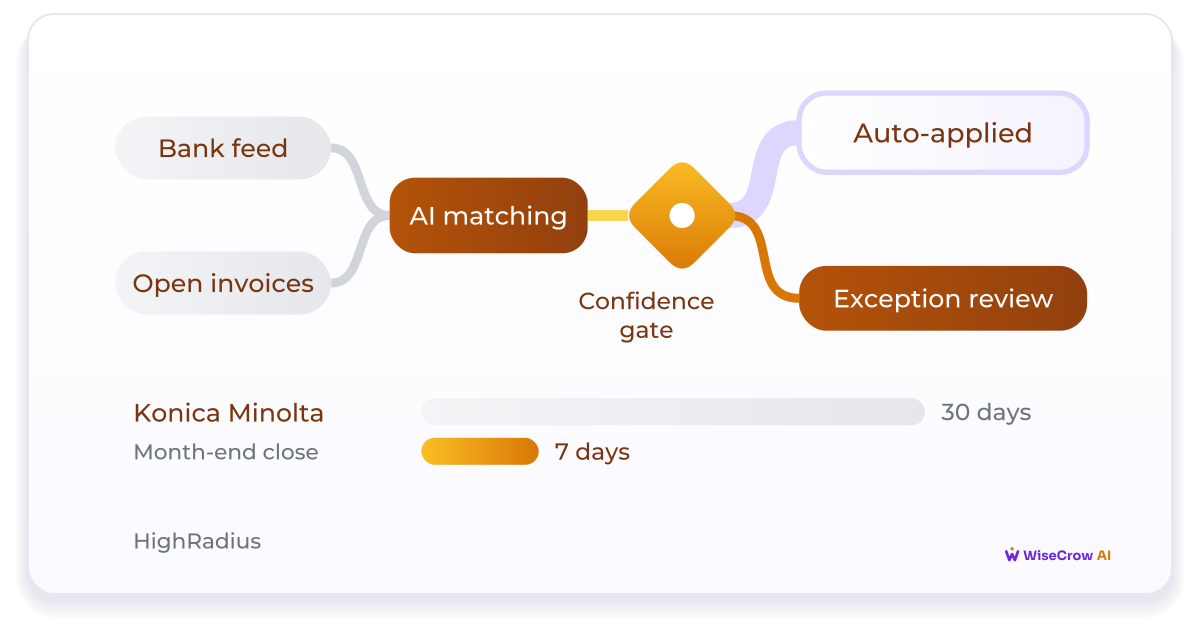
Reconciliation is repetitive, rule-heavy and painful at month-end, which makes it an ideal second use case. AI matches bank transactions to open invoices even when references are missing or a customer pays several invoices in one transfer. The daily volume and the hard month-end deadline are what push its return so high.
The return comes from two places: fewer hours spent matching and a faster close. Set a confidence threshold so only certain matches are applied automatically, and let your team handle the short exception list. In my client work, the first month-end after go-live is the bumpy one, because the model still needs your team’s corrections.
What Changes in Your Month-End
- Bank feeds and open items sync into your accounting system every day.
- AI proposes matches based on amounts, names, dates and past patterns.
- Each proposed match gets a confidence score.
- Matches above your threshold are applied without manual work.
- Your team resolves the remaining exceptions and the model learns from them.
What You Can Use for Reconciliation
Many accounting platforms now include AI matching, and larger finance teams add a dedicated reconciliation tool on top. You mainly need clean bank feeds and agreed rules for partial and split payments.
Order and Document Intake
If your operations team copies orders, forms or delivery notes from emails and PDFs into your ERP, this use case pays off fast. AI reads each document, fills in the order or record and flags anything that does not match your price list or stock.
Errors at intake are expensive because they travel downstream into wrong shipments and credit notes. Catching them at the start saves time twice, once at entry and once in the clean-up you no longer have to do. Agents are starting to handle the follow-up questions to customers as well, which I cover in my overview of AI automation trends.
From Inbox to ERP Record
- Orders and documents arrive by email, portal or scan.
- AI identifies the document type and extracts the key fields.
- Product codes, prices and quantities are checked against your master data.
- Valid orders are created in your ERP automatically.
- Anything unclear goes to a person with the open questions listed.
- The customer gets a confirmation as soon as the order is created.
The Tools Behind Order Intake
Document AI handles the reading, and an automation platform or your ERP’s own import creates the records. Start with your most common document type before you add the rare formats.
Employee Onboarding
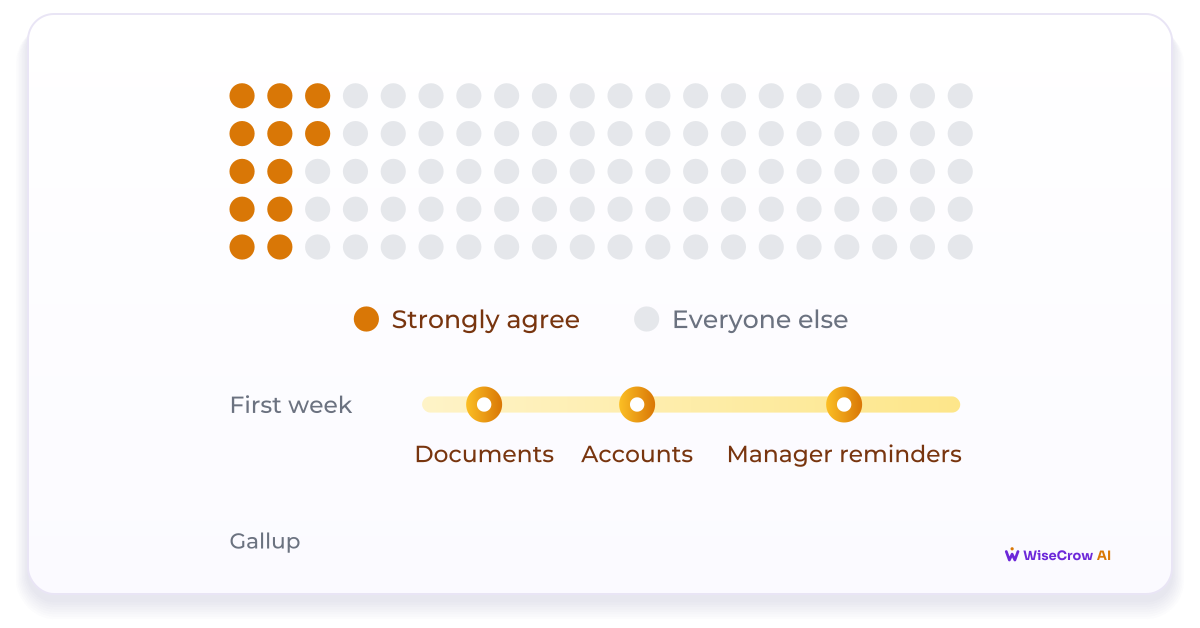
Onboarding involves dozens of small tasks spread across HR, IT, payroll and the new hire’s manager, and something is almost always forgotten. AI automation collects the new hire’s documents, checks them for completeness, creates accounts and sends each person their tasks at the right time. I rate its return medium to high, because the work is spread over many small tasks across HR, IT and managers.
The return is measured in hours saved and in a smoother first week, which helps new hires settle in and stay. You get the most value when you hire regularly, so smaller teams that hire a few people a year should rank this lower.
What a New Hire’s First Week Looks Like
- A signed offer in your applicant tracking system starts the workflow.
- The new hire uploads documents through a single checklist.
- AI checks each document for completeness and flags missing items.
- Accounts, equipment and payroll records are requested automatically.
- The manager and buddy get reminders for their part of the plan.
Tools for Automated Onboarding
Most HR platforms include onboarding workflows, and an automation tool connects them to IT and payroll systems. Add AI document checks only where your team currently reviews files by hand.
HR and Internal Help Desk
An assistant connected to your handbook answers routine questions about leave, benefits, expenses and IT access, right in Slack or Teams. Your HR team stops answering the same ten questions every week and gets time back for the conversations that need a person. Its return is medium: each question takes a minute, but they add up over a year.
The return depends on how many routine questions your team gets, so count them for two weeks before you build. Make sure sensitive topics, such as health, conflicts or pay, always go straight to a person.
How Employees Get Answers
- Your handbook, policies and IT guides are connected as sources.
- Employees ask questions in Slack, Teams or the intranet.
- The assistant answers and links to the exact policy section.
- Sensitive or personal questions are routed to HR privately.
What You Can Build It With
Several HR and IT service platforms include an assistant, and workplace AI tools can read your internal documents directly. Choose one that respects your existing access rights, so employees only see what they are allowed to see.
Month-End Reporting and Variance Commentary
Every month, someone in finance pulls the numbers, compares them with budget and writes the same kind of commentary. AI can draft the variance explanations from your ledger and notes, so your controller starts from a draft.
The volume is low, which is why this ranks below the high-frequency tasks, but the time saved is expensive senior time. Keep a person responsible for every number and sentence that goes to management or the board.
How the Reporting Cycle Changes
- Actuals and budget figures are pulled from your accounting system.
- Variances above your thresholds are identified automatically.
- AI drafts commentary using the transactions and notes behind each variance.
- Your controller reviews, corrects and approves the final report.
Tools for AI-Assisted Reporting
Financial planning tools increasingly include AI commentary, and a general AI assistant connected to your data can draft the text. Make sure every figure is pulled from the system, not typed in by the model.
Inventory and Demand Forecasting
Forecasting can free up a lot of cash tied in stock, but it needs reliable sales and inventory history to work. AI models combine seasonality, promotions and lead times to suggest what to reorder and when, and your buyers stay in charge of the final order.
I rank it last because the payback is less predictable and depends on your data quality, even though the upside can be large. If your stock data is messy, fix that first, and this use case often moves up your list.
Setting Up the Forecast
- Sales, stock and supplier data are combined in one place.
- Seasonality, promotions and lead times are added as signals.
- A model forecasts demand by product and location.
- Buyers receive reorder suggestions with a confidence level.
- Forecast accuracy is tracked and the model is retrained regularly.
- Products with unusual demand are flagged for a closer look.
Tools You Can Use for Forecasting
Many ERP and inventory platforms include forecasting modules, and specialist tools add accuracy for large catalogs. Start inside the system where your sales and stock data already live.
Estimate the ROI of Your Top Use Case
Pick the use case at the top of your own list and enter how often the task happens and how long it takes. The calculator shows you the hours and value it could free up each year. When the first one pays off, the AI automation roadmap shows how to move from that pilot to company-wide scale.
How Much Time Could You Save?
Move the sliders to match one repetitive task in your business.
How to Choose Your First Use Case
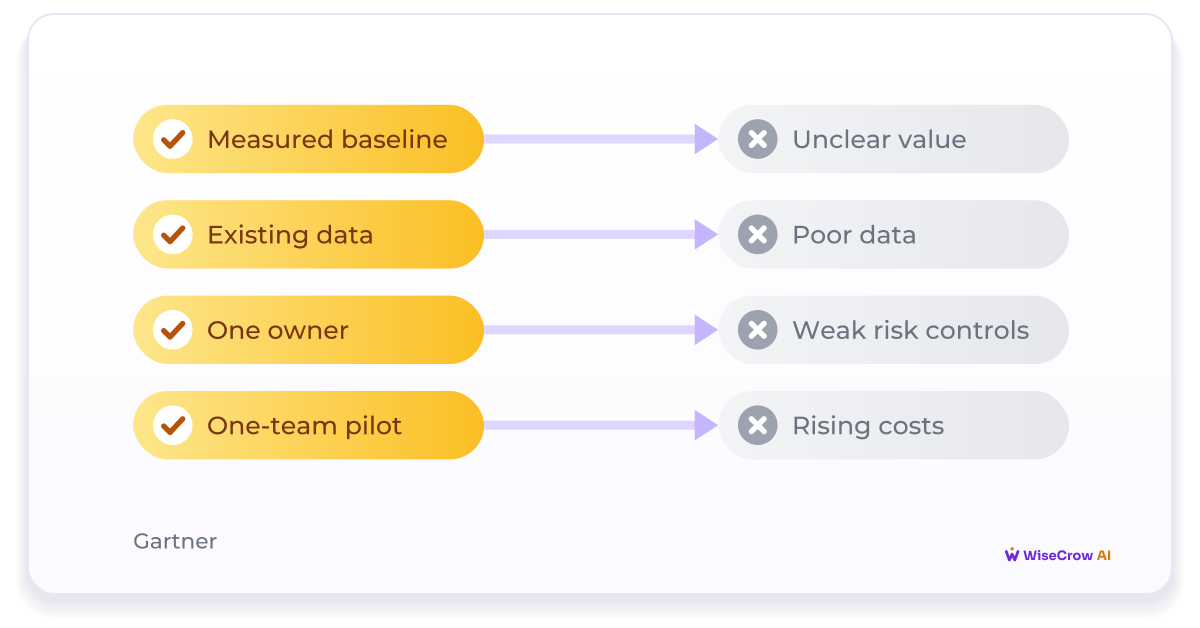
Once you have a ranked shortlist, check your top candidate against these questions before you commit budget:
- Do you know today’s volume and time per task, so you can prove the return later?
- Does the data the AI needs already exist in your systems?
- Is there one owner who wants the change and will review the exceptions?
- Can you go live in one team or entity before you roll out everywhere?
To see which platforms fit each use case, compare them in my ranking of AI automation tools.
Questions About AI Automation Use Cases
What Are the Most Common AI Automation Use Cases?
In finance, HR and operations, the most common use cases are invoice processing, reconciliation, document and order intake, onboarding and internal help desks. They share high volume, repeatable steps and data that already exists in your systems.
Which AI Automation Use Case Has the Best ROI?
For most businesses I work with, accounts payable invoice processing delivers the fastest return, because the volume is high and the savings are easy to measure. Your own ranking depends on where your team spends the most hours, so score your processes before you decide.
How Do You Calculate the ROI of an AI Automation Use Case?
Multiply how often the task happens by the minutes it takes and the share AI can handle, then value those hours at your staff cost. Add the cost of errors you avoid, and subtract build and running costs. The calculator in this guide gives you a quick first estimate.
How Long Does It Take to Implement an AI Automation Use Case?
A focused use case, such as invoice processing for one entity, can often go live within weeks. Timelines grow with the number of systems involved, your data quality and how much review and testing your team needs.
Do I Need Clean Data Before I Start?
You need data that is good enough for the specific task, not perfect data across the whole company. Document-based use cases, such as invoices and orders, often need less preparation than forecasting, which depends on reliable history.
Should I Start in Finance, HR or Operations?
Start where you find the highest volume of repetitive work and a clear owner who wants the change. That is often finance, but if your operations team retypes hundreds of orders a week, start there instead.
Can AI Automation Replace My Finance or HR Team?
The use cases in this guide take over repetitive work, and the roles stay. Your people stop retyping and chasing routine questions and spend more time on exceptions, analysis and conversations that need judgment.
General information only: this is not legal, financial or tax advice. Examples and numbers reflect typical projects; check the specifics with your advisers before deciding.
Did you find this helpful?
Thank you for your feedback.
Marlena leads the WiseCrow editorial team and works with our consultants to turn real client projects into practical guides on AI strategy, automation and governance. Before joining WiseCrow, she spent 12 years in B2B operations and SaaS content. She has since edited more than 400 articles on AI and automation and reviewed workflows from over 60 client projects. She is based in Austin, Texas.