Summary
- Conversational AI understands requests in people’s own words, decides the next step, uses your data and replies.
- Rule-based bots are predictable but narrow, while LLM assistants handle open questions and need firm guardrails.
- Voice bots face tighter timing, more recognition errors and per-minute costs than chatbots on the same tasks.
- Start where your contact volume is highest, and only after your help content and systems are ready.
When a client asks me to explain conversational AI, they usually want two answers at once. What is it, really, under the vendor language? And should they start with a chatbot or a voice bot? Those are the first questions I work through in any conversational AI consulting project, and the answers shape everything that follows.
In this guide, I explain how the technology works in plain words, how older rule-based bots differ from today’s LLM assistants, and where chat and voice each make sense. You’ll also get the typical uses I see working, the risks I’d plan for and a checklist to see if you’re ready to build.
What Conversational AI Actually Is
Conversational AI is software that lets people talk or type to a system in their own words and get a useful reply. It understands the request, keeps track of the conversation, pulls in the right information and answers in natural language. The better systems also act on the request: they rebook the appointment, check the order or open the ticket.
Two products account for most of what you’ll meet. A chatbot works in text, on a website, in an app or on messaging channels like WhatsApp. A voice bot works in speech, mostly on the phone, and sometimes inside an app or a smart speaker. Underneath, they run on the same core technology. What differs is the layer that turns speech into text and back.
It helps to know what doesn’t count. A search box over your FAQ page isn’t conversational AI, because it can’t ask a follow-up question. A phone menu that says “press 1 for billing” isn’t either. Plenty of so-called chatbots are also just decision trees with a chat window on top, and they break the moment someone types something the designer didn’t plan for.
How Conversational AI Works, Step by Step
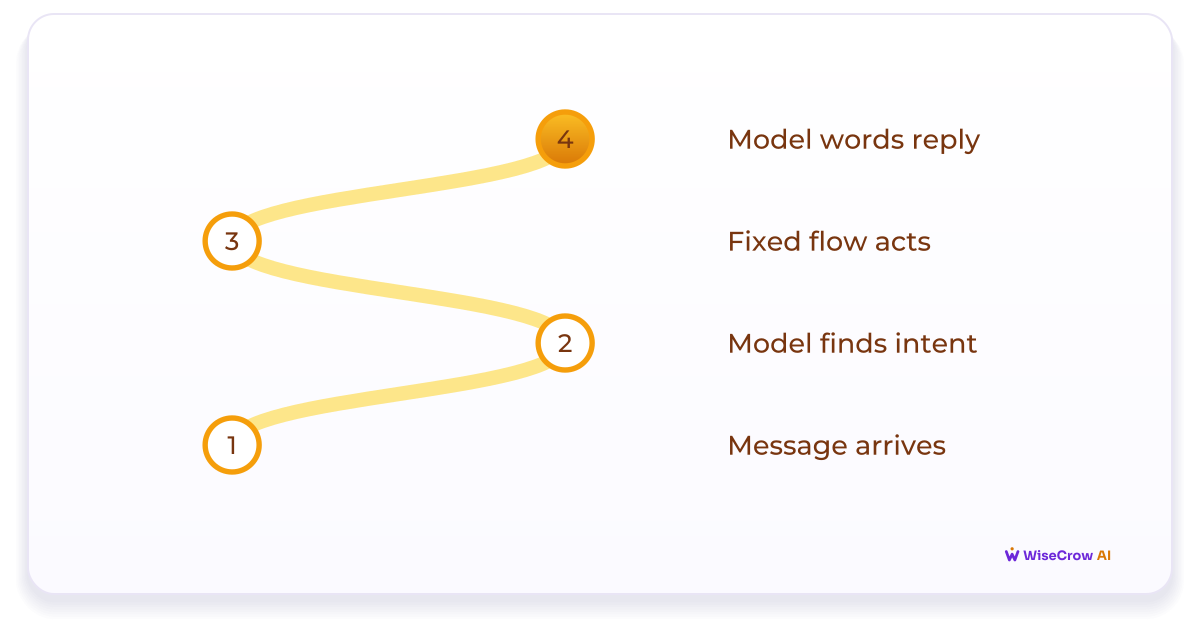
Every message goes through four jobs, in roughly the same order. The tools differ by vendor, and modern systems sometimes blend two jobs into one model call. The logic still holds, and knowing it makes vendor demos far easier to judge.
Understanding the Message
First, the system works out what the person wants and pulls out the useful details. “Can I move my Thursday cleaning to next week?” contains a request (reschedule), a service (cleaning) and a date (Thursday). Older systems did this by matching the message to a list of trained request types. Newer ones hand the message to a large language model, which also copes with typos, slang and two questions in one sentence.
Understanding also covers language. If your customers write in Spanish, French or German, the assistant should detect the language from the first message and stay in it. Good multilingual support is easier today than it was a few years ago, but each language still needs its own test set.
Dialogue Management
Next, the system decides what to do with the request. It tracks what has already been said, checks which details are still missing and picks the next move: ask a question, confirm something, take an action or hand over to a person. People rarely notice the dialogue manager, yet it carries most of the business logic.
In practice, dialogue management is where most of my design time goes. A request like “cancel my subscription” sounds simple until you add identity checks, a retention offer, a notice period and the customer who changes their mind halfway through.
Knowledge and Actions
To answer well, the assistant needs facts. For questions, it searches your approved content, such as help articles, policies and product data, and uses what it finds. For tasks, it calls your systems through APIs: the booking calendar, the order database, the CRM. An assistant that can only talk is a smarter FAQ. One that can act removes work from your team.
The connections are where projects slow down. In my client work, the integration list decides the timeline far more often than the choice of model does.
Response Generation
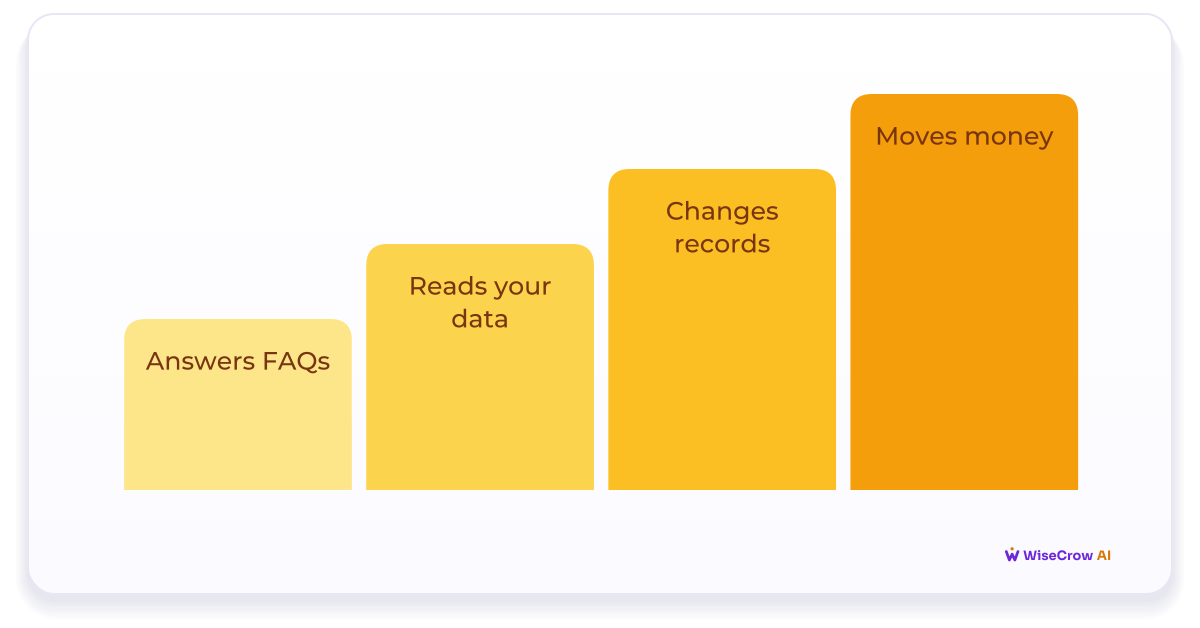
Last, the system writes the reply. Rule-based bots send prewritten text, sometimes with a few fields filled in. LLM assistants write each reply fresh, guided by instructions about tone, length and what they may say. On voice, the text then goes to a speech engine that reads it aloud.
Fresh replies sound natural, and they also bring the risk of a reply nobody approved. Most production systems I build use a mix: the model words the answer, while fixed templates cover anything legal, financial or contractual.
Rule-Based Bots vs LLM Assistants
You’ll hear both called chatbots, but they’re built in very different ways. Knowing which one a vendor is selling tells you a lot about cost, effort and risk before you see a demo.
How Rule-Based Bots Work
A rule-based bot follows a script. The designer maps every path as a flowchart: if the customer clicks “Track my order”, ask for the order number, look it up, show the status. Some add keyword matching or a trained classifier so customers can type freely, but each answer and each step is still written by hand.
The upside is control. You know exactly what the bot will say, it’s cheap to run and testing is straightforward. The downside shows up the first week after launch, when customers ask things nobody mapped and the bot replies “Sorry, I didn’t understand” for the fourth time.
What LLM Assistants Changed
Large language models made it possible to understand almost any phrasing and answer from your content without writing every reply by hand. You give the assistant instructions, connect it to your knowledge base and define the actions it may take. It handles the long tail of odd questions that rule-based bots never could.
The trade-off is predictability. An LLM can phrase the same answer differently each time, and it can be wrong while sounding sure. You test it on sets of real conversations, since you can’t check every path by hand, and you need guardrails that limit what it may say and do.
Where Each Still Wins
I still recommend a rule-based bot when the job is narrow and the stakes are high. A pharmacy refill flow or a bank card freeze has a fixed set of steps, and nobody wants creativity there. LLM assistants win when customers ask hundreds of different questions and you have good written content behind them, like a software help desk or a retailer’s pre-sales chat.
Most new builds end up as a hybrid, with the model doing the understanding and the wording while fixed flows handle anything that touches money or accounts. My conversational AI framework covers how to draw that line for each request type.
Chatbots vs Voice Bots
A chatbot and a voice bot can share the same understanding, knowledge and actions. The channel still changes the experience, the build and the bill. Here’s how they compare on the points that matter most when you pick one.
| Factor | Chatbot | Voice bot |
|---|---|---|
| Channel | Website widget, app, WhatsApp, SMS | Phone line, smart speaker, in-app voice |
| Latency | A few seconds is fine | Every pause is heard, so replies must start fast |
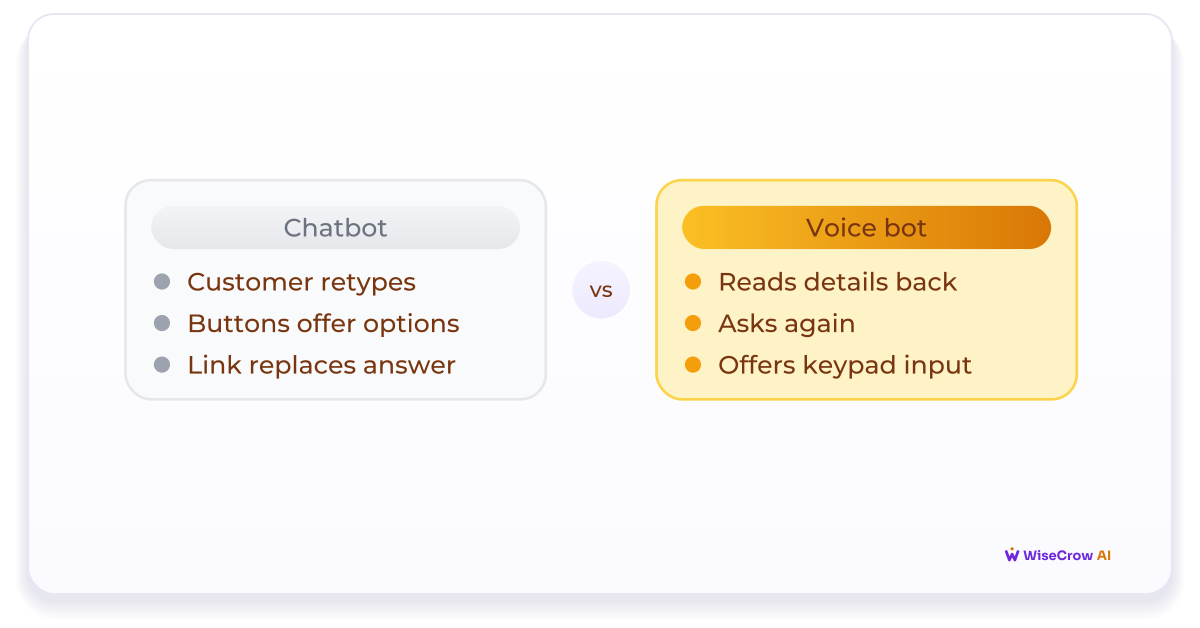
| Error handling | Buttons, links, retype the message | Read back, ask again, keypad input |
| Cost drivers | Platform fee, model usage per conversation | Call minutes, speech recognition, speech synthesis |
| Best uses | Questions with links, forms, order lookups | Bookings, status checks, call routing |
Why Timing Matters So Much on Voice
People are fast at taking turns. A study of conversations in 10 languages found an average gap of about 208 milliseconds between one speaker finishing and the next starting. In chat, nobody minds waiting three seconds for a reply. On a call, three seconds of silence feels like the line dropped, and callers start talking again just as the bot begins to answer.
A voice bot has more work to fit into that gap. It has to notice that the caller has finished speaking, turn the audio into text, run the understanding and dialogue steps, write a reply and turn it back into speech. Good voice platforms stream each step and start speaking before the full reply is ready. Some newer models handle speech in and speech out directly, which cuts the delay further.
What a Voice Bot Adds to the Stack
On top of the shared core, a voice bot needs speech recognition, speech synthesis and a connection to your phone system. It also needs a few things a chatbot never thinks about: letting callers interrupt mid-sentence, deciding when a pause means “I’m done”, and a keypad fallback for account numbers and dates.
Recognition errors are the daily reality. Names, email addresses, postcodes and long numbers get misheard, especially on a noisy mobile line. I design every voice flow so the bot reads back key details before it acts, and I keep voice scope narrower than chat scope in the first release.
How Costs Differ Between the Two
Chatbot costs mostly come from the platform fee and model usage, often billed per conversation or per resolution. Voice bots add telephony minutes, speech recognition and speech synthesis, all of which scale with call length. A two-minute call that loops through three clarifying questions costs more than a crisp one, so good voice design pays off on the invoice too.
Cost per conversation is only half of the picture, though. Phone contacts are usually the most expensive ones your team handles, so a voice bot can return more even with higher running costs. My breakdown of conversational AI ROI shows how to run those numbers for your own volumes.
Typical Uses for Conversational AI
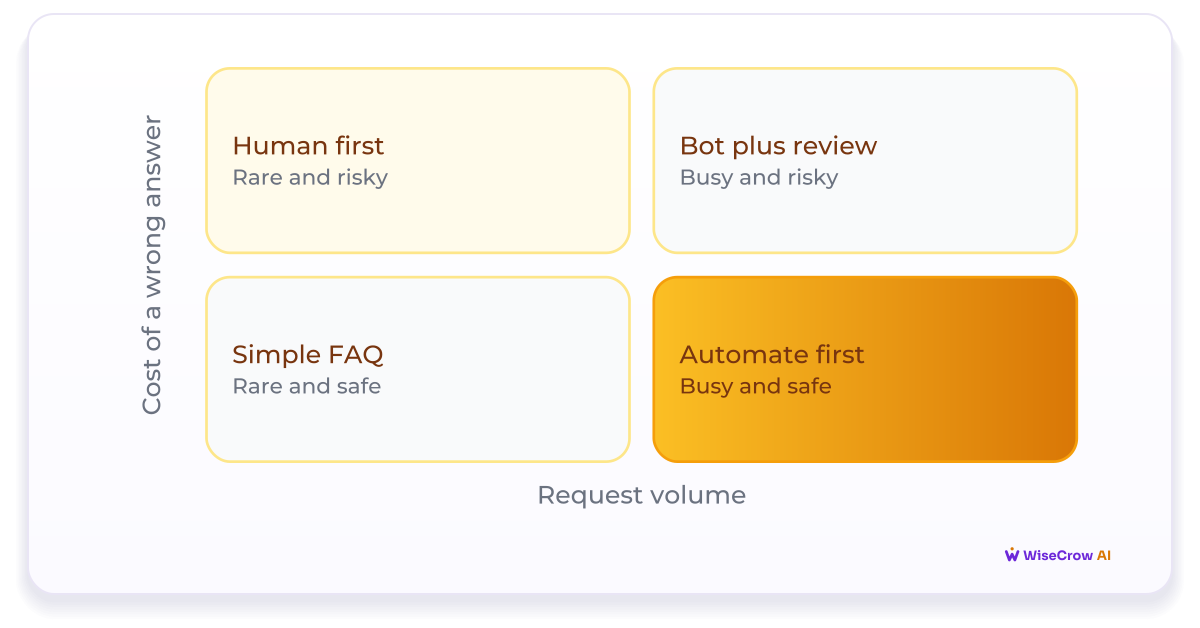
The uses that work share three traits: high volume, a clear outcome and access to the data needed to finish the job. Here are the ones I see deliver most often, grouped by where the conversation happens.
Customer Service
Order status, delivery questions, returns, password resets and account changes make up a big share of support volume in most companies. They’re repetitive, the answer sits in a system and customers want it at 11 p.m. as much as at 11 a.m. Chat handles most of these well, and voice takes the same tasks off the phone queue.
Bookings and Scheduling
Clinics, salons, service businesses and repair shops spend hours a week booking, moving and confirming appointments. A voice bot that answers the phone, checks the calendar and confirms the slot is one of the clearest wins I know, because many of these customers still prefer to call.
Sales and Lead Qualification
On a website, a chatbot can answer product questions, ask a few qualifying questions and book a call with sales. It works best when it’s honest about being automated and passes hot leads to a person quickly. A bot that grills a buyer with ten questions before showing a price loses more leads than it gains.
Internal Help Desks
IT and HR teams answer the same questions every week: how to reset a VPN, how many vacation days are left, where the expense policy lives. An internal assistant connected to your intranet and HR system takes those off the queue, and the risk is lower because your users are employees. It’s a good first project if you want to learn before facing customers.
Which product fits these uses depends on your channels and systems. My ranking of conversational AI platforms compares the main options on features and pricing.
Limits and Risks to Plan For
Conversational AI fails in ways that are easy to predict and easy to underestimate. These are the risks I raise in every planning session.
Confident Wrong Answers
An assistant can invent a policy that doesn’t exist, and your company may be held to it. In a 2024 case in Canada, a tribunal ordered Air Canada to pay a customer after its website chatbot gave wrong information about bereavement fares, and the airline’s argument that it wasn’t liable for its chatbot failed, as Global News reported. Treat anything your assistant says as something your company said.
Manipulation and Data Leaks
People will try to make your assistant ignore its instructions, reveal its prompt or say something embarrassing. If it can see account data, a weak identity check can expose one customer’s details to another. Limit what the assistant can read and do, mask sensitive data in logs and test attacks before launch.
Frustration and Dead Ends
A bot that hides the way to a person or loops on the same question does real damage to how customers see you. Dialogue design matters as much as the model here, and my list of conversational AI best practices covers the habits that prevent it.
Upkeep Nobody Planned
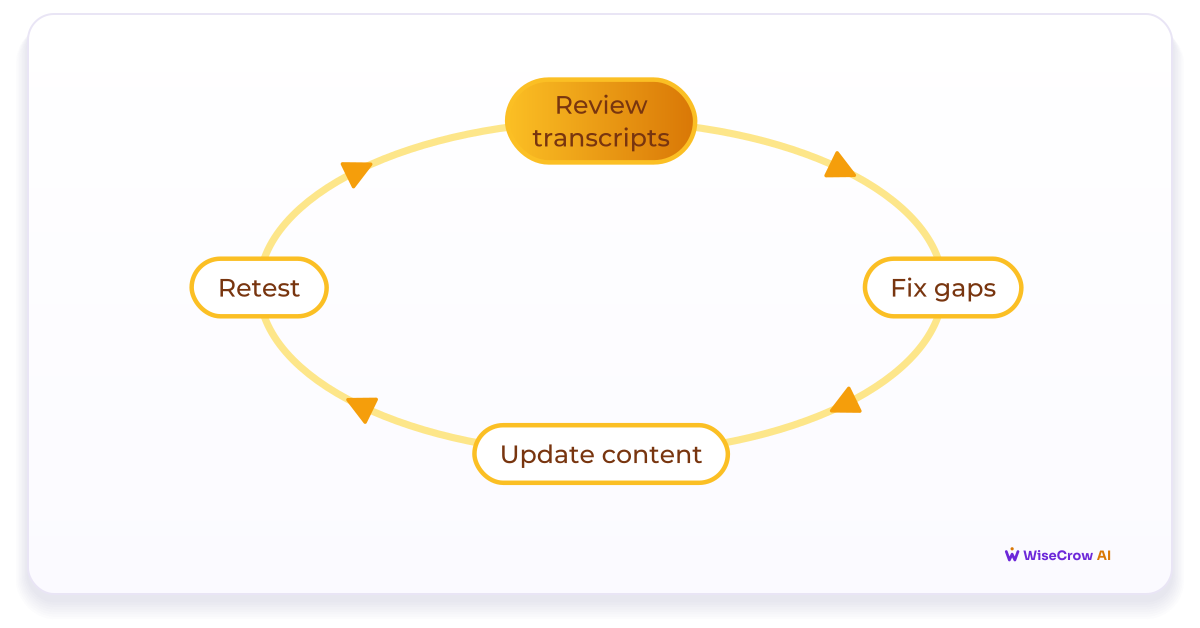
Prices change, policies change and products launch. Every change has to reach the assistant’s knowledge, or it gives yesterday’s answer with today’s confidence. In my experience, the teams that budget a few hours a week for review and fixes get steadily better results. The teams that treat launch as the finish line watch quality slide within a few months.
Conversational AI Readiness Checklist
Before you choose a tool or a channel, check where you stand. The more of these you can tick, the faster and cheaper your first release will be.
- You know your top contact reasons and roughly how many arrive per week, per channel.
- Your help content and policies are current, and each one has an owner.
- The systems the assistant needs, such as orders, bookings or CRM, have APIs you can use.
- You can verify who a customer is on the channel you plan to use.
- You have a clear list of topics the assistant must never handle on its own.
- A person or team is ready to take over conversations, with a defined route.
- You’ve recorded a baseline for handle time, cost per contact and satisfaction.
- Someone owns the assistant after launch, with time set aside each week to improve it.
- Legal and security have agreed on disclosure, data retention and transcript access.
If you tick fewer than five, spend the first few weeks on the gaps. It feels slow, and it saves you a rebuild later.
How to Choose Between a Chatbot and a Voice Bot
Start with where your customers already are. Pull last quarter’s contacts by channel and by reason, then look for the biggest pile of repetitive requests. That pile tells you more than any vendor comparison.
- Most of your volume comes through the website, email or messaging: start with a chatbot.
- Your phone queue is long and the top call reasons are simple lookups or bookings: start with a voice bot.
- Requests need links, documents or forms: chat handles them far better than voice.
- Many callers are older or on the move: voice reaches people who won’t open a chat window.
- You’re new to conversational AI: a chatbot is the lower-risk place to learn, then add voice.
My own default for a first project is chat, unless the phone queue is clearly the bigger problem. Chat is cheaper to test, easier to fix and gives you transcripts that show what customers really ask. Once the chatbot works, much of the knowledge and the actions carry over to voice. When you’re ready to plan the build, my walkthrough of conversational AI implementation covers the steps from build to go-live.
Questions About Conversational AI, Chatbots and Voice Bots
What Is Conversational AI in Simple Terms?
Conversational AI is software that understands what people say or type in their own words, works out what they need and replies in natural language. Chatbots and voice bots are the two most common forms. The better ones can also take actions, such as booking an appointment or looking up an order.
What Is the Difference Between a Chatbot and Conversational AI?
Conversational AI is the umbrella term for the technology. A chatbot is one product built with it, usually for text. Some older chatbots don’t use AI at all and simply follow fixed menus and keyword rules, so not every chatbot counts as conversational AI.
Is a Voice Bot the Same as an IVR?
No. A classic IVR plays a menu and waits for you to press a key or say a single word. A voice bot lets callers explain their request in a full sentence, asks follow-up questions and can complete the task on the call. Many companies now put a voice bot in front of their existing IVR.
Do I Need a Large Language Model for My Chatbot?
Not always. If your bot handles a short list of fixed tasks with predictable answers, a rule-based flow is cheaper and easier to test. An LLM pays off when people ask many different questions in many different ways, and you have good help content for it to answer from.
Which Is Cheaper to Run, a Chatbot or a Voice Bot?
A chatbot is usually cheaper per conversation. A voice bot adds telephony minutes, speech recognition and speech synthesis on top of the model and platform costs. A voice bot can still pay off faster if your phone line carries a large share of your contact volume.
Can Conversational AI Give Wrong Answers?
Yes. LLM-based assistants can produce confident answers that are wrong, and rule-based bots can send people down the wrong path. You reduce the risk by limiting answers to approved content, keeping rules about money and accounts in fixed flows and testing with real customer messages before launch.
How Long Does It Take to Launch a First Conversational AI Assistant?
It depends on scope, channels and integrations. A web chatbot that answers questions from existing help content is the quickest start. A voice bot that needs identity checks and access to your booking or order system takes longer, because the integrations and call testing take most of the time.
Sources
- Stivers et al., Universals and cultural variation in turn-taking in conversation, PNAS (2009): pmc.ncbi.nlm.nih.gov
- Air Canada chatbot ruling by the B.C. Civil Resolution Tribunal (February 2024): Global News
Disclaimer: This article is for general information only and isn’t legal advice. Court decisions, platform rules and AI regulations differ by country and change often, so check the current position with your advisers before you act.
Did you find this helpful?
Thank you for your feedback.
Marlena leads the WiseCrow editorial team and works with our consultants to turn real client projects into practical guides on AI strategy, automation and governance. Before joining WiseCrow, she spent 12 years in B2B operations and SaaS content. She has since edited more than 400 articles on AI and automation and reviewed workflows from over 60 client projects. She is based in Austin, Texas.